What Is a Mono Bluetooth Headset?
 By Theo LangUpdated
A mono Bluetooth headset is a wireless headset with one earpiece that plays sound into one ear and carries a microphone for calls. Mono means single-channel audio, so the same sound goes to that one ear instead of separate left and right channels. Bluetooth is the wireless link that pairs the headset with a phone, tablet or computer.
What mono means
Mono is short for monophonic, one channel of sound. A mono headset puts that channel through a single earpiece worn on one ear, with a microphone for your voice. Because the other ear stays uncovered, you can hear voices and sounds around you while you listen or talk. Stereo headsets instead send separate left and right channels to two earpieces.
How the Bluetooth link works
Bluetooth pairs the headset with a source device without a cable between them. You put the headset in pairing mode, select it in the Bluetooth settings of the phone, tablet or computer, and the two stay linked while they are in range. Check that your device has Bluetooth and that it supports headset or hands-free use for calls before you rely on the microphone.
Mono compared with stereo headsets
The difference is the number of earpieces and channels. A mono headset covers one ear and plays one channel, which suits voice calls and spoken audio. A stereo headset covers two ears and plays left and right channels, which suits music, films and games where direction and separation of sounds matter. The stereo gaming headsets listed below show the two-ear form.
What people use mono headsets for
Mono headsets are made for voice first. Common uses are phone calls, video meetings, voice chat and listening to spoken audio while keeping one ear open to the room. They are not made for music or games where stereo separation matters. If your main use is calls and you want to hear what happens around you, mono matches that use.
What to check before choosing one
Check which ear the earpiece fits, or whether it can switch ears, and how it stays on, such as an ear hook or a headband. Check the microphone style, the call and volume controls, and how the headset charges. Also check the stated Bluetooth support on your phone or computer, since a device without the right profile may play sound but not carry the microphone.
What you need
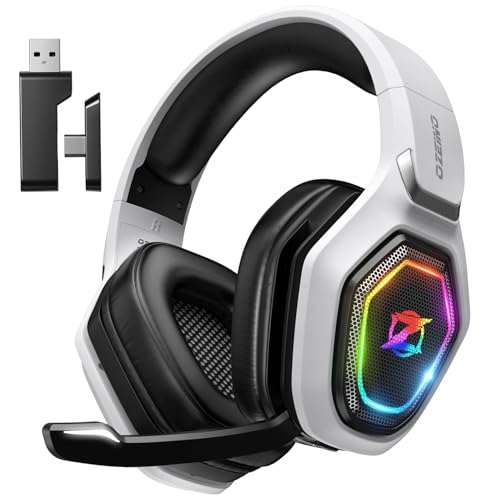
Ozeino Wireless Gaming Headset For PS5
A stereo gaming headset with 50 mm drivers, a flip microphone and Bluetooth mode for phone, laptop and Switch, plus a 2.4 GHz dongle mode.
View on Amazon
HyperX Cloud III S Wireless Gaming Headset
A stereo gaming headset with 53 mm drivers, a detachable boom microphone and Bluetooth or 2.4 GHz dongle connection for PC, consoles and mobile.
View on Amazon
WESEARY Wireless Gaming Headset for PS5
A stereo gaming headset with 50 mm drivers, an omnidirectional microphone with noise cancellation and Bluetooth 5.4 or 2.4 GHz connection modes.
View on Amazon
Razer BlackShark V3 Wireless PC Gaming Headset
A stereo gaming headset with 50 mm drivers, a detachable microphone and triple-mode connection over 2.4 GHz, Bluetooth 5.3 or wired USB-C.
View on AmazonThese come from our ranked list Best Bluetooth Gaming Headset, which compares them spec by spec.
FAQ
Can a mono Bluetooth headset play music?
Yes, it can play music and other audio through its one earpiece. The sound is single-channel, so there is no left and right separation as there is with a stereo headset.
Does mono mean the sound is worse?
No. Mono describes the number of channels, not a quality grade. For voice calls and spoken audio one channel is enough, while stereo adds separation that matters more for music and games.
Will a mono headset work with a computer?
It will if the computer has Bluetooth and supports headset or hands-free use. Check the Bluetooth settings and the headset notes for your computer, since some setups play sound but do not carry the microphone.