What Does a Graphics Card Look Like?
 By Theo LangUpdated
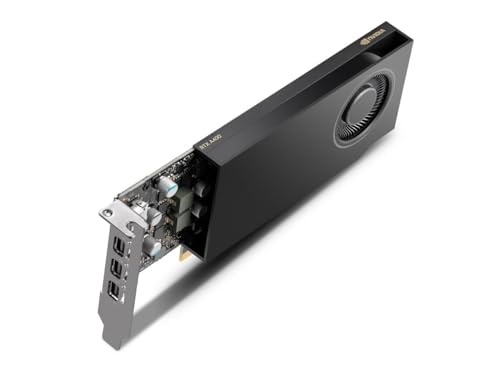
A graphics card is a long, flat circuit board that plugs into a slot on your computer's motherboard, inside the case. One face carries fans under a cover, the other face can have a flat metal backplate, and a metal bracket at the back of the case holds the video ports. You can find it by following the cable from your monitor to the back of the computer.
The board and its shape
A graphics card is a rectangular board, longer than it is wide, with chips and memory on its surface and a connector edge along one long side. That edge plugs into a slot on the motherboard, and a metal bracket at one end screws to the back of the case. The card sits flat, parallel to the motherboard, with its fans facing down or toward the side panel of the case.
Fans, shroud and backplate
The side you see first is the cooling side. Fans sit in round openings in a plastic cover called a shroud, and the fans move air across the board to carry heat away. On the far side, a flat metal plate called a backplate covers the board and adds rigidity. Cards with two fans place them side by side along the length of the board.
The ports on the back bracket
The metal bracket at the end of the card pokes through the back of the case, and it holds the video ports. You will see HDMI and DisplayPort sockets there, and the monitor cable plugs into one of them. The bracket also has small vents that let warm air leave the case. If the monitor cable plugs into a port on the main board instead, the computer is using graphics built into the motherboard.
How it connects inside the case
Inside the case, the card's connector edge sits in a PCIe slot on the motherboard, and a screw at the back of the case holds the bracket in place. The picture reaches the monitor through the ports on the bracket. A card can cover the slot next to it, so check the space beside the card when you plan a build.
How to look at your own card
Shut the computer down and unplug it before you open the case, and follow the maker's manual for your model. Look for the long board in the PCIe slot with fans on its face and ports on the back bracket. If the case has a clear side panel, you can see the card without opening it. If you are unsure about opening the case, contact the maker.
What you need

ASUS PRIME GeForce RTX 5060 Ti 16GB
An ASUS GeForce RTX 5060 Ti card with 16 GB of GDDR7 memory, PCIe 5.0, HDMI 2.1, Axial-tech fans and a Dual BIOS switch.
View on Amazon
ASUS Prime GeForce RTX 5060 Ti 8GB
An ASUS GeForce RTX 5060 Ti card with 8 GB of GDDR7 memory, PCIe 5.0, HDMI 2.1, a 2.5-slot design and Dual BIOS.
View on Amazon
MSI Gaming RTX 3050 LP 6G OC Graphics Card
A low-profile MSI GeForce RTX 3050 card with 6 GB of GDDR6 memory, a 1492 MHz boost clock, two HDMI 2.1a ports and one DisplayPort port.
View on Amazon
NVIDIA RTX 4000 SFF Ada Generation Workstation Ada Lovelace Architecture Dual Slot Low Profile Professional Graphics Board 900-5G192-2571-000 VD8465
An NVIDIA RTX 4000 SFF Ada Generation board, a dual-slot low-profile professional card built on the Ada Lovelace architecture.
View on AmazonThese come from our ranked list Best Sff GPU, which compares them spec by spec.
FAQ
Where is the graphics card inside a computer?
It sits in a PCIe slot on the motherboard, inside the case, with its fans facing down or toward the side panel. Follow the cable from your monitor to the bracket at the back of the computer, and the card is at the other end of that cable.
Can I see the graphics card without opening the case?
Look at the back of the computer for the bracket with HDMI or DisplayPort sockets, and look through a clear side panel if the case has one. Without a side panel, shut the computer down, unplug it and follow the maker's manual to open the case.
Why does a graphics card have fans?
The fans move air across the board to carry heat away while the card works. Without that airflow the board would heat up, so the fans spin up when the card is busy and slow down when it is idle.