
What Do Graphics Cards Do for Gaming?
 By Theo LangUpdated
A graphics card draws the picture in a game: it builds each frame from the game's data and sends it to your monitor. It also handles the effects that shape how a scene looks, such as lighting, shadows and textures. The cards here are desktop graphics cards with 16 GB of GDDR6 video memory, and three of them list an HDMI output.
What the card draws
A graphics card turns game data into the picture on your monitor, frame by frame. It draws the geometry, applies textures and lighting, and sends the finished frame to the display. Video memory holds the textures and frame data the card works with, and all four cards here have 16 GB of GDDR6 memory. The ASRock card puts that memory on a 256-bit bus at 20 Gbps. More video memory gives the card more room for larger textures and higher resolutions. Check the requirements published for your game before you pick a card.
Clock speed and what it means
Boost clock is the card's top speed, stated in MHz. The XFX RX 9060 XT lists a boost clock up to 3320 MHz, the XFX RX 9070 XT lists up to 2970 MHz, the ASRock RX 9070 lists up to 2520 MHz with a 2070 MHz game clock, and the ASUS RX 9060 XT lists up to 3250 MHz in OC mode with a 2640 MHz game clock. A higher clock speed does not by itself set how a game looks, since the card's memory, the game and the rest of the computer shape the result. Check the requirements published for your game.
Cooling, size and power
Graphics cards make heat while they work, so fans move air across the card. The two XFX cards and the ASRock card use three fans, and the ASUS card uses Axial-tech fans. The ASRock and ASUS cards have 0dB technology, and the ASUS card has a dual BIOS switch for Quiet and Performance profiles. The ASRock and ASUS cards are 2.5-slot designs. The ASRock card measures 290 by 123 by 51 mm, takes two 8-pin power connectors, and the maker recommends a 700W power supply. Check the size and power connectors before you buy.
Connecting the monitor
The card sends the picture to the monitor through its outputs. Three of the cards here list an HDMI output, and the ASUS card has HDMI 2.1b. The XFX RX 9060 XT has two DisplayPort outputs, the XFX RX 9070 XT has three, and the ASUS card has DisplayPort 2.1a. Check that the card has the port your monitor uses. The ASRock and ASUS cards use PCIe 5.0, so check that your desktop has a matching slot and enough room for the card.
What you need

XFX Swift RX 9060
An AMD RX 9060 XT card with 16 GB of GDDR6 memory, a boost clock up to 3320 MHz, triple fans and an HDMI output.
View on Amazon
XFX Swift RX 9070
An AMD RX 9070 XT card with 16 GB of GDDR6 memory, a boost clock up to 2970 MHz, triple fans and an HDMI output.
View on Amazon
ASRock Radeon RX 9070 Challenger
A Radeon RX 9070 card with 16 GB of GDDR6 memory on a 256-bit bus, PCIe 5.0, triple fans and 0dB technology.
View on Amazon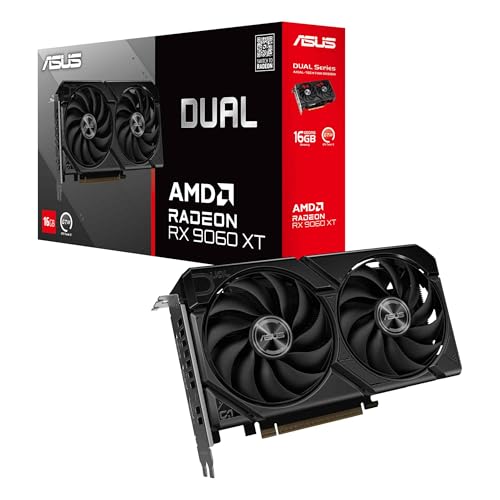
ASUS Dual Radeon RX 9060 XT
A Radeon RX 9060 XT card with 16 GB of GDDR6 memory, PCIe 5.0, HDMI 2.1b, DisplayPort 2.1a and Axial-tech fans.
View on AmazonThese come from our ranked list Best GPU for Gaming, which compares them spec by spec.
FAQ
Do I need a graphics card for gaming?
A desktop can show a picture without a separate graphics card if the processor has built-in graphics, but a separate card takes on the graphics work. Check the requirements published for your game to see what it asks for.
How much video memory do these cards have?
All four cards here have 16 GB of GDDR6 video memory. The ASRock card puts its 16 GB on a 256-bit bus at 20 Gbps. Check the requirements published for your game before you pick a card.
What should I check before buying a graphics card?
Check the card's size against the space in your desktop case, the power connectors it takes, and the ports your monitor uses. The ASRock card measures 290 by 123 by 51 mm and takes two 8-pin power connectors, and the maker recommends a 700W power supply.


