
How to Pick Noise Cancelling Headphones
 By Theo LangUpdated
Pick noise cancelling headphones by matching the noise cancelling strength, fit, battery life and controls to where you will use them. Check the fit, the connection options and the app controls before you buy, so the pair works for calls, travel and daily listening.
Decide where you will use them
Start with the places you will listen most, such as a train, an office or at home. A pair with hybrid active noise cancelling suits noisy travel and shared offices, while a transparency mode lets you hear announcements and traffic when you need to stay aware. If you mostly listen at home, fit and sound matter more than the noise cancelling.
Check the fit and weight
Over-ear headphones rest on your ears, so try the pair on if you can. Look for earcups that cover your ears fully and a headband that stays comfortable over a long session. A lighter pair is easier to wear for hours, and a foldable design packs smaller for travel. If the fit is loose, outside sound leaks in and the noise cancelling works less well.
Compare battery life and charging
Check how many hours the headphones play with noise cancelling switched on, since that figure is lower than the figure with it off. Fast charging can add hours of listening after a short charge, which helps before a flight or a long commute. A battery display shows the remaining charge at a glance, so you know when to plug in.
Check connections and controls
Check whether the headphones connect by Bluetooth and whether they also work with a cable, such as AUX or USB-C, for wired listening. Some pairs connect to two devices at once, so you can switch between a laptop and a phone without pairing again. App controls let you adjust the sound with EQ presets and switch between noise cancelling, normal and transparency modes.
Check the microphone and call quality
If you take calls on the headphones, look at the microphone setup. More microphones with noise reduction help the person on the other end hear your voice in a noisy street or office. An AI voice assistant can take hands-free commands, and a dedicated call microphone helps keep your voice clear during calls.
What you need

soundcore by Anker Q20i Hybrid Active Noise Cancelling Headphones
Hybrid active noise cancelling with 40 mm drivers, Bluetooth 5.0, 40 hours of playtime with noise cancelling on and a soundcore app for EQ and mode control.
View on Amazon
Soundcore by Anker Q20i Hybrid Active Noise Cancelling Headphones
Hybrid active noise cancelling with 40 mm drivers, Bluetooth 5.0 and dual-device connection, in Taupe, with app EQ control and three listening modes.
View on Amazon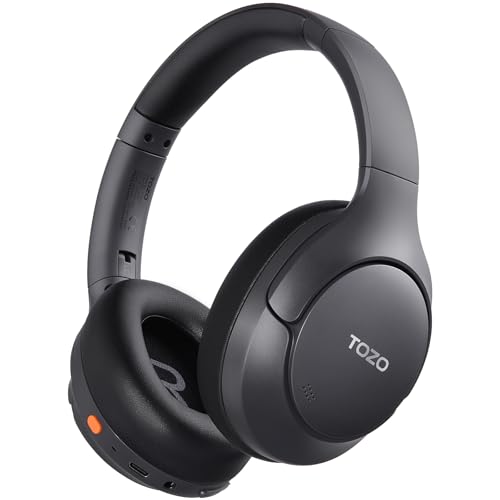
TOZO HT3 Hybrid Noise Cancelling Wireless Headphones
Hybrid noise cancelling with 40 mm drivers, Bluetooth 6.0, up to 90 hours of playtime and 32 EQ modes in the TOZO app.
View on Amazon
Hybrid Active Noise Cancelling Headphones
Hybrid active noise cancelling with 40 mm drivers, Bluetooth 6.0, up to 120 hours of playtime and a digital battery display.
View on AmazonThese come from our ranked list Best Noise Cancelling Headphones for PC, which compares them spec by spec.
FAQ
Do noise cancelling headphones remove all outside sound?
No. Active noise cancelling reduces steady background sound, and the earcups cut out some of the rest, but sudden loud sounds still get through. Transparency mode lets outside sound in when you need to hear it.
Can I use noise cancelling headphones for calls?
Yes. Pairs with built-in microphones and noise reduction work for calls, and some connect to two devices at once so you can switch between a phone and a laptop.
Does noise cancelling use more battery?
Yes. Playtime with noise cancelling switched on is shorter than playtime with it off, so check the figure for noise cancelling on before you buy.


