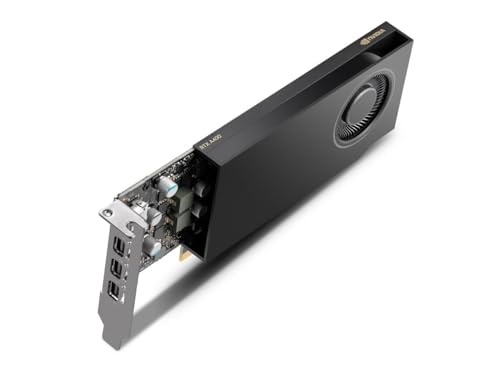
How to Install a Low Profile Graphics Card
 By Theo LangUpdated
To install a low profile graphics card, shut the PC down, unplug it, open the case, and fit the card into a PCIe slot with the low profile bracket attached. Low profile cards are short cards made for small cases, so check that the bracket and the card length match the case. Then connect a monitor, start the PC, and install the driver from the card maker's site.
Check the case and the bracket
Measure the space inside the case and compare it with the card length the maker lists, such as 182mm on the GIGABYTE low profile cards here. A low profile bracket is the short bracket that fits slim cases, while a full-height bracket fits a standard case, so use the bracket that matches the case. Check the case manual for the slot layout and the bracket size it takes.
Shut down and open the case
Shut the PC down, unplug it from the wall, and follow the case and motherboard manuals for opening the case. Touch a bare metal part of the case to discharge static, and work on a clear surface with the case lying flat if the manual shows it that way. Keep the screws from the slot cover in a small dish so they do not roll away.
Fit the bracket and seat the card
Attach the low profile bracket to the card if it is not already fitted. Remove the slot cover from the PCIe slot, line up the card with the slot, and press it down evenly until the slot latch clicks. Fasten the bracket screw so the card sits flat against the case and cannot move.
Connect a monitor and install the driver
Close the case, plug the PC back in, and connect a monitor to the card with an HDMI or DisplayPort cable. Start the PC, then download the driver from the card maker's site and install it. Open the display settings and check that the card and the screen appear, then set the resolution the monitor lists, such as 1080p or 4K.
Fix a card the PC does not see
Check that the card is pressed fully into the slot, the bracket screw is tight, and the monitor cable is plugged into the card and not the motherboard. Try another PCIe slot or another cable, and check in the display settings that the card appears. If the card still does not appear, contact the card maker for help rather than forcing the card or the slot.
What you need

GIGABYTE GeForce RTX 5060 OC Low Profile
An 8 GB GDDR7 low profile card on PCIe 5.0 with HDMI and DisplayPort, a 182mm length and support for up to 4 displays.
View on Amazon
GIGABYTE GeForce RTX 5050 OC Low Profile
An 8 GB GDDR6 low profile card on PCIe 5.0 with a 182mm length, built on the Blackwell architecture.
View on Amazon
MSI Gaming RTX 3050 LP 6G OC Graphics Card
A 6 GB GDDR6 low profile card with a 1492 MHz boost clock, one DisplayPort and two HDMI 2.1a outputs.
View on Amazon
MSI GeForce RTX 3050 LP 6G OC
A 6 GB GDDR6 low profile card with a 1492 MHz boost clock, HDMI output and two fans for a slim small form factor build.
View on AmazonThese come from our ranked list Best Low Profile GPU, which compares them spec by spec.
FAQ
Do low profile cards fit in any case?
No. A low profile card fits slim and small form factor cases with a short bracket, so measure the space inside the case and compare it with the card length the maker lists before buying one.
What is a low profile bracket?
It is the short bracket that holds a low profile card in a slim case. A full-height bracket is taller and fits a standard case, so use the bracket that matches the case.
How do I know the card is installed?
Start the PC and open the display settings. The card and the screen should appear there, and the monitor should show a picture after the driver is installed from the card maker's site.