
How to Clean White Headphones
 By Theo LangUpdated
White headphones show dirt, sweat and makeup marks fast, but most marks come off with a dry soft cloth and a little patience. Power the headset off and unplug it, then wipe the headband, ear cups and cushions, and use a slightly damp cloth for marks that stay. Let the headset dry fully before you wear it or plug it in again.
Power off and unplug first
Turn the headset off and unplug any cable before you clean it, and take it off the charger if it is wireless. Cleaning a headset that is on or plugged in risks shorting the electronics if moisture gets in. Set it on a clean dry surface with the ear cups facing up, so you can reach the headband and both sides of each cup.
Wipe the outside with a dry cloth
Use a dry soft cloth, such as a microfiber cloth, and wipe the headband, the outside of each ear cup and the cable. A dry cloth lifts dust, skin oils and light marks without wetting the headset, and it works well as a start on white plastic and white cushions. Wipe in short strokes and check the cloth as you go, so you do not rub dirt back across the surface.
Treat marks with a damp cloth
For marks that stay after a dry wipe, dampen a soft cloth with a little water and wring it out until it is barely wet. Wipe the mark with light pressure and work from the edge toward the middle, then wipe the area dry with a second cloth. Never pour water on the headset or soak a cushion, and keep water out of the drivers, microphone and ports.
Clean the ear cushions and microphone
Wipe each ear cushion with a dry cloth first, then with a barely damp cloth for marks that stay, and let the cushions dry in the air before you wear the headset again. Wipe the microphone boom or opening with a dry cloth and clear dust from the mesh with a soft brush, taking care not to push dirt into the opening. Do not pull cushions off unless your manual says they come off.
Let it dry before you use it
Let the headset dry fully in the air before you wear it, plug it in or charge it, since trapped moisture can harm the drivers and the microphone. Store the headset on a clean dry surface, away from dust and dirt, so it stays white longer and needs less cleaning next time.
What you need

BENGOO Pro Gaming Headset for PS4 PS5 PC Xbox One Controller
A white wired headset with 40 mm drivers, a microphone and a braided USB cable, so marks show on its white ear cups and headband.
View on Amazon
Razer BlackShark V3 Wireless PC Gaming Headset
A white wireless headset with 50 mm drivers, a detachable microphone and 2.4 GHz, Bluetooth and USB wired modes.
View on Amazon
Wireless Gaming Headset
A black-and-white wireless headset with 7.1 surround sound, a retractable microphone and Bluetooth and 2.4 GHz wireless.
View on Amazon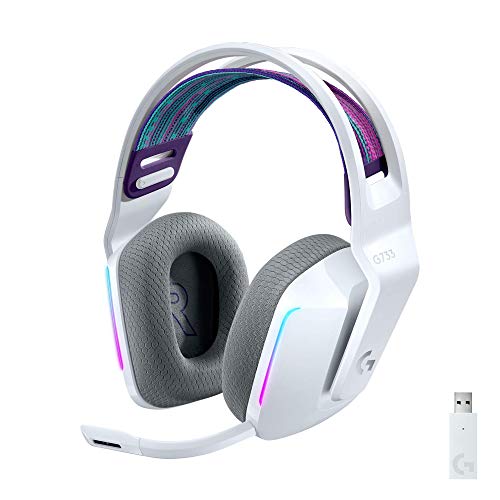
Logitech G733 Lightspeed Wireless Gaming Headset
A white wireless headset with LIGHTSPEED wireless, a suspension headband, LIGHTSYNC RGB lighting and a microphone.
View on AmazonThese come from our ranked list Best White Gaming Headset, which compares them spec by spec.
FAQ
Can I use water to clean white headphones?
Yes, on a cloth, not on the headset. Dampen a soft cloth, wring it out so it is barely wet, wipe the marks, then wipe the surface dry with a second cloth. Keep water out of the drivers, microphone and ports.
How do I clean the ear cushions?
Wipe them with a dry soft cloth first, then a slightly damp one for marks that stay. Let them dry fully in the air before you wear the headset again, and do not press water into the foam.
What should I avoid when cleaning headphones?
Avoid soaking the headset, spraying cleaner straight onto it and using rough cloths or strong cleaners. Keep moisture out of the drivers, microphone and charging port, and let the headset dry fully before you use it.


