
How to Make Your PC Quieter
 By Theo LangUpdated
A quieter PC starts with airflow and fan control: clean the dust out, set fan curves so fans spin slower at idle, and replace loud fans with larger, slower ones. A case with mesh panels and room for a large radiator helps, since bigger fans and radiators move air with less noise. Shut the PC down and unplug it before you open it, and follow the maker's manual.
Find what makes the noise
Listen for the source before you change parts. Case fans, the CPU cooler, the graphics card and the power supply each make their own sound, and a rattling fan sounds different from air moving through a vent. Open the case only after you shut the PC down and unplug it, then check each fan for dust, loose screws and cables touching the blades. Note which fan makes the noise at idle and under load, since that tells you what to check first.
Clean dust from fans and filters
Dust on fan blades and filters forces fans to spin faster to move the same air. Shut the PC down, unplug it and follow the maker's manual to open the case. Brush dust off the blades and filters, and clear the vents on the case panels. Put the panels back and check that no cable rests against a fan blade.
Set fan curves in the BIOS
A fan curve sets how fast each fan spins at a given load, so the fans stay slow when the PC idles and ramp up only when parts get hot. Open the BIOS or the fan software that came with your motherboard and lower the speeds at idle and light loads. Raise the speeds in small steps until temperatures stay in the range your parts maker lists, then save the profile.
Give the case room for airflow
Tight cases with clogged vents make fans work harder. Keep the case off carpet and away from walls so air can reach the intake vents, and leave space behind it for warm air to leave. The Lian Li A3-mATX and the Cooler Master NR200P V3 use mesh panels that let air through, and both fit large radiators: the A3 fits a 360mm radiator and the NR200P V3 fits 240 or 280mm radiators.
Swap loud fans for larger ones
Larger fans move the same air at lower speeds, so a 120mm fan can spin at a lower speed than a smaller fan moving the same air. The Lian Li A3-mATX fits up to 10 120mm fans, so you can fill its mounts with large fans and run them slow. Check the fan mounts in your case before you buy, and match the fan size to the mount.
What you need

Lian Li A3-mATX PC Case
Steel mesh side and top panels, with room for a 360mm radiator and up to 10 120mm fans, for airflow in a quiet build.
View on Amazon
Lian Li A4-H2OX5 Mini-ITX Case-SFX Layout-PCIe 5.0 Riser-Black-A4H2OX5
A compact 11-liter Mini-ITX case with mesh panels on the bottom, sides and top, and room for a 240mm AIO.
View on Amazon
Fractal Design Terra Jade
A 10.4L Mini-ITX case with anodized aluminum panels, a walnut front panel and 30mm of slidable wall travel for arranging parts.
View on Amazon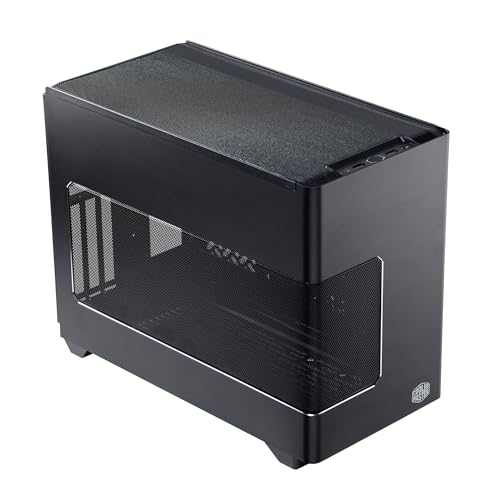
Cooler Master NR200P V3 Mini-ITX PC Case
A Mini-ITX case with a vented mesh side panel, room for 240 or 280mm radiators and a vertical GPU mount.
View on AmazonThese come from our ranked list Best ITX Case, which compares them spec by spec.
FAQ
Why is my PC loud at idle?
A fan may be clogged with dust, set to a high speed in the BIOS, or rubbing against a cable. Shut the PC down, unplug it, open the case and check each fan for dust and cables touching the blades.
Does a bigger case make a PC quieter?
It can help. A larger case fits larger fans and radiators, which move air at lower speeds, and it leaves room for cables to sit clear of fan blades. The Lian Li A3-mATX fits a 360mm radiator and up to 10 120mm fans.
Should I replace the stock CPU cooler?
A larger cooler with a bigger fan moves more air at lower speeds than a small stock cooler. Check that the cooler fits your case and socket, and follow the maker's manual when you fit it.


