
How to Make Your Own Computer
 By Theo LangUpdated
Making your own computer means choosing each part and fitting it into a case yourself. You pick the motherboard, processor, memory, storage, graphics card, power supply and cooler, then install them in order and connect the cables. The cases shown here are small form factor cases, so checking sizes before you buy matters more than in a larger case.
List the parts first
A computer build starts with a parts list: a case, a motherboard, a processor, memory, storage, a graphics card, a power supply and a cooler. Decide what the computer will run, then check the requirements published for that software or game before you pick parts. Memory comes as DDR4 or DDR5, so match the memory type to the motherboard. Write the list down and compare each part with the others, so a part that does not fit the case or the motherboard shows up before you buy it.
Match the case and motherboard
The case sets the motherboard size. The Lian Li A3 takes mATX and ITX motherboards with 4 expansion slots, while the Lian Li A4, the Fractal Design Terra and the Cooler Master NR200P take Mini-ITX motherboards. Check the form factor on the motherboard box against the case, and count the expansion slots when you plan add-in cards.
Check GPU length and cooling room
Measure the graphics card against the case figure. The A3 fits graphics cards up to 415 mm, the Terra fits cards up to 322 mm, and the NR200P fits cards up to 361.5 mm, while the A4 fits a triple-slot card behind the motherboard on its PCIe 5.0 riser. For cooling, the A3 supports a 360 mm radiator, the A4 a 240 mm radiator, and the NR200P a 240 or 280 mm radiator. Compare both figures with the parts you picked.
Fit the power supply
Power supply size differs by case. The A3 takes ATX, SFX and SFX-L power supplies, the A4 takes SFX and SFX-L power supplies on a removable bracket, and the NR200P takes SFX power supplies up to 130 mm long. Check the power supply type and length on its box against the case, and check the wattage figure on the power supply against the requirements published for your parts.
Assemble it and check the first start
Work on a clear surface and follow the manual for each part. Shut the computer down and unplug it before you open the case, and keep the manual nearby for the order of parts. Fit the power supply, motherboard, cooler, memory, storage and graphics card, then connect the cables and close the panels. Connect a monitor and keyboard, plug the computer in, and switch it on to check that it starts.
What you need

Lian Li A3-mATX PC Case
An mATX case with steel mesh panels, room for graphics cards up to 415 mm, a 360 mm radiator and 10 120 mm fans, with no fans included.
View on Amazon
Lian Li A4-H2OX5 Mini-ITX Case-SFX Layout-PCIe 5.0 Riser-Black-A4H2OX5
An 11 liter Mini-ITX case with a sandwich layout, a triple-slot graphics card mount and a PCIe 5.0 riser cable, for 240 mm radiators.
View on Amazon
Fractal Design Terra Jade
A 10.4 liter Mini-ITX case with a walnut front panel, room for graphics cards up to 322 mm, a PCIe 4.0 riser cable and USB Type-C.
View on Amazon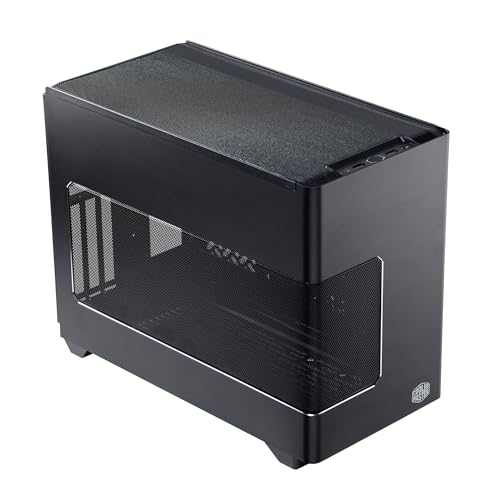
Cooler Master NR200P V3 Mini-ITX PC Case
An 18.6 liter Mini-ITX case with a vertical graphics card mount, room for cards up to 361.5 mm, a PCIe 5.0 riser and tool-free mesh panels.
View on AmazonThese come from our ranked list Best ITX Case, which compares them spec by spec.
FAQ
Do I need tools to build a computer?
A screwdriver handles the screws in the case and the parts, and the NR200P has tool-free side panels for quick access. Keep the manual for each part nearby, since it shows the order of parts and where each screw goes. Shut the computer down and unplug it before you open the case.
How do I know the parts fit together?
Compare the figures on each part with the figures on the case: motherboard form factor, graphics card length, radiator size and power supply type and length. Check the requirements published for your software or game, and check the manual for each part before you buy.
Can I use the same case for a bigger graphics card later?
Only if the longer card fits the case figure. The A3 fits cards up to 415 mm, the NR200P fits cards up to 361.5 mm and the Terra fits cards up to 322 mm, so measure the new card and compare it with the case before you buy.


