
Best Pci Express NVMe Enclosure (2026): 4 Picks Compared
 By Theo LangUpdated
Choose the ORICO M.2 NVMe SSD Enclosure if you want a 10 Gbps USB 3.1 Gen 2 enclosure for a PCIe NVMe SSD up to 8 TB, with UASP support and included USB-C to USB-C and USB-C to USB-A cables. It works with Windows, Mac and Linux with no driver required, and its aluminum top and plastic bottom keep it light at 0.22 lb for carrying.
Your shortlist at a glance
PCKitHQ scores range from 9.2 to 9.8. See how we pick.
| Product and key specifications | Score and retailer |
|---|---|
01 Best Overall ORICO M.2 NVMe SSD Enclosure | 9.8PCKitHQ scoreView on Amazon |
02 Second Pick MOKiN 80Gbps M.2 NVMe SSD Enclosure | 9.6PCKitHQ scoreView on Amazon |
03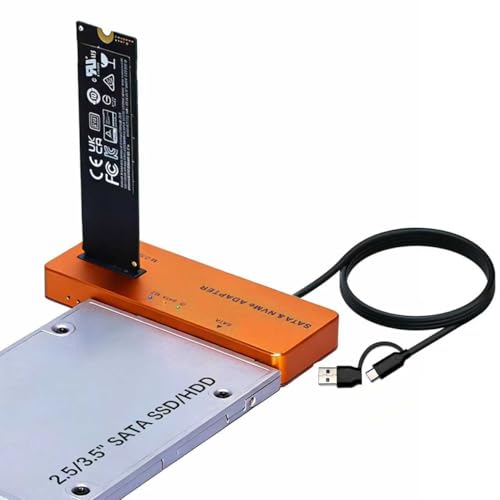 Also Consider FARBOKO 10Gbps M.2 NVMe SATA SSD Enclosure | 9.4PCKitHQ scoreView on Amazon |
04 Also Consider fanxiang SSD Enclosure | 9.2PCKitHQ scoreView on Amazon |
A closer look at each configuration
ORICO M.2 NVMe SSD Enclosure
score
The 10 Gbps USB 3.1 Gen 2 interface, UASP support and 8 TB capacity define this ORICO enclosure for NVMe SSDs.
- Interface
- USB 3.1 Gen 2
- Weight
- 0.22 lb
- Warranty
- ORICO 12Months Manufacturer Warranty
With high-performance NVMe media, read and write speeds can exceed 900 MB/s. It accepts NVMe M-Key M.2 SSDs in 2230, 2242, 2260 and 2280 sizes up to 8 TB, and it does not support M.2 SATA SSDs, M.2 PCIe AHCI SSDs or SSDs from Mac computers. Included USB-C to USB-C and USB-C to USB-A cables work with USB-C and USB-A hosts. It is plug and play with no driver required on Windows, Mac and Linux, and new SSDs must be formatted before use. The aluminum top and plastic bottom measure 108 by 29.5 by 13.5 mm, and the enclosure weighs 0.22 lb. The warranty runs 12 months from the manufacturer.
Choose it if
- You want a 10 Gbps USB-C enclosure for a PCIe NVMe SSD up to 8 TB
- You want plug-and-play use on Windows, Mac or Linux with no driver
Consider another if
- You need the 80 Gbps Thunderbolt 5 connection of the MOKiN enclosure
- You need an enclosure that accepts an M.2 SATA SSD
MOKiN 80Gbps M.2 NVMe SSD Enclosure
score
The 80 Gbps Thunderbolt 5 connection, LCD status display and active cooling fan define this MOKiN enclosure.
- Interface
- Thunderbolt 5
- Warranty
- 18-MONTH
This MOKiN enclosure uses an Intel JHL9480 and Realtek RTL9210B chipset and supports PCIe Gen5 SSDs at speeds rated up to 80 Gbps, with a Thunderbolt 5 cable included. The 80 Gbps speed requires a Thunderbolt 5 port and cable. An LCD screen shows temperature and fan speed, and icons alert you to fan issues or overheating. The built-in fan starts at 40 degrees Celsius and has three speed levels: Low, Medium and High. It supports NVMe M.2 SSDs in 2280, 2260, 2242 and 2230 sizes up to 8 TB, with M and B+M keys, and it does not support SATA M.2 SSDs with a B key. It works with Thunderbolt 5, 4 and 3 and USB4, 3.2, 3.1, 3.0 and 2.0 ports on Mac M1, M2, M3 and M4 computers and Windows PCs. The warranty runs 18 months.
Choose it if
- You want the 80 Gbps Thunderbolt 5 connection for large file transfers
- You want an LCD display showing temperature and fan speed
Consider another if
- You need 80 Gbps speeds from a USB port
- You want an enclosure without a built-in cooling fan
FARBOKO 10Gbps M.2 NVMe SATA SSD Enclosure
score
Dual NVMe and SATA support, tool-free installation and a 10 Gbps USB 3.2 interface define this FARBOKO enclosure.
- Interface
- USB 3.2
- Form factor
- M.2
- USB-C
- Yes
- Weight
- 0.2 lb
This FARBOKO enclosure has a USB 3.2 interface rated up to 10 Gbps and supports M.2 NVMe and SATA SSDs with M-key and M+B-key interfaces, in any size of M.2 SSD, plus 2.5-inch and 3.5-inch SATA hard drives. It can handle three hard disks at a time. Installation is tool-free with no tools or drivers required: insert the drive and connect the included USB A/C cable. Anti-breakage and over-current protection safeguard the drive, and the enclosure supports SSD TRIM commands and UASP acceleration. The vertical design dissipates heat during high-speed operation. A 30 W USB-C charger and cables are included in the package. The adapter does not support cloning between IDE, SATA and M.2 hard disks, and an M.2 SSD with an encrypted transmission protocol must have that protocol turned off before use.
Choose it if
- You want one enclosure for M.2 NVMe, M.2 SATA and 2.5-inch or 3.5-inch SATA drives
- You want tool-free installation with no drivers required
Consider another if
- You need to clone data between IDE, SATA and M.2 hard disks
- You need the 80 Gbps Thunderbolt 5 connection of the MOKiN enclosure
fanxiang SSD Enclosure
score
The 10 Gbps USB 3.2 Gen 2 interface, aluminum alloy body and 0.12 lb weight define this fanxiang enclosure.
- Interface
- USB 3.2 Gen 2
- USB-C
- Yes
- Weight
- 0.12 lb
- Warranty
- 1 years manufacturer
This fanxiang enclosure has a USB 3.2 Gen 2 interface rated up to 10 Gbps, with UASP acceleration, and it is backward compatible with USB 3.1 and USB 3.0. It supports NVMe M-Key and B+M-Key SSDs in 2230, 2242, 2260 and 2280 sizes up to 8 TB, and it does not support M.2 SATA or NGFF, mSATA, or SSDs with heatsinks. The aluminum alloy body and silicone case give shock and drop resistance, and a thermal pad works with the metal casing to channel heat away from the SSD. It weighs 68 g with the protective silicone case. It works with Windows 7 and above, Mac OS, Linux and Android, and with desktops, laptops, smart TVs, PS4 and PS5, Xbox series consoles and OTG-enabled Android smartphones. It is plug and play, and it comes with a 1-year after-sales service.
Choose it if
- You want a 0.12 lb aluminum enclosure for travel
- You want plug-and-play use with Windows, Mac, Linux or Android
Consider another if
- You need to use an SSD with a heatsink
- You need to use an M.2 SATA SSD
Make the choice for your setup
Match the interface to your port
The ORICO enclosure uses USB 3.1 Gen 2 at a rated 10 Gbps, the fanxiang enclosure uses USB 3.2 Gen 2 at a rated 10 Gbps, and the FARBOKO enclosure uses USB 3.2 at a rated 10 Gbps. The MOKiN enclosure uses Thunderbolt 5 at a rated 80 Gbps, and it also works with Thunderbolt 4 and 3 and USB4, 3.2, 3.1, 3.0 and 2.0 ports. The 80 Gbps speed requires a Thunderbolt 5 port and cable. These rated speeds are theoretical figures, and actual speed varies with the connected devices and the SSD. Check the ports on your computer first, then match the enclosure interface to a port you already have.
Check which SSD types each enclosure accepts
The ORICO enclosure accepts NVMe M-Key M.2 SSDs in 2230, 2242, 2260 and 2280 sizes up to 8 TB, and it does not support M.2 SATA SSDs, M.2 PCIe AHCI SSDs or SSDs from Mac computers. The MOKiN enclosure accepts NVMe M.2 SSDs in the same four sizes up to 8 TB, with M and B+M keys, and it does not support SATA M.2 SSDs with a B key. The fanxiang enclosure accepts NVMe M-Key and B+M-Key SSDs in the same four sizes up to 8 TB, and it does not support M.2 SATA or NGFF, mSATA, or SSDs with heatsinks. The FARBOKO enclosure accepts M.2 NVMe and SATA SSDs and 2.5-inch and 3.5-inch SATA hard drives, and it can handle three hard disks at a time. A related shortlist covers the Best Pibox NVMe Enclosure with Fan.
Weigh cooling, size and warranty
The MOKiN enclosure has a built-in fan that starts at 40 degrees Celsius with three speed levels, plus an LCD screen showing temperature and fan speed. The fanxiang enclosure pairs an aluminum alloy body with a thermal pad and a silicone case, and it weighs 68 g with that case. The ORICO enclosure has an aluminum top and plastic bottom, measures 108 by 29.5 by 13.5 mm and weighs 0.22 lb. The FARBOKO enclosure uses a vertical design to dissipate heat and includes a 30 W USB-C charger. Warranty terms differ: the ORICO warranty runs 12 months, the MOKiN warranty runs 18 months, and the fanxiang enclosure comes with a 1-year after-sales service.
Comparing more options? See Best SSD Enclosure.
FAQ: Pci Express NVMe Enclosure
Which enclosure supports Thunderbolt 5 at 80 Gbps?
The MOKiN enclosure supports PCIe Gen5 SSDs at speeds rated up to 80 Gbps, with a Thunderbolt 5 cable included. The 80 Gbps speed requires a Thunderbolt 5 port and cable, and it also works with Thunderbolt 4 and 3 and USB4, 3.2, 3.1, 3.0 and 2.0 ports.
Which enclosures accept SATA SSDs as well as NVMe?
The FARBOKO enclosure supports M.2 NVMe and SATA SSDs and 2.5-inch and 3.5-inch SATA hard drives, and it can handle three hard disks at a time. The ORICO, MOKiN and fanxiang enclosures accept NVMe SSDs only, with their own key and size limits.
Which enclosure suits carrying in a pocket or bag?
The fanxiang enclosure weighs 68 g with its protective silicone case and fits easily into a pocket or bag. The ORICO enclosure measures 108 by 29.5 by 13.5 mm and weighs 0.22 lb, and the FARBOKO enclosure weighs 0.2 lb.


