Best NVMe Enclosure for Heat Dissipation (2026): 5 Picks Compared
 By Theo LangUpdated
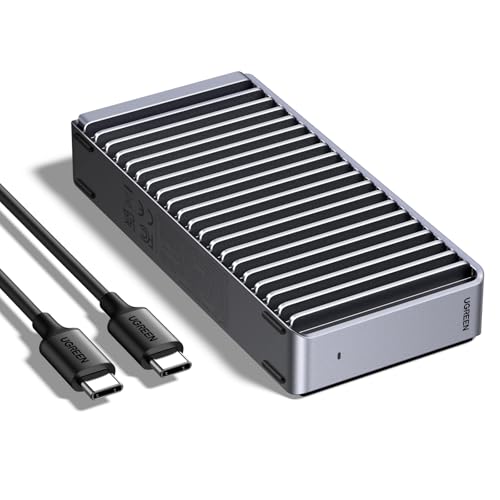
Choose the UGREEN 80Gbps M.2 NVMe SSD Enclosure if you want an 80Gbps Thunderbolt 5 enclosure whose double-sided aluminum fins carry heat away from the drive during long transfers. Its dual-chip design moves data at up to 7000 MB/s, and it fits M.2 sizes 2230 to 2280 and SSDs up to 8TB. The ACASIS adds a cooling fan, the ANYOYO and RayCue use fin designs, and the MAIWO covers NVMe and SATA at 10Gbps.
Your shortlist at a glance
PCKitHQ scores range from 9.2 to 9.8. See how we pick.
| Product and key specifications | Score and retailer |
|---|---|
01 | 9.8PCKitHQ scoreView on Amazon |
02 Second Pick ACASIS 40Gbps M.2 NVMe SSD Enclosure | 9.7PCKitHQ scoreView on Amazon |
03 Also Consider ANYOYO NVMe M.2 SSD Enclosure | 9.5PCKitHQ scoreView on Amazon |
04 | 9.3PCKitHQ scoreView on Amazon |
05 Also Consider RayCue 40Gbps M.2 NVMe Enclosure | 9.2PCKitHQ scoreView on Amazon |
A closer look at each configuration
UGREEN 80Gbps M.2 NVMe SSD Enclosure(SSD Not Included)
score
The UGREEN pairs an 80Gbps Thunderbolt 5 interface with double-sided aluminum fins and a 1-year warranty.
- Interface
- Thunderbolt5
- Weight
- 0.51 lb
- Warranty
- 1 Year
This UGREEN enclosure uses a dual-chip design with an Intel JHL9480 Thunderbolt controller and a JMicron JMS583 bridge controller, with speeds up to 7000 MB/s. Its three-dimensional cooling design uses dual-sided aluminum alloy biomimetic fins, which the maker states increase heat dissipation by 91% and reduce surface temperatures by 10%. It supports M.2 sizes 2230, 2242, 2260 and 2280, and SSDs up to 8TB, and it works with Thunderbolt 5, 4 and 3 and USB4, 3.2 and 3.0. SSDs with pre-installed heatsinks are not supported, and it does not take SATA or mSATA SSDs. It weighs 0.51 lb and carries a 1-year warranty.
Choose it if
- You want an 80Gbps Thunderbolt 5 enclosure for fast transfers
- You want double-sided fin cooling on an aluminum enclosure
Consider another if
- You need a cooling fan like the ACASIS
- You need a 2-year warranty like the ACASIS
ACASIS 40Gbps M.2 NVMe SSD Enclosure
score
The ACASIS pairs a 40Gbps Thunderbolt 5 interface with a built-in cooling fan and a 2-year warranty.
- Interface
- Thunderbolt 5
- Weight
- 0.36 lb
- Warranty
- 2 YEAR
This ACASIS enclosure pairs a built-in silent cooling fan with an aluminum heat dissipation design, and the maker states it keeps the SSD at 45°C during heavy workloads. Press the switch to activate the fan. It uses a certified Intel JHL7440 dual-chip design across Thunderbolt 5, 4 and 3 and USB4, 3.2, 3.1 and 3.0, with read and write speeds up to 2805 and 2734 MB/s with a Samsung 980 Pro on a MacBook, as the maker reports. It supports M.2 sizes 2280, 2260, 2242 and 2230 and SSDs up to 8TB, and it weighs 0.36 lb with a 2-year warranty.
Choose it if
- You want a built-in cooling fan for long editing sessions
- You want a 2-year warranty on the enclosure
Consider another if
- You need 80Gbps speed like the UGREEN
- You want a fanless enclosure with passive cooling only
ANYOYO NVMe M.2 SSD Enclosure
score
The ANYOYO pairs a 40Gbps Thunderbolt 4 interface with a Deep-Groove Fin design and tool-free installation.
- Interface
- Thunderbolt 3/4
This ANYOYO enclosure uses an ASM2464PD chip and a Deep-Groove Fin design on an aluminum housing, with silicone thermal pads included to absorb and dissipate heat. It supports transmission speeds up to 40Gbps, with a maximum speed of up to 3,100MB/s when a Thunderbolt 4 or USB 4 cable and device are used, and a 50cm 40Gbps cable is included. It fits M-Key and B&M Key NVMe SSDs in sizes 2230, 2242, 2260 and 2280, and it works with Thunderbolt 3 and 4 and USB4, 3.2, 3.1, 3.0 and 2.0. Installation is tool-free: slide open the cover, insert the SSD and secure it without tools. It does not support SATA NGFF or mSATA, and the SSD is not included. A 24-month technical support term is stated.
Choose it if
- You want a 40Gbps enclosure with a 40Gbps cable included
- You want tool-free installation for quick SSD swaps
Consider another if
- You need an 80Gbps interface like the UGREEN
- You need a cooling fan like the ACASIS
MAIWO M.2 SSD Enclosure for PCIe NVMe (M-Key) and NGFF SATA (B+M-Key) Solid State Drive
score
The MAIWO pairs a 10Gbps USB 3.1 interface with NVMe and SATA support and a 1-year warranty.
- Interface
- USB 3.1 Gen 2
- USB-C
- Yes
- Weight
- 0.11 lb
- Warranty
- One Year
This MAIWO enclosure supports M.2 PCIe NVMe SSDs and M.2 SATA SSDs in sizes 2230, 2242, 2260 and 2280, with a USB-C 3.1 Gen 2 interface at up to 10Gbps and support for UASP and TRIM. It takes SSDs up to 8TB, and its aluminium alloy shell has ventilation holes, with a silicone thermal pad and an aluminium thermal pad included. It measures 4.33 by 1.48 by 0.49 inches, weighs 0.11 lb and carries a 1-year warranty. Installation is tool-free, with an LED indicator and plug-and-play use. M.2 SATA B-Key SSDs are not supported, and a new drive needs initialization, partition and formatting before use.
Choose it if
- You want an enclosure that also takes SATA SSDs
- You want a 0.11 lb enclosure for travel
Consider another if
- You need 40Gbps speed like the ANYOYO
- You need a fin or fan cooling design like the UGREEN
RayCue 40Gbps M.2 NVMe Enclosure
score
The RayCue pairs a 40Gbps Thunderbolt 5 interface with double-sided fins and tool-free installation.
- Interface
- Thunderbolt 5
- Weight
- 0.75 lb
- Warranty
- 1 Year
This RayCue enclosure delivers read and write speeds up to 3600MB/s over its 40Gbps interface, and it works with Thunderbolt 5, 4 and 3 and USB 4, 3.2, 3.1, 3.0 and 2.0. Its double-sided fin design and three-dimensional cooling system move heat away from the drive, with quiet operation and no fan noise. It supports drives up to 8TB, and installation is tool-free. It weighs 0.75 lb and carries a 1-year warranty. It does not support SATA NGFF or mSATA SSDs, and the SSD is not included.
Choose it if
- You want 40Gbps speed with double-sided fin cooling
- You want tool-free installation for an NVMe SSD
Consider another if
- You need 80Gbps speed like the UGREEN
- You need a cooling fan like the ACASIS
Make the choice for your setup
Fin cooling against fan cooling
The UGREEN, ANYOYO and RayCue cool with fins: the UGREEN uses double-sided aluminum alloy biomimetic fins, the ANYOYO uses a Deep-Groove Fin design with silicone thermal pads, and the RayCue uses a double-sided fin design with a three-dimensional cooling system. The ACASIS adds a built-in silent cooling fan to its aluminum heat dissipation design, and the maker states it keeps the SSD at 45°C during heavy workloads, with a switch to activate the fan. The MAIWO uses an aluminium alloy shell with ventilation holes and silicone and aluminium thermal pads. Fin cooling works without moving parts or a switch to press, while fan cooling adds active airflow for sustained transfers. Match the cooling design to the workload: long video transfers and editing sessions ask more of the enclosure than short file copies.
Interface speed and what it needs
The UGREEN runs at 80Gbps over Thunderbolt 5, with speeds up to 7000 MB/s through its dual-chip design. The ACASIS and RayCue run at 40Gbps, and the ANYOYO runs at 40Gbps with a maximum speed of up to 3,100MB/s when a Thunderbolt 4 or USB 4 cable and device are used. The MAIWO runs at 10Gbps over USB 3.1 Gen 2. The interface decides the ceiling: the UGREEN needs Thunderbolt 5 for 80Gbps, and the ANYOYO needs a Thunderbolt 4 or USB 4 cable and device for its peak 3,100MB/s, so check the port and cable on the computer first. If that fits your setup better, see our guide to the Best SATA SSD Enclosure.
SSD size, capacity and warranty
The UGREEN, ACASIS and ANYOYO support M.2 sizes 2230, 2242, 2260 and 2280, and the MAIWO supports the same four sizes for NVMe and SATA drives. The UGREEN, ACASIS, ANYOYO, MAIWO and RayCue all support SSDs up to 8TB, so capacity does not separate them. The UGREEN does not take SSDs with pre-installed heatsinks, and the MAIWO does not take M.2 SATA B-Key SSDs. Warranty terms differ: the ACASIS carries a 2-year warranty, the UGREEN, MAIWO and RayCue carry a 1-year warranty, and the ANYOYO states 24-month technical support instead of a warranty term. Check the SSD size and the warranty term before ordering.
For a wider shortlist, start with Best SSD Enclosure.
FAQ: NVMe Enclosure for Heat Dissipation
Which enclosure has an 80Gbps interface here?
The UGREEN, with an 80Gbps Thunderbolt 5 interface and speeds up to 7000 MB/s through its dual-chip design. The ACASIS, ANYOYO and RayCue run at 40Gbps, and the MAIWO runs at 10Gbps over USB 3.1 Gen 2.
Which enclosures use a cooling fan?
Only the ACASIS, with a built-in silent cooling fan and an aluminum heat dissipation design. The maker states it keeps the SSD at 45°C during heavy workloads, and a switch activates the fan. The UGREEN, ANYOYO and RayCue cool with fins, and the MAIWO uses ventilation holes and thermal pads.
What SSD sizes and capacities do these enclosures take?
The UGREEN, ACASIS and ANYOYO take M.2 sizes 2230, 2242, 2260 and 2280, and the MAIWO takes the same sizes for NVMe and SATA drives. All five support SSDs up to 8TB. The UGREEN does not take SSDs with pre-installed heatsinks, and the MAIWO does not take M.2 SATA B-Key SSDs.