Best NVMe Enclosure Gen5 (2026): Our 5 Picks Ranked
 By Theo LangUpdated
The MOKiN 80Gbps M.2 NVMe SSD Enclosure with LCD Display suits buyers who want to watch temperature and fan speed, with an 80Gbps Thunderbolt 5 link, a cooling fan and support for 2280, 2260, 2242 and 2230 SSDs up to 8TB. The ACASIS TB501 Max and TB504 mini add 60W PD charging, while the UGREEN and GLOTRENDS enclosures cover the same 80Gbps link. Choose by charging, cooling and the drive sizes each enclosure accepts.
Your shortlist at a glance
PCKitHQ scores range from 9.2 to 9.8. See how we pick.
| Product and key specifications | Score and retailer |
|---|---|
01 Best Overall MOKiN 80Gbps M.2 NVMe SSD Enclosure | 9.8PCKitHQ scoreView on Amazon |
02 | 9.7PCKitHQ scoreView on Amazon |
03 | 9.5PCKitHQ scoreView on Amazon |
04 Also Consider UGREEN 80Gbps Thunderbolt 5 Portable NVMe SSD | 9.3PCKitHQ scoreView on Amazon |
05 Also Consider GLOTRENDS EM6001 80Gbps TB5 M.2 NVMe SSD Enclosure | 9.2PCKitHQ scoreView on Amazon |
A closer look at each configuration
MOKiN 80Gbps M.2 NVMe SSD Enclosure
score
The MOKiN pairs an 80Gbps Thunderbolt 5 link with an LCD status display and a cooling fan that starts at 40C.
- Interface
- Thunderbolt 5
- Warranty
- 18-MONTH
The MOKiN enclosure uses the Intel JHL9480 and RTL9210B chipset with a Thunderbolt 5 cable included, and the 80Gbps link requires a Thunderbolt 5 port and cable. Its LCD screen shows temperature as Normal, Medium or High, plus fan speed, with icons for fan issues or overheating. The built-in fan starts at 40C and runs at three speeds, Low, Medium and High. The enclosure accepts M.2 NVMe SSDs in 2280, 2260, 2242 and 2230 sizes up to 8TB with M or B+M keys, and it works with Windows, macOS and Linux. Warranty is 18 months.
Choose it if
- You want an LCD display showing temperature and fan speed
- Your NVMe SSD is 2230, 2242, 2260 or 2280 up to 8TB
Consider another if
- You need more than 8TB of external SSD capacity
- You need a SATA M.2 SSD in this enclosure
ACASIS 80Gbps M.2 NVMe SSD Enclosure 60W PD Charge
score
The ACASIS TB501 Max adds 60W PD charging to an 80Gbps Thunderbolt 5 link with an intelligent cooling fan.
- Interface
- Thunderbolt 5
- Form factor
- M.2
- Weight
- 0.62 lb
- Warranty
- 2 Year Warranty
The ACASIS TB501 Max uses the JHL9480 chip and supports PCIe 5.0 SSDs over Thunderbolt 5 and USB4 V2 at up to 80Gbps, with read and write speeds of up to 6000 MB/s. Speeds above 3000 MB/s call for a PCIe 4.0 x4 NVMe 1.4 or higher SSD. Its 60W PD delivery powers a compatible laptop through the same connection used for storage. The built-in smart fan adjusts cooling from SSD temperature, and installation is tool-free with no drivers. The package includes an 80Gbps cable of 19.68 in, two silicone stoppers, an SSD size adapter, two thermal pads and a user manual. Warranty is 2 years.
Choose it if
- You want 60W PD charging over the same cable
- Your workflow needs up to 6000 MB/s read and write speeds
Consider another if
- You need Thunderbolt 3 compatibility for your host
- You need more than 60W of PD charging
ACASIS 80Gbps M.2 NVMe SSD Enclosure Compatible Thunderbolt 5
score
The ACASIS TB504 mini cools passively with a deep-fin aluminum body at 80Gbps with 60W PD.
- Interface
- Thunderbolt 5
- USB-C
- Yes
- Weight
- 0.84 lb
- Warranty
- 1 Year Warranty
The ACASIS TB504 mini is a fanless enclosure with a deep-fin aluminum body and no vents, rated at 0dB, and it delivers 80Gbps over USB-C with up to 60W PD pass-through when a PD charger connects to the PD port. Read speed is 6168 MB/s and write speed is 6831 MB/s on a PCIe Gen5 drive. It fits 2230, 2242, 2260 and 2280 NVMe drives up to 8TB, M-Key or B+M-Key, and it is NVMe only. The enclosure weighs 0.84 lb and is 1 in thick. It works with Thunderbolt 5 and 4, USB4 V2 and V1, and USB 3.2, 3.1 and 3.0 hosts, including MacBook, iPad, iPhone, Surface and ThinkPad. Warranty is 1 year.
Choose it if
- You want silent cooling with no fan noise
- Your drive is 2230 to 2280 NVMe up to 8TB
Consider another if
- You need Thunderbolt 3 compatibility for your host
- You need more than 8TB of external SSD capacity
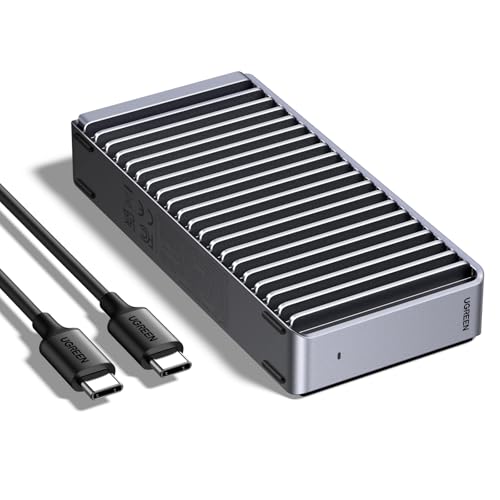
UGREEN 80Gbps Thunderbolt 5 Portable NVMe SSD
score
The UGREEN enclosure reaches up to 7000MB/s on Thunderbolt 5 with a cooling fan and a silicone case.
- Interface
- Thunderbolt 5
- Weight
- 0.42 lb
- Warranty
- 2-year Warranty
The UGREEN enclosure uses the JHL9480 chip and is rated at up to 7000MB/s on a Thunderbolt 5 connection, with backward compatibility for Thunderbolt 4, USB4 and USB 3.2, 3.1 and 3.0. Its built-in cooling fan turns on when the internal temperature reaches 40°C, and the aluminum body spreads heat. It accepts M-Key and B+M-Key 2280 NVMe SSDs up to 8TB with PCIe 5.0, and it works with Windows, Linux and macOS (M5 Pro). The enclosure weighs 0.42 lb and ships with a silicone case. Thunderbolt 3 works only on computers with macOS 15 or higher. Warranty is 2 years.
Choose it if
- You want a 0.42 lb enclosure for travel
- Your SSD is a 2280 NVMe drive up to 8TB
Consider another if
- You need a 2230, 2242 or 2260 SSD in this enclosure
- You need more than 8TB of external SSD capacity
GLOTRENDS EM6001 80Gbps TB5 M.2 NVMe SSD Enclosure
score
The GLOTRENDS EM6001 uses the JHL9480 B2 chip for a full PCIe 5.0 x4 link at 80Gbps.
- Interface
- Thunderbolt 5
- Form factor
- M.2 2280
- USB-C
- Yes
- Warranty
- 30 Day Warranty Against Manufacturer Defects
The GLOTRENDS EM6001 uses the 2025 JHL9480 B2 controller with a full PCIe 5.0 x4 link, rated at up to 7,000MB/s over the 80Gbps link, and it accepts M.2 2280 NVMe drives up to 8TB in PCIe 5.0, 4.0 and 3.0. Its PWM fan spins between 40 and 60°C and ramps automatically, while the aluminum housing spreads heat from the controller. The enclosure works with Thunderbolt 5, 4 and 3 and USB4 ports on Mac and USB4 PCs, and it is not for USB-C 3.2, 3.1 or 3.0 ports or smartphones. It ships with an 80Gbps USB-C to USB-C cable of 0.5m and works with Windows, macOS, Linux and ChromeOS. Warranty is 30 days against manufacturer defects.
Choose it if
- You want a PCIe 5.0 x4 link on a Gen5 drive
- Your host has Thunderbolt 5, 4 or 3 or USB4
Consider another if
- You need a USB-C 3.2, 3.1 or 3.0 host port
- You need a 2230, 2242 or 2260 SSD in this enclosure
Make the choice for your setup
Match the port to the 80Gbps link
Every enclosure here is built around an 80Gbps Thunderbolt 5 link, and the full rate needs a Thunderbolt 5 port and cable. The MOKiN reaches 80Gbps on a Thunderbolt 5 port and cable, and it stays compatible with Thunderbolt 5, 4 and 3 and USB4, 3.1, 3 and 2. The ACASIS TB501 Max and TB504 mini both run at 80Gbps on Thunderbolt 5 and USB4 V2, and neither works with Thunderbolt 3. The UGREEN works with Thunderbolt 5, 4 and USB4, and Thunderbolt 3 works only on computers with macOS 15 or higher. The GLOTRENDS works with Thunderbolt 5, 4 and 3 and USB4, and it is not for USB-C 3.2, 3.1 or 3.0 ports or smartphones.
Cooling: fan, fanless or PWM
Cooling is the clearest difference between these five enclosures. The MOKiN has a built-in fan that starts at 40C with three speeds, Low, Medium and High, and its LCD screen shows temperature and fan speed. The ACASIS TB501 Max has a smart fan that adjusts cooling from SSD temperature. The ACASIS TB504 mini is a fanless enclosure: a deep-fin aluminum body cools passively and is rated at 0dB. The UGREEN has a built-in cooling fan that turns on when the internal temperature reaches 40°C, inside an aluminum body. The GLOTRENDS has a PWM fan that spins between 40 and 60°C and ramps automatically, with an aluminum housing spreading heat from the controller. A related shortlist covers the Best SSD Enclosure USB C.
Drive sizes and capacity limits
The MOKiN, the ACASIS TB504 mini, the UGREEN and the GLOTRENDS accept NVMe SSDs up to 8TB, and the size range differs by model. The MOKiN accepts 2280, 2260, 2242 and 2230 SSDs with M or B+M keys, and it does not accept SATA M.2 SSDs with a B key. The ACASIS TB504 mini accepts 2230, 2242, 2260 and 2280 drives with M-Key or B+M-Key, and it is NVMe only. The UGREEN accepts M-Key and B+M-Key 2280 NVMe SSDs, and the GLOTRENDS accepts M.2 2280 NVMe drives in PCIe 5.0, 4.0 and 3.0. The ACASIS TB501 Max package includes an SSD size adapter, two thermal pads and two silicone stoppers.
For a wider shortlist, start with Best SSD Enclosure.
FAQ: NVMe Enclosure Gen5
Which enclosures support 60W PD charging?
The ACASIS TB501 Max supports up to 60W PD power delivery, and the ACASIS TB504 mini offers up to 60W PD pass-through when a PD charger connects to the PD port. One cable then carries data and charging at the same time.
Which enclosures cool without a fan?
The ACASIS TB504 mini is fanless, with a deep-fin aluminum body rated at 0dB and no vents. The MOKiN fan starts at 40C with three speeds, the ACASIS TB501 Max fan adjusts automatically, the UGREEN fan turns on at 40°C, and the GLOTRENDS PWM fan spins between 40 and 60°C.
What drive sizes does each enclosure accept?
The MOKiN accepts 2280, 2260, 2242 and 2230 NVMe SSDs up to 8TB. The ACASIS TB504 mini accepts 2230, 2242, 2260 and 2280 drives up to 8TB. The UGREEN and GLOTRENDS accept 2280 drives up to 8TB. The ACASIS TB501 Max includes an SSD size adapter in the package.