
Best SSD Enclosure USB C (2026): 6 Picks Compared
 By Theo LangUpdated
The UGREEN USB C Hard Drive Enclosure for 2.5" SATA SSD suits readers who want to turn a spare 2.5-inch SATA drive into portable storage at 6Gbps. Its aluminum body sheds heat without a fan, and the tool-free setup needs no driver. The ASUS Cobble covers M.2 NVMe drives instead, while the ORICO runs at 5Gbps on USB 3.1 Gen 1.
Your shortlist at a glance
PCKitHQ scores range from 9.2 to 9.8. See how we pick.
| Product and key specifications | Score and retailer |
|---|---|
01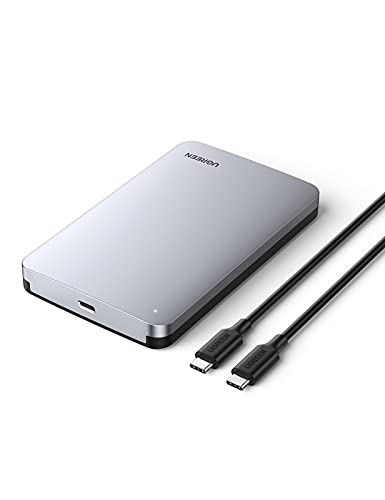 | 9.8PCKitHQ scoreView on Amazon |
02 Second Pick POSUGEAR 2.5'' External Hard Drive Enclosure | 9.7PCKitHQ scoreView on Amazon |
03 Also Consider POSUGEAR 2.5'' External Hard Drive Enclosure PS4 | 9.6PCKitHQ scoreView on Amazon |
04 Also Consider ASUS Cobble USB-C SSD Enclosure | 9.4PCKitHQ scoreView on Amazon |
05 | 9.3PCKitHQ scoreView on Amazon |
06 | 9.2PCKitHQ scoreView on Amazon |
A closer look at each configuration
UGREEN USB C Hard Drive Enclosure for 2.5-inch SATA SSD HDD
score
A 2.5-inch SATA enclosure with a 6Gbps link, USB-C 3.1 Gen 2, and an aluminum body.
- Interface
- USB 3.1 Gen 2
- USB-C
- Yes
- Weight
- 0.23 lb
This UGREEN enclosure takes 2.5-inch SATA III, II, or I drives up to 6TB over USB-C 3.1 Gen 2 with UASP. The SATA link runs at up to 6Gbps, and the USB-C port supports 10Gbps. An ASM235CM chipset sits inside an aluminum alloy body that sheds heat without a fan. Installation is tool-free and plug and play, with no driver, no extra power supply, and a USB-C to USB-C cable in the box. It works with Windows, Mac OS, Linux, consoles, smart TVs, and routers, and weighs 0.23 lb.
Choose it if
- You want a 2.5-inch SATA SSD or HDD up to 6TB in an enclosure
- You want USB-C 3.1 Gen 2 with UASP for 6Gbps transfers
Consider another if
- You need an M.2 NVMe drive enclosure like the ASUS Cobble
- You need a clear shell to see the drive inside
POSUGEAR 2.5'' External Hard Drive Enclosure
score
A clear 2.5-inch SATA enclosure with a 6Gbps USB-C link, UASP and TRIM, and a sliding cover.
- Interface
- USB C 3.1 Gen 2
- USB-C
- Yes
- Weight
- 0.17 lb
The clear POSUGEAR enclosure takes 2.5-inch 7mm or 9.5mm SATA drives up to 4TB. Its USB-C 3.1 Gen 2 link runs at 6Gbps with UASP and TRIM, and a sliding cover opens with no tools. The clear PC and ABS shell shows the drive inside, resists drops and shocks, and an EVA sponge steadies the SATA connection. A built-in chip adds automatic hibernation and over-current, over-voltage, and over-heat protection. LED indicators show the working status. It works with Windows, Linux, and Mac OS, and weighs 0.17 lb.
Choose it if
- You want a clear shell that shows the drive inside
- You want a 2.5-inch SATA drive up to 4TB over USB-C
Consider another if
- You need a 6TB drive capacity like the UGREEN
- You need an M.2 NVMe drive enclosure like the ASUS Cobble
POSUGEAR 2.5'' External Hard Drive Enclosure PS4
score
A black 2.5-inch SATA enclosure with a 6Gbps USB-C link, UASP and TRIM, and a sliding cover.
- Interface
- USB C 3.1 Gen 2
- USB-C
- Yes
- Weight
- 0.18 lb
The black POSUGEAR enclosure takes 2.5-inch 7mm or 9.5mm SATA drives up to 4TB. Its USB-C 3.1 Gen 2 link runs at 6Gbps with UASP and TRIM, and a sliding cover opens with no tools. The black PC and ABS shell resists drops and shocks, and an EVA sponge steadies the connection. A built-in chip adds automatic hibernation and over-current, over-voltage, and over-heat protection. LED indicators show the working status. It works with Windows, Linux, and Mac OS, plus Xbox and PS5, and weighs 0.18 lb.
Choose it if
- You want a black 2.5-inch SATA enclosure for 7mm or 9.5mm drives
- You want a 2.5-inch SATA enclosure for PS5 and Xbox
Consider another if
- You need an aluminum body for heat dissipation like the UGREEN
- You need a 10Gbps link like the ASUS Cobble
ASUS Cobble USB-C SSD Enclosure
score
An M.2 NVMe and SATA enclosure with a 10Gbps USB-C link, IP55 protection, and tool-free Q-Latch.
- Interface
- USB-C 3.2 Gen 2x1
- USB-C
- Yes
- Weight
- 0.41 lb
- Warranty
- 1 Year Warranty
The ASUS Cobble takes M.2 2242, 2260, or 2280 SSDs up to 4TB, as NVMe or SATA, over USB-C 3.2 Gen 2x1 rated at 10Gbps. A dual-protocol chip supports both NVMe and legacy SATA drives. The tool-free Q-Latch and screwless cover allow one-handed SSD swaps, and it carries IP55 water and dust resistance. It works with macOS, Windows 10 and 11, iPhone 15, 16, and 17 Pro, plus PS5 and Xbox, with a USB-C cable in the box. It weighs 0.41 lb with a 1-year warranty.
Choose it if
- You want an M.2 NVMe or SATA SSD up to 4TB over USB-C
- You want IP55 water and dust resistance for outdoor use
Consider another if
- You need a 2.5-inch SATA drive enclosure like the UGREEN
- You need a 6TB drive capacity like the UGREEN
Cable Matters Aluminum 10Gbps USB C Hard Drive Enclosure for 2.5-inch SSD/HDD
score
A 2.5-inch SATA enclosure with up to 10Gbps over USB-C, aluminum housing, and UASP and TRIM.
- Interface
- USB 3.1
- USB-C
- Yes
- Weight
- 0.21 lb
- Warranty
- 1-Year Limited Warranty
The Cable Matters enclosure takes a 2.5-inch SATA SSD or HDD up to 9.5mm, including 7mm, in an aluminum housing that helps with heat dissipation. Its USB-C link runs at up to 10Gbps with a compatible computer, while the SATA III link runs at up to 6Gbps. UASP, TRIM, and S.M.A.R.T support work with compatible computers, drives, and systems. Setup is tool-free, with USB-C and USB cables in the box. It works with Windows and Mac computers and Thunderbolt 3, 4, and USB4 ports, and weighs 0.21 lb with a 1-year limited warranty.
Choose it if
- You want a 2.5-inch SATA drive up to 9.5mm over USB-C
- You want UASP, TRIM, and S.M.A.R.T support with a compatible computer
Consider another if
- You need an M.2 NVMe drive enclosure like the ASUS Cobble
- You need a clear shell to see the drive inside
ORICO 2.5-inch USB C Hard Drive Enclosure USB 3.1 Gen 1 to SATA III External Hard Drive Case for SSD HDD 9.5 7mm Tool-Free
score
A 2.5-inch SATA enclosure with a 5Gbps USB 3.1 Gen 1 link, UASP, and a 12-month warranty.
- Interface
- USB 3.1 Gen 1
- USB-C
- Yes
- Weight
- 0.22 lb
- Warranty
- 12 Month
The ORICO enclosure takes 2.5-inch 7mm or 9.5mm SATA I, II, or III drives over USB 3.1 Gen 1. The USB-C link runs at 5Gbps with UASP, while the SATA III link supports up to 6Gbps. Setup is tool-free and plug and play, with no driver and hot-swap support. The black ABS body is lightweight and portable, with an EVA foam pad and a USB-C to USB-A cable in the box. It weighs 0.22 lb with a 12-month warranty.
Choose it if
- You want a lightweight ABS enclosure for a 2.5-inch SATA drive
- You want tool-free drive swaps with hot-swap support
Consider another if
- You need a 10Gbps link like the ASUS Cobble
- You need an M.2 NVMe drive enclosure like the ASUS Cobble
Make the choice for your setup
Interface speed and SATA limits
The UGREEN, the two POSUGEAR enclosures, and the Cable Matters enclosure all move data over a 6Gbps SATA III link, while the UGREEN and Cable Matters USB-C ports run at 10Gbps and the two POSUGEAR models run at 6Gbps. The ORICO runs its USB-C link at 5Gbps on USB 3.1 Gen 1, with the same 6Gbps SATA III link. The ASUS Cobble is the only M.2 pick, with a USB-C 3.2 Gen 2x1 link rated at 10Gbps for NVMe drives. A 2.5-inch SATA drive caps at 6Gbps in every SATA enclosure here, so match the enclosure to the drive and the port.
Drive fit and capacity
The UGREEN fits 2.5-inch SATA drives up to 6TB, ahead of the 4TB POSUGEAR and ASUS picks. The two POSUGEAR enclosures fit 2.5-inch 7mm or 9.5mm SATA drives up to 4TB, and the Cable Matters enclosure fits 2.5-inch SATA drives up to 9.5mm, including 7mm. The ORICO fits 2.5-inch 7mm or 9.5mm SATA I, II, or III drives. The ASUS Cobble fits M.2 2242, 2260, or 2280 SSDs up to 4TB, in NVMe or SATA form. Check the drive thickness and form factor before ordering, since a 2.5-inch drive does not fit an M.2 enclosure and an M.2 drive does not fit a 2.5-inch enclosure. If that fits your setup better, see our guide to the Best NVMe USB Enclosure.
Build, protection, and warranty
The UGREEN and Cable Matters enclosures use aluminum housings that help with heat dissipation, while the two POSUGEAR enclosures use PC and ABS shells and the ORICO uses a black ABS shell. The clear POSUGEAR shows the drive inside without opening the case, and the ORICO adds an EVA foam pad that steadies the drive against shaking. The ASUS Cobble carries IP55 water and dust resistance, and the POSUGEAR chip in both models adds over-current, over-voltage, and over-heat protection with automatic hibernation. The ASUS carries a 1-year warranty, the Cable Matters a 1-year limited warranty, and the ORICO a 12-month warranty.
Before you decide, also read Best SSD Enclosure.
FAQ: SSD Enclosure USB C
Which enclosures here fit a 2.5-inch SATA SSD?
The UGREEN, the two POSUGEAR enclosures, the Cable Matters, and the ORICO all fit 2.5-inch SATA SSDs. The UGREEN fits drives up to 6TB, the POSUGEAR models fit drives up to 4TB, and the ASUS Cobble fits M.2 SSDs instead.
Which enclosure here has the highest USB-C speed?
The UGREEN, the Cable Matters, and the ASUS Cobble all offer 10Gbps over USB-C, the ASUS on USB-C 3.2 Gen 2x1. The two POSUGEAR enclosures run at 6Gbps, and the ORICO runs at 5Gbps. SATA drives in the 2.5-inch enclosures still cap at 6Gbps.
Which enclosures here carry a warranty?
The ASUS Cobble carries a 1-year warranty, the Cable Matters carries a 1-year limited warranty, and the ORICO carries a 12-month warranty. Those are the three warranty terms documented across the six enclosures in this guide.


