
Best Docking Station for Gaming PC (2026): 4 Picks Compared
 By Theo LangUpdated
If you want three 4K displays from one dock, choose the LIONWEI Docking Station Dual Monitor 4K HDMI 13-in-1 USB C Hub, which drives two 4K HDMI monitors plus a DisplayPort monitor at 4K@60Hz on Windows. It suits a gaming PC setup that needs triple screens, Gigabit Ethernet and 10Gbps USB ports from one cable. The TobenONE offers 19 ports for dual monitors, while the Baseus adds a privacy button.
Your shortlist at a glance
PCKitHQ scores range from 9.2 to 9.8. See how we pick.
| Product and key specifications | Score and retailer |
|---|---|
01 | 9.8PCKitHQ scoreView on Amazon |
02 | 9.6PCKitHQ scoreView on Amazon |
03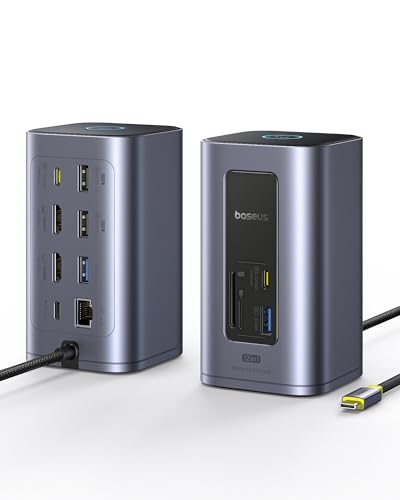 Also Consider Baseus Spacemate Nomos Air Docking Station 12-in-1 for Dual MonitorPower delivery: 100 W | 9.4PCKitHQ scoreView on Amazon |
04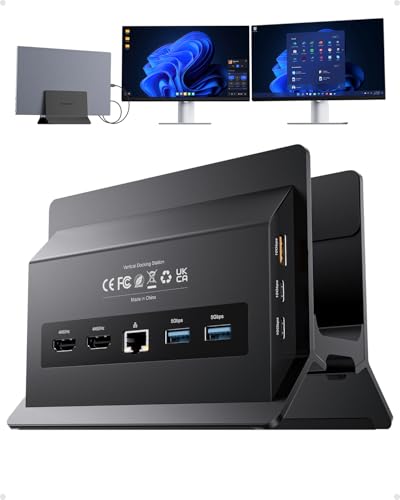 | 9.2PCKitHQ scoreView on Amazon |
A closer look at each configuration
Docking Station Dual Monitor 4K
score
A 13-in-1 USB-C dock with triple 4K display support, 10Gbps USB ports, Gigabit Ethernet and 87W laptop charging.
- Power delivery
- 87 W
- Interface
- USB C
- HDMI
- Yes
- DisplayPort
- Yes
- Ethernet
- Yes
- USB-C
- Yes
- Weight
- 0.31 lb
- Warranty
- 18 month
This LIONWEI dock is the only pick here with three display outputs: 2 4K HDMI ports and a DisplayPort, each rated up to 4K@60Hz. On Windows it supports MST and SST mirror and extend modes, while Mac OS can extend only one monitor at 4K@60Hz. It carries 2 USB-C ports with 100W Power Delivery and 10Gbps data, a USB 3.1 port at 10Gbps, 3 USB 3.0 ports, 2 USB 2.0 ports, a 3.5mm audio jack and Gigabit Ethernet. The dock takes 100W PD input and passes 87W to the laptop, using 13W itself. It weighs 0.31 lb and carries an 18 month warranty.
Choose it if
- You want triple 4K displays from two HDMI ports and DisplayPort
- You want 10Gbps USB ports for fast external drives
Consider another if
- You use a Mac and need two extended monitors
- You need a 2-year warranty like the TobenONE
TobenONE 19-in-1 Laptop Docking Station Dual Monitor
score
A 19-in-1 USB-C dock with 10 USB ports, dual 4K HDMI, SD and MicroSD slots and 100W passthrough charging.
- Power delivery
- 100 W
- Interface
- USB-C
- HDMI
- Yes
- Ethernet
- Yes
- USB-C
- Yes
- Weight
- 0.68 lb
- Warranty
- 2 Year Manufacturer
This TobenONE dock packs 19 ports into one body: 10 USB ports, 2 HDMI outputs for dual 4K displays, a PD charging port, a host port, Gigabit Ethernet, SD and MicroSD card slots and a 3.5mm audio jack. File transfers run at 5Gbps, and the PD port supports 100W passthrough charging with a 65W or higher power adapter, which is not included. It is built for Windows and Chrome OS laptops with full-featured USB-C ports and is not recommended for Mac users. The dock weighs 0.68 lb and carries a 2 Year Manufacturer warranty.
Choose it if
- You keep 10 USB devices plugged in at once
- You want SD and MicroSD card slots in the dock
Consider another if
- You use a Mac laptop with your dock
- You need 10Gbps USB transfer speeds
Baseus Spacemate Nomos Air Docking Station 12-in-1 for Dual Monitor
score
A 12-in-1 USB-C dock with dual 4K@60Hz HDMI, 10Gbps transfers, a 31.5 inch host cable and a privacy button.
- Power delivery
- 100 W
- Interface
- usb c
- HDMI
- Yes
- Ethernet
- Yes
- USB-C
- Yes
- Weight
- 0.92 lb
- Warranty
- 2 Year
This Baseus dock drives dual monitors up to 4K@60Hz across 2 HDMI outputs, with no extended display mode on Mac. It carries 7 USB ports, of which 6 are for data transfer only and cannot charge peripherals, while the PD input port charges the laptop and powers the dock. Transfers run up to 10Gbps, and the host cable measures 31.5 inches. The top button locks the screen with a 1 second press and enables Smart Power Saving Mode with a 2 second hold. The charger is not included, with 100W or higher recommended. It weighs 0.92 lb and carries a 2 Year warranty.
Choose it if
- You want a privacy button that locks your screen
- You want a 31.5 inch host cable for desk placement
Consider another if
- You charge phones from your dock USB ports
- You need extended dual displays on a Mac
USB C Docking Station Dual Monitor 4K@
score
An 11-in-1 Windows USB-C dock with dual 4K@60Hz HDMI, 10Gbps Gen2 ports and a vertical laptop stand built in.
- Power delivery
- 85 W
- Interface
- USB-C
- HDMI
- Yes
- Ethernet
- Yes
- USB-C
- Yes
This PULWTOP dock combines an 11-in-1 dock with a vertical laptop stand for Windows laptops. It carries 2 HDMI ports at 4K@60Hz with MST support, 2 USB-C Gen2 ports and 1 USB-A Gen2 port at 10Gbps, 2 USB 3.0 ports at 5Gbps, a USB 2.0 port and Gigabit Ethernet. The USB-C ports are data-only, with no video output or charging. The PD port takes up to 100W input and delivers 85W charging to the laptop, with a 65W or higher adapter recommended and not included. It supports Thunderbolt 3, 4 and 5 and USB4, and does not support Mac users.
Choose it if
- You want a vertical stand and dock in one body
- You want USB-C and USB-A Gen2 ports at 10Gbps
Consider another if
- You use a Mac laptop with your dock
- You need video output from the USB-C ports
Make the choice for your setup
Display outputs and refresh rates
Display support splits these four docks. The LIONWEI is the only triple-display pick, with 2 4K HDMI ports and a DisplayPort rated up to 4K@60Hz, plus MST and SST modes on Windows. The TobenONE, Baseus and PULWTOP each drive dual 4K displays over 2 HDMI ports, with the Baseus and PULWTOP rated at 4K@60Hz. Mac support is limited across the list: the LIONWEI extends only one monitor on Mac OS, the Baseus drives dual 4K displays on Windows, and the TobenONE and PULWTOP are made for Windows. The TobenONE dual 4K HDMI outputs work on Windows and Chrome OS laptops with full-featured USB-C ports. Match the display count to your operating system first.
USB ports and transfer speeds
Port counts and speeds differ more than the display specs. The TobenONE carries 10 USB ports, the most here, with file transfers at 5Gbps. The LIONWEI carries 2 USB-C ports with 10Gbps data plus USB 3.1 at 10Gbps, 3 USB 3.0 and 2 USB 2.0 ports. The PULWTOP mixes 10Gbps Gen2 USB-C and USB-A ports with 5Gbps USB 3.0 ports and a USB 2.0 port for mouse and keyboard, though its USB-C ports are data-only. The Baseus carries 7 USB ports at up to 10Gbps, but 6 are data-only and cannot charge peripherals. The TobenONE 10 USB ports include a PD charging port and a host port, and the LIONWEI carries a 3.5mm audio jack. Count your peripherals, then check the speed of each port. If that fits your setup better, see our guide to the Best Docking Station for Surface Pro 9.
Charging power and what is included
Charging figures need care because input and laptop power differ. The LIONWEI takes 100W PD input and passes 87W to the laptop, using 13W itself. The PULWTOP takes up to 100W input and delivers 85W to the laptop. The TobenONE supports 100W passthrough charging with a 65W or higher adapter, and the Baseus recommends a charger of 100W or higher. Adapters are not included with the TobenONE, Baseus or PULWTOP, so a separate PD adapter is needed with those three. The LIONWEI, TobenONE and PULWTOP include Gigabit Ethernet, and the Baseus includes Ethernet, so each dock gives a wired connection. The Baseus host cable measures 31.5 inches, and the PULWTOP builds in a vertical laptop stand.
Comparing more options? See Best Docking Station.
FAQ: Docking Station for Gaming PC
Which dock here supports three monitors?
The LIONWEI supports triple 4K displays with 2 HDMI ports and a DisplayPort, each rated up to 4K@60Hz on Windows. The TobenONE, Baseus and PULWTOP each support dual 4K displays over 2 HDMI ports. On Mac OS, the LIONWEI extends only one monitor.
How much charging power reaches the laptop?
The LIONWEI passes 87W to the laptop from 100W PD input, and the PULWTOP delivers 85W from up to 100W input. The TobenONE supports 100W passthrough with a 65W or higher adapter, and the Baseus recommends a 100W or higher charger. Adapters are not included with those three.
Do these docks work with Mac laptops?
Mac support is limited. The LIONWEI extends only one monitor at 4K@60Hz on Mac OS, and the Baseus drives dual 4K displays on Windows. The TobenONE is built for Windows and Chrome OS and is not recommended for Mac users, and the PULWTOP states no Mac support.


