
Best Docking Station for Dell XPS 13 (2026): 8 Picks Compared
 By Theo LangUpdated
If your laptop needs two 4K monitors, choose the Selore&S-Global USB C Docking Station Dual HDMI Monitor. It gives you dual 4K@60Hz HDMI ports, 85W power delivery, and USB 3.0 ports for a mouse and keyboard.
Your shortlist at a glance
PCKitHQ scores range from 9.2 to 9.8. See how we pick.
| Product and key specifications | Score and retailer |
|---|---|
01 | 9.8PCKitHQ scoreView on Amazon |
02 | 9.7PCKitHQ scoreView on Amazon |
03 | 9.6PCKitHQ scoreView on Amazon |
04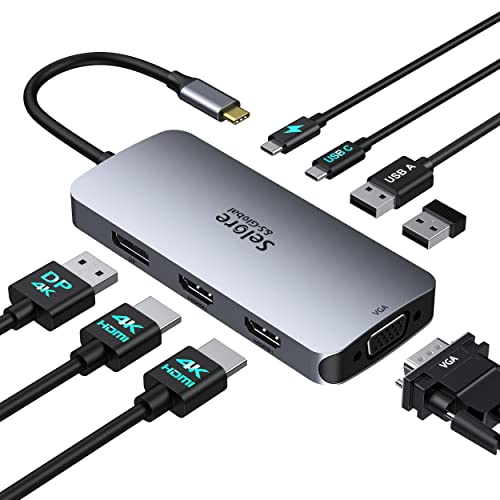 | 9.5PCKitHQ scoreView on Amazon |
05 | 9.5PCKitHQ scoreView on Amazon |
06 | 9.4PCKitHQ scoreView on Amazon |
07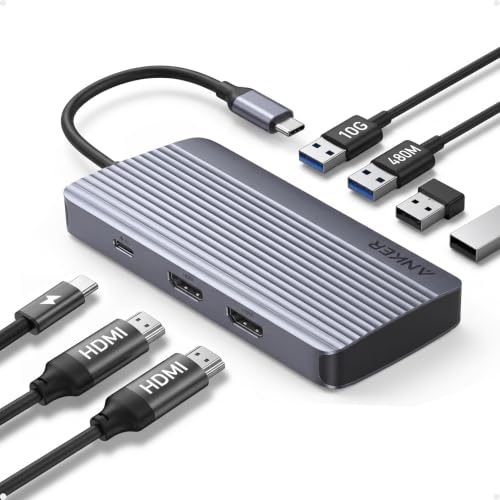 | 9.3PCKitHQ scoreView on Amazon |
08 | 9.2PCKitHQ scoreView on Amazon |
A closer look at each configuration
USB C Docking Station Dual
score
The Selore dock pairs dual 4K@60Hz HDMI ports with 85W power delivery and 5Gbps USB ports.
- Power delivery
- 85 W
- Interface
- USB C
- HDMI
- Yes
- USB-C
- Yes
- Weight
- 0.2 lb
- Warranty
- 1-year
This Selore 8-in-1 dock has two HDMI ports at 4K@60Hz, a USB-C port up to 5Gbps, two USB-A 3.0 ports up to 5Gbps, and an SD/TF card slot up to 104 Mbps. Its USB-C power delivery port takes 100W input and delivers 85W to the laptop, and the power charger and charging cable are not included. It weighs 0.2 lb and carries a 1-year warranty. It needs a Thunderbolt or full-featured USB-C port, and it extends two monitors under Windows through MST.
Choose it if
- You want dual 4K@60Hz monitors from your Dell XPS 13
- You want 85W charging through a USB-C dock
Consider another if
- You need the 90W output of the Acer dock
- You need Gigabit Ethernet like the Selore triple HDMI dock
Acer USB-C Docking Station Dual Monitor
score
The Acer dock pairs dual 4K@60Hz HDMI ports with 90W power delivery and three USB-A ports.
- Power delivery
- 90 W
- Interface
- USB-C
- HDMI
- Yes
- USB-C
- Yes
- Warranty
- 1 Year
This Acer 9-in-1 dock has two HDMI ports at 4K@60Hz, three USB-A ports at 5Gbps, one USB-C port at 5Gbps, and SD/MicroSD slots up to 104Mbps. Its USB-C port takes 100W input and delivers 90W to the laptop, and the power adapter is not included with the dock. It has a 0.66-foot built-in cable, an aluminum alloy body, and a lock button. It carries a 1-year manufacturer warranty.
Choose it if
- You want three USB-A ports at 5Gbps on your dock
- You want 90W charging for your Dell XPS 13
Consider another if
- You need the 100W output of the Selore triple HDMI dock
- You need 10Gbps USB ports like the Selore triple HDMI dock
Selore Docking Station 3 Monitors Triple
score
The Selore triple HDMI dock pairs three 4K@60Hz HDMI ports with 10Gbps USB and Gigabit Ethernet.
- Power delivery
- 100 W
- Interface
- USB C
- HDMI
- Yes
- Ethernet
- Yes
- USB-C
- Yes
This Selore 13-in-1 dock has three HDMI ports at 4K@60Hz, two USB-C 3.1 ports at 10Gbps, one USB-A 3.1 port at 10Gbps, two USB-A 2.0 ports, SD and microSD card slots, Gigabit Ethernet, and a 100W PD 3.0 charging port. A one-touch button switches between mirror and extend modes. It works with Windows laptops that have USB-C with DisplayPort Alt Mode or Thunderbolt 3/4, including Dell XPS 13 and XPS 15.
Choose it if
- You want three 4K@60Hz monitors from one dock
- You want Gigabit Ethernet and 100W charging together
Consider another if
- You need the 300W output of the Dell Thunderbolt 5 dock
- You need a DisplayPort output like the Dell Thunderbolt 5 dock
Selore USB C Docking Station Dual
score
The Selore quad-display dock pairs dual HDMI, DisplayPort, and VGA with 100W power delivery.
- Power delivery
- 100 W
- Interface
- USB C
- HDMI
- Yes
- DisplayPort
- Yes
- USB-C
- Yes
- Weight
- 0.2 lb
- Warranty
- 18-month
This Selore dock has dual HDMI ports, one DisplayPort, and one VGA port for multiple monitors. One HDMI port runs at 4K@60Hz, the other at 4K@30Hz, the DisplayPort at 4K@60Hz, and the VGA port at 1080p. Its USB-C port delivers up to 100W charging, and it has two USB 2.0 ports and a USB-C 2.0 port with transfer speeds up to 480Mbps. It weighs 0.2 lb and carries an 18-month warranty.
Choose it if
- You want HDMI, DisplayPort, and VGA outputs in one dock
- You want 100W charging with an 18-month warranty
Consider another if
- You need 10Gbps USB ports like the Selore triple HDMI dock
- You need the 300W output of the Dell Thunderbolt 5 dock
Anker Laptop Docking Station 3 Monitors
score
The Anker 14-in-1 dock pairs dual 4K HDMI ports with 80W charging and Gigabit Ethernet.
- Power delivery
- 80 W
- Interface
- USB-C
- HDMI
- Yes
- Ethernet
- Yes
- USB-C
- Yes
- Weight
- 0.3 lb
- Warranty
- 18-month
This Anker 14-in-1 dock has two 4K HDMI ports, a 1080p VGA port, a 5Gbps USB-C port, five USB-A ports, a 1Gbps Ethernet port, an SD/microSD slot, and an AUX port. Its 100W USB-C PD-IN port delivers 80W pass-through charging, and the wall charger is not included. It connects three monitors at once, with two HDMI ports at 4K and the VGA port at 1080p. It weighs 0.3 lb and carries an 18-month warranty.
Choose it if
- You want five USB-A ports and an AUX port
- You want triple-display output with a VGA port
Consider another if
- You need the 100W output of the Selore triple HDMI dock
- You need 10Gbps USB ports like the Selore triple HDMI dock
Dell Pro Thunderbolt 5 300W Dock WD25TB5
score
The Dell Thunderbolt 5 dock pairs 300W power delivery with 8K display support and 2.5G Ethernet.
- Power delivery
- 300 W
- Interface
- Thunderbolt 5
- HDMI
- Yes
- DisplayPort
- Yes
- Ethernet
- Yes
- USB-C
- Yes
- Weight
- 1.37 lb
- Warranty
- one-year
This Dell Pro Thunderbolt 5 dock supports one 8K@60Hz display or up to four 4K@120Hz displays, depending on the host system. It delivers up to 300W charging for supported Dell systems and up to 240W USB PD 3.1 for compatible non-Dell laptops, with Thunderbolt 5 data transfer speeds up to 80Gbps. It has two DisplayPort 2.1 ports, one HDMI 2.1 port, 2.5 Gigabit Ethernet, and USB ports at 10Gbps. It weighs 1.37 lb, includes a 330W AC power adapter, and carries a one-year seller warranty.
Choose it if
- You want a Thunderbolt 5 dock with 2.5G Ethernet
- You want up to four 4K displays from one dock
Consider another if
- You need a 0.2 lb dock like the Selore dock
- You need a dock without a Thunderbolt 5 port
Anker 7-in-1 USB-C Hub
score
The Anker 7-in-1 hub pairs dual 1080p HDMI displays with 85W charging and 10Gbps transfers.
- Power delivery
- 85 W
- Interface
- USB-C
- HDMI
- Yes
- USB-C
- Yes
- Weight
- 0.21 lb
- Warranty
- 18-month
This Anker 7-in-1 hub has dual HDMI ports at 1080p@60Hz, a 10Gbps data transfer port, and a 100W input with 85W output. The wall charger is not included. It supports USB-C, USB4, and Thunderbolt connections, and it works with MacBook, Windows 10 and 11, and ChromeOS laptops that have DP Alt Mode and Power Delivery. It is not compatible with Linux. It weighs 0.21 lb and carries an 18-month warranty.
Choose it if
- You want dual 1080p monitors from a compact hub
- You want 10Gbps data transfers with 85W charging
Consider another if
- You need dual 4K@60Hz monitors like the Acer dock
- You need an Ethernet port like the Anker 14-in-1 dock
Dell USB 3.0 Ultra HD/4K Triple Display Docking Station (D3100)
score
The Dell D3100 pairs triple-display output over USB 3.0 with two HDMI and one DisplayPort.
- Interface
- USB 3.0
- HDMI
- Yes
- DisplayPort
- Yes
- Weight
- 0.63 lb
- Warranty
- No Warranty
This Dell D3100 dock connects over USB 3.0 and supports a triple monitor setup with two HDMI ports and one DisplayPort output. Its maximum video resolution is 2048 by 1152 at 60Hz. It has three USB 3.0 ports, two USB 2.0 ports, a network RJ-45 port, and a headphone input and output. It is designed for the XPS 13 (9343) and other Dell models, and it works with Windows XP, 7, 8, 8.1, and 10. It weighs 0.63 lb.
Choose it if
- You want a USB 3.0 dock for an older Dell XPS 13
- You want two HDMI ports plus a DisplayPort output
Consider another if
- You need 4K@60Hz HDMI like the Acer dock
- You need 100W charging like the Selore triple HDMI dock
Make the choice for your setup
Display outputs and resolution
The Selore 8-in-1 dock and the Acer dock each have two HDMI ports at 4K@60Hz. The Anker 7-in-1 hub has two HDMI ports at 1080p@60Hz. The Selore triple HDMI dock has three HDMI ports at 4K@60Hz, and the Anker 14-in-1 dock has two 4K HDMI ports plus a 1080p VGA port. The Selore quad-display dock adds a DisplayPort at 4K@60Hz and a VGA port at 1080p. The Dell D3100 reaches 2048 by 1152 at 60Hz. Check the resolution of each HDMI port before you buy, since the Selore quad-display dock runs one HDMI port at 4K@30Hz.
Power delivery and charging
The Selore 8-in-1 dock takes 100W input and delivers 85W. The Acer dock takes 100W input and delivers 90W. The Selore triple HDMI dock and the Selore quad-display dock each deliver up to 100W. The Anker 14-in-1 dock takes 100W input and delivers 80W. The Anker 7-in-1 hub takes 100W input and delivers 85W. The Dell Pro dock delivers up to 300W for supported Dell systems and up to 240W for compatible non-Dell laptops. Chargers are not included with the Selore 8-in-1 dock, the Acer dock, the Anker 14-in-1 dock, or the Anker 7-in-1 hub. The Dell Pro dock includes a 330W AC power adapter. Shoppers with a related need can compare our guide to the Best Docking Station for HP Laptop.
Ports, weight, and warranty
The Selore 8-in-1 dock weighs 0.2 lb and carries a 1-year warranty. The Acer dock has three USB-A ports at 5Gbps and a 1-year manufacturer warranty. The Selore triple HDMI dock has USB ports at 10Gbps and Gigabit Ethernet. The Anker 14-in-1 dock weighs 0.3 lb, has five USB-A ports and a 1Gbps Ethernet port, and carries an 18-month warranty. The Anker 7-in-1 hub weighs 0.21 lb and carries an 18-month warranty. The Dell D3100 weighs 0.63 lb and has three USB 3.0 ports and two USB 2.0 ports. The Selore quad-display dock weighs 0.2 lb and carries an 18-month warranty.
For a wider shortlist, start with Best Docking Station.
FAQ: Docking Station for Dell XPS 13
Which docks support dual 4K monitors at 60Hz?
The Selore 8-in-1 dock, the Acer dock, and the Selore triple HDMI dock support dual 4K@60Hz HDMI output. The Anker 14-in-1 dock also has two 4K HDMI ports. The Anker 7-in-1 hub has dual HDMI ports at 1080p@60Hz, and the Dell D3100 reaches 2048 by 1152 at 60Hz.
How much power do these docks deliver to a laptop?
The Selore 8-in-1 dock delivers 85W, the Acer dock delivers 90W, and the Anker 7-in-1 hub delivers 85W. The Selore triple HDMI dock and the Selore quad-display dock each deliver up to 100W, and the Anker 14-in-1 dock delivers 80W.
Do these docks work with a Dell XPS 13?
The Selore triple HDMI dock works with Dell XPS 13 and XPS 15 laptops that have DisplayPort Alt Mode. The Acer dock is compatible with Dell XPS laptops, and the Selore quad-display dock works with Dell XPS 13, 15, and 17. The Dell D3100 is designed for the XPS 13 (9343).


