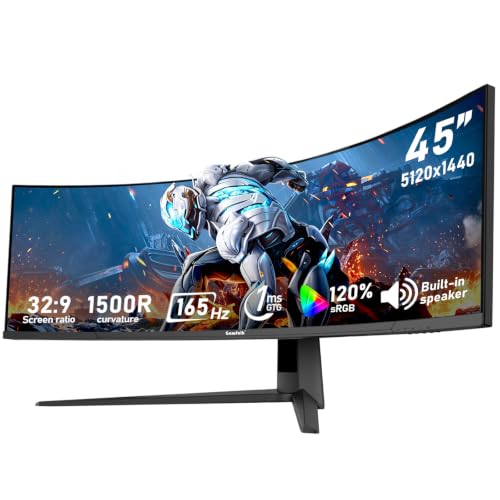
What Is Considered an Ultrawide Monitor?
 By Theo LangUpdated
An ultrawide monitor is a monitor whose screen shape is wider than the standard 16:9 widescreen shape. The extra width gives more horizontal space on the desktop. A monitor with a 1920x1080 resolution is a standard widescreen model, so check the aspect ratio and resolution when you compare screens.
Start with the screen shape
Aspect ratio describes the shape of the screen: how wide it is compared with how tall it is. A standard widescreen monitor uses a 16:9 shape, like the Acer KB242Y G0bi with its 1920 x 1080 resolution in a 16:9 aspect ratio. An ultrawide monitor uses a wider shape than that, so the picture stretches further from side to side for the same screen height. When a product page gives only the diagonal size in inches, look for the aspect ratio or the resolution to learn the shape.
Read the resolution figures
Resolution gives the pixel count across and down the screen. A 1920x1080 resolution matches the standard 16:9 shape, and all four monitors shown below use 1920x1080 or 1920 x 1080. An ultrawide screen lists a wider pixel count across than a standard screen of a similar class, because the shape itself is wider. Compare the first figure of the resolution with the second: a much larger first figure relative to the second means a wider shape. Keep resolution separate from refresh rate, which describes how often the screen redraws the picture.
Separate size from shape
Screen size in inches measures the diagonal, not the shape. A 24 inch monitor and a 27 inch monitor can share the same 16:9 shape at different sizes, and a 34 inch screen can be built in a wider shape. That is why two monitors with the same diagonal can give different amounts of side-to-side space. Before you buy, check three figures together: the diagonal size, the aspect ratio, and the resolution. Then check that your desk depth and your computer video output suit the screen you picked.
Check the connection and the manual
The monitors below have HDMI connections, and the Dell 27 240Hz Gaming Monitor and the Sceptre Prime 24-inch monitor also have DisplayPort. A port name alone does not confirm which resolution and refresh rate your computer will output to a wider screen. Check your computer manual or spec sheet for the resolutions its video output supports, and match them with the resolution listed for the monitor. If the output cannot drive the wider resolution, the picture may be scaled or letterboxed.
What you need

Dell 24 Monitor SE2426H
A 23.8 inch 1920x1080 IPS monitor at 144Hz with HDMI: a standard widescreen shape to compare against ultrawide screens.
View on Amazon
Dell 27 Gaming Monitor SE2726HG
A 27 inch 1920x1080 IPS monitor at 240Hz with HDMI and DisplayPort, in the standard widescreen shape.
View on Amazon
Acer 23.8-inch Office Monitor KB242Y G0bi
A 23.8 inch 1920 x 1080 IPS monitor at 120Hz with HDMI, stated in a 16:9 aspect ratio.
View on Amazon
Sceptre 24-inch Gaming Monitor 1ms E248W-FW100T
A 24 inch 1920 x 1080 monitor at 100Hz with DisplayPort and HDMI, in the standard widescreen shape.
View on AmazonThese come from our ranked list Best PC with Monitor, which compares them spec by spec.
FAQ
Is a 1920x1080 monitor considered ultrawide?
No. A 1920x1080 resolution matches the standard 16:9 widescreen shape. The Acer KB242Y G0bi states this directly with a 16:9 aspect ratio. An ultrawide monitor has a wider shape and a wider resolution than that standard.
Does a larger screen size mean ultrawide?
No. Size in inches is the diagonal measurement, while ultrawide describes the shape. A 27 inch monitor can use the standard 16:9 shape, as the Dell 27 240Hz Gaming Monitor does at 1920x1080. Check the aspect ratio, not only the inches.
What should I check before buying an ultrawide monitor?
Check the aspect ratio and resolution for the shape, the diagonal size for your desk, and your computer manual for the resolutions its video output supports. Match the monitor inputs, such as HDMI or DisplayPort, with the ports on your computer.