
What Do A1 and A2 Mean on SD Cards?
 By Theo LangUpdated
A1 and A2 are Application Performance Classes printed on SD cards. They describe how well a card handles the small reads and writes that apps make, which is a different job from recording video. A2 is the higher class, so it is rated for heavier app use than A1, and both marks only help when the device supports them.
What A1 and A2 mean
A1 and A2 are marks from the Application Performance Class, a class for cards that run apps. A card with one of these marks is built to handle the many small reads and writes an app makes when it opens, saves and updates data, rather than one long video file. A1 is the lower class and A2 is the higher class, so A2 is rated for heavier app use. The mark sits on the card next to the speed class marks, such as Class 10 and U1, which describe video recording instead.
How A classes differ from speed classes
Speed class marks such as Class 10, U1 and V30 describe sustained writing for video recording, so they answer whether a card keeps up with a video stream. A1 and A2 describe something else: how the card copes with the scattered small reads and writes of apps. A card can carry both kinds of marks at once, and one mark does not replace the other. When you compare cards, read the A mark for app use and the speed mark for video, and check both against what your device lists.
Check what your device supports
An A1 or A2 mark only helps when the device uses it. Before you buy, look in the device manual or spec sheet for the card classes it lists, and check whether the device runs apps from the card at all. A card with a higher class still stores files in a device that takes the card, but the A mark adds nothing if the device does not use it. The INLAND card below also warns that its SDHC card works only with SDHC or SDXC host devices, so match the card type to the device as well as the class.
How to read the marks on a card
The card carries the letter A with a number next to it, beside the speed class marks such as Class 10, U1 or V30. A card with no A mark carries no Application Performance Class, so judge it by its speed marks alone. When you shop, match the A mark to the class your device lists, and match the speed mark to the video you plan to record. If the two marks point to different cards, let the device manual decide, since it lists the classes the device was built around.
What you need

32GB SD Card (3 Pack)
A 32GB SDHC card in a three-pack, rated V30 with read speed up to 90MB/s for Full HD video recording.
View on Amazon
GIGASTONE 32GB SD Card 5-Pack UHS-I U1
A 32GB SDHC card in a five-pack, rated Class 10 and U1 with read speed up to 80MB/s and five mini cases.
View on Amazon
GIGASTONE 32GB SD Card 2-Pack
A 32GB SDHC card in a two-pack, rated Class 10 and U1 with read speed up to 100MB/s and two mini cases.
View on Amazon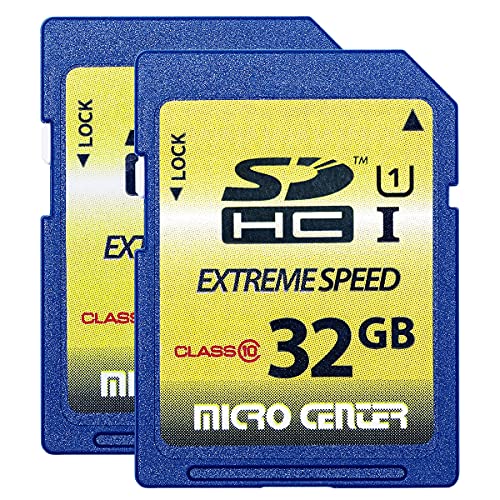
INLAND 32GB SDHC Flash Memory Card Standard
A 32GB SDHC card in a two-pack, rated Class 10 with 60MB/s read speed and 10MB/s write speed for trail cameras.
View on AmazonThese come from our ranked list Best Sdhc, which compares them spec by spec.
FAQ
Do I need an A2 card for my phone?
Only if the phone runs apps from the card and lists A2 support. Check the phone manual for the classes it supports, and match the card to that list. A card with no A mark still stores photos and video when the device takes the card.
Is an A2 card faster than an A1 card?
A2 is the higher Application Performance Class, so it is rated for heavier app use than A1. The difference shows when apps read and write many small pieces of data. For plain file copies, check the read speed the card lists instead.
Does an A1 or A2 card work in any device?
The card stores files in a device that accepts its card type, but the A class only helps when the device supports it. Check the device manual for the classes it lists before you buy. The INLAND card here works only with SDHC or SDXC host devices.


