What Does an Unlocked Processor Mean?
 By Theo LangUpdated
An unlocked processor is one whose clock multiplier is left open, so you can raise its clock speed above the rated boost speed in the motherboard settings. The Ryzen 7 5700X and Ryzen 9 9900X are listed as unlocked for overclocking. A locked processor runs only at the speeds its maker sets.
What unlocked means
A processor runs at a clock speed set by its multiplier times a base clock. On an unlocked processor, the maker leaves the multiplier adjustable, so you can set a higher speed in the motherboard settings. On a locked processor, that setting stays fixed and the chip runs at the speeds the maker set. The Ryzen 7 5700X and Ryzen 9 9900X are listed as unlocked for overclocking.
What changes when you overclock
Raising the clock speed raises how many cycles the processor runs each second, which can shorten the time some tasks take. It also raises heat and power draw, so the chip needs cooling that can handle the extra heat. The Ryzen 7 5700X and Ryzen 9 9900X ship without a cooler, so you need a separate cooler. Check the cooler rating and your motherboard manual before you change any setting.
Check the motherboard and memory
An unlocked processor still needs a motherboard that lets you change the multiplier, so check your board's manual for overclocking settings before you buy. The Ryzen 7 5700X fits Socket AM4 boards and supports DDR4-3200 memory, while the Ryzen 9 9900X fits Socket AM5 boards and supports DDR5-5600 memory. The 5700X can support PCIe 4.0 on X570 and B550 motherboards, and the 9900X can support PCIe 5.0 on select motherboards.
Locked processors and when unlocked matters
A locked processor is not a lesser chip for everyday work; it runs at the speeds its maker set and needs no tuning. An unlocked processor matters only if you plan to change the clock speed yourself and accept the extra heat and the risk of instability. If you never open the overclocking settings, an unlocked chip behaves like any other chip at its rated speeds.
What you need

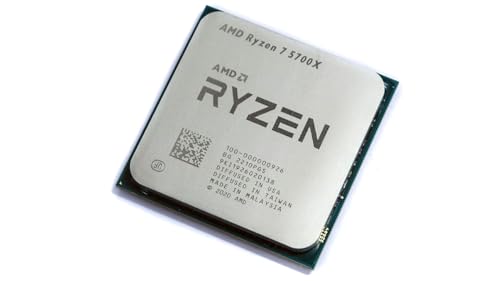
AMD Ryzen 7 5700X 8-Core
An 8-core, 16-thread unlocked processor with a 4.6 GHz max boost, 36 MB cache, and DDR4-3200 support on Socket AM4.
View on Amazon
AMD Ryzen 7 5800X3D 8-core
An 8-core, 16-thread processor with AMD 3D V-Cache technology, a 4.5 GHz max boost, and 100 MB cache on Socket AM4.
View on Amazon
AMD Ryzen 9 9950X3D 16-Core Processor
A 16-core processor with a boost clock up to 5.7 GHz and a 4.3 GHz base clock on Socket AM5.
View on Amazon
AMD Ryzen 9 9900X 12-Core
A 12-core, 24-thread unlocked processor with a 5.6 GHz max boost, 76 MB cache, and DDR5-5600 support on Socket AM5.
View on AmazonThese come from our ranked list Best CPU for Computer, which compares them spec by spec.
FAQ
Can you overclock a locked processor?
No. A locked processor keeps its multiplier fixed, so the overclocking settings in the motherboard have nothing to change. Buy an unlocked processor, such as the Ryzen 7 5700X or Ryzen 9 9900X, if you want to change the clock speed.
Does an unlocked processor run faster on its own?
No. An unlocked processor runs at its rated speeds until you change the settings yourself. The Ryzen 7 5700X runs up to a 4.6 GHz max boost and the Ryzen 9 9900X up to a 5.6 GHz max boost without any changes.
Do you need a separate cooler for these processors?
The Ryzen 7 5700X, Ryzen 7 5800X3D, and Ryzen 9 9900X ship without a cooler, so you need a separate one. A high-performance cooler is recommended for the 5800X3D. Check your cooler's rating against your processor before you install it.