What to Look for in a Gaming Laptop
 By Theo LangUpdated
A gaming laptop is built around its graphics card, its memory and storage, and its display. The graphics card draws each frame, memory holds the game while it runs, and the display sets the resolution and refresh rate you see. Cooling, weight and ports decide how it feels to carry and use every day.
The graphics card draws each frame
The graphics card renders the picture in each game, so it is the first part to compare. The Acer and ASUS laptops here carry a GeForce RTX 5060, the MSI carries a GeForce RTX 5070, and the HP carries a GeForce RTX 3050. Check the requirements published for the games you play and compare them with the card, processor and memory in the laptop before you buy.
Memory and storage hold your games
Memory holds the game and its data while you play, and storage holds the games you install. The Acer and MSI laptops have 32 GB of DDR5 memory with a 1 TB SSD, while the ASUS has 16 GB of DDR5 memory with a 1 TB SSD and the HP has 16 GB of memory with a 512 GB SSD. Memory comes in sizes such as 16 GB and 32 GB; check the requirements published for your games before you choose.
The display sets resolution and refresh rate
Resolution sets how much detail the screen shows, and refresh rate sets how many frames the screen draws each second. The HP has a 15.6-inch Full HD display at 144 Hz, the ASUS has a 16-inch FHD+ display at 165 Hz, and the MSI has a 15.6-inch QHD+ display at 165 Hz. The Acer has a 16-inch WUXGA display at 180 Hz with 100% sRGB color coverage. Pick the resolution and refresh rate that fit the games you play.
Cooling, weight and ports
Cooling moves heat out of the case while the processor and graphics card work. The ASUS uses a vapor chamber with three fans, and the MSI uses dual fans with five heat pipes. Weight runs from 4.63 lb on the Acer to 7 lb on the HP, so check it if you carry the laptop daily. The MSI adds USB-C, HDMI, USB-A ports, RJ45 Ethernet and Wi-Fi 6E for wired and wireless connections.
Match the laptop to your games
List the games you play and open the requirements each one publishes. Compare the processor, graphics card, memory and storage with the laptop's spec sheet, and look for the resolution and refresh rate you want in the display. A laptop that clears the published requirements for your games is the one to buy.
What you need

Acer Nitro V 16S Gaming Laptop
A 16-inch gaming laptop with a Ryzen 7 260 processor, a GeForce RTX 5060, 32 GB of DDR5 memory, a 1 TB SSD and a 180 Hz display.
View on Amazon
ASUS ROG Strix G16 Gaming Laptop
A 16-inch gaming laptop with an Intel Core i7-14650HX processor, a GeForce RTX 5060, 16 GB of DDR5 memory, a 1 TB Gen 4 SSD and a 165 Hz display.
View on Amazon
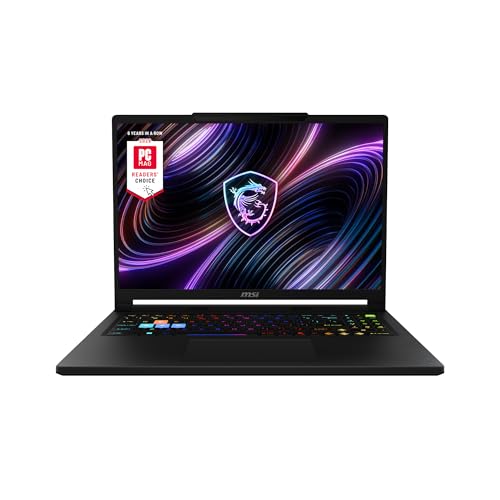
MSI Katana 15 HX 15.6-inch Gaming Laptop
A 15.6-inch gaming laptop with an Intel Core i9-14900HX processor, a GeForce RTX 5070, 32 GB of DDR5 memory, a 1 TB NVMe SSD and a 165 Hz QHD+ display.
View on Amazon
HP Victus 15.6-inch Gaming Laptop
A 15.6-inch gaming laptop with an Intel Core i5-12450H processor, a GeForce RTX 3050, 16 GB of memory, a 512 GB SSD and a 144 Hz display.
View on AmazonThese come from our ranked list Best Gaming Laptop, which compares them spec by spec.
FAQ
How much RAM does a gaming laptop need?
There is no single figure. Check the requirements published for the games you play and compare them with the memory in the laptop. The picks here carry 16 GB and 32 GB of memory.
Is a 144 Hz display enough for gaming?
It depends on the games you play. A 144 Hz display draws 144 frames each second, and the HP here has one. The ASUS and MSI have 165 Hz displays and the Acer has a 180 Hz display, so compare the refresh rate with the resolution you want.
Do gaming laptops need a dedicated graphics card?
It depends on the games you play. The graphics card draws each frame, and the picks here carry GeForce RTX 5060, RTX 5070 and RTX 3050 cards. Check the requirements published for your games and compare them with the card in the laptop.
Can I upgrade a gaming laptop later?
It depends on the model. The Acer has two DDR5 slots and two PCIe M.2 slots, with one slot available, so check the maker's manual before you open the laptop. Shut it down and unplug it first, and contact the maker about work under warranty.