What Are the 3 Types of Processors?
 By Theo LangUpdated
The three main types of processors are the CPU, which runs general tasks and the operating system, the GPU, which handles graphics and parallel work, and specialized processors such as NPUs, which speed up specific jobs like AI tasks. The desktop CPUs below show the CPU type in current gaming and content creation models.
CPU: the general-purpose processor
The central processing unit, or CPU, runs the operating system, applications and game logic. It is built from cores, and each core handles instructions in sequence, so more cores and threads help when several tasks run at once. The AMD Ryzen desktop processors in the list below are CPUs: they state core counts and boost clocks, and they fit a named motherboard socket such as AM4 or AM5.
GPU: the graphics processor
The graphics processing unit, or GPU, handles rendering and other work that splits into many small parallel jobs. In a gaming PC it draws the frames the CPU prepares, and in content work it can accelerate effects and encoding. Some CPUs include basic graphics, while the Ryzen 7 5700X needs a discrete graphics card. A separate GPU is a different processor from the CPU, even when both sit in the same PC.
Specialized processors for one job
Specialized processors are built for a narrow task instead of general computing. Neural processing units handle AI workloads, and stacked-cache gaming CPUs such as the Ryzen 7 5800X3D add 3D V-Cache on top of a standard CPU design. The Ryzen 9 9950X3D combines gaming and content creation in one desktop processor. These designs trade flexibility for speed in the work they target, while a plain CPU stays the general-purpose choice.
How to tell which type you need
Match the processor to the work. A desktop CPU with more cores and threads suits multitasking and content creation, a CPU with stacked cache suits gaming, and a GPU handles the graphics side of games and visual work. Check the socket before you buy: the AM4 models below fit AM4 motherboards, and the AM5 models fit AM5 boards. Note whether a cooler is included: the Ryzen 7 5700X, Ryzen 7 5800X3D and Ryzen 9 9900X do not include a cooler.
What you need

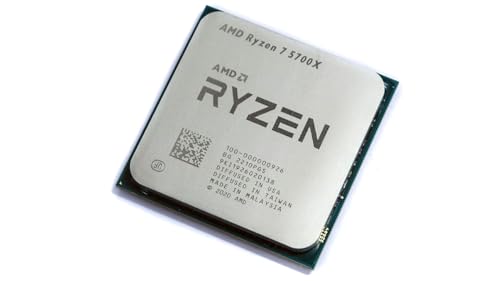
AMD Ryzen 7 5700X 8-Core
An 8-core, 16-thread desktop CPU on the AM4 socket with a 4.6 GHz max boost and 36 MB cache.
View on Amazon
AMD Ryzen 7 5800X3D 8-core
An 8-core, 16-thread AM4 desktop CPU with AMD 3D V-Cache technology and 100 MB cache for gaming.
View on Amazon
AMD Ryzen 9 9950X3D 16-Core Processor
A 16-core AM5 desktop processor for gaming and content creation with up to 5.7 GHz max boost clock.
View on Amazon
AMD Ryzen 9 9900X 12-Core
A 12-core, 24-thread unlocked AM5 desktop CPU with a 5.6 GHz max boost and 76 MB cache.
View on AmazonThese come from our ranked list Best CPU for Computer, which compares them spec by spec.
FAQ
Is a GPU a type of processor?
Yes. A GPU is a processor built for graphics and parallel work, while a CPU handles general tasks. A gaming PC uses both: the CPU runs the game logic and the GPU draws the frames.
What is the difference between cores and threads?
Cores are the physical processing units inside a CPU, and threads are the instruction streams they handle. The Ryzen 7 5700X has 8 cores and 16 threads, so each core handles two threads.
Do these desktop CPUs include a cooler?
The Ryzen 7 5700X, Ryzen 7 5800X3D and Ryzen 9 9900X do not include a cooler, and the 5800X3D recommends a high-performance cooler. Plan for a separate cooler with those models.