How to Choose a CPU for Gaming
 By Theo LangUpdated
Pick a gaming processor by matching its socket to your motherboard first, then comparing cores, threads, cache and boost clock against the requirements published for the games you play. The processors here span AM4 and AM5 sockets, DDR4 and DDR5 memory support, and cache sizes from 36 MB to 100 MB, so the right choice depends on the platform you already own or plan to build.
Check the socket and motherboard first
A processor only fits a motherboard with the matching socket, so start there. The Ryzen 7 5700X and Ryzen 7 5800X3D use Socket AM4 and can support PCIe 4.0 on X570 and B550 motherboards. The Ryzen 9 9950X3D and Ryzen 9 9900X use Socket AM5, and the 9900X can support PCIe 5.0 on select motherboards. Check your motherboard model and its processor support list in the maker's manual before you buy, since socket fit alone does not confirm support.
Compare cores, threads and cache
Cores and threads describe how much work the processor can handle in parallel, and cache is fast memory on the processor itself. The Ryzen 7 5700X and 5800X3D each state 8 cores and 16 threads, the Ryzen 9 9900X states 12 cores and 24 threads, and the Ryzen 9 9950X3D states 16 cores. Cache figures here run from 36 MB on the 5700X to 100 MB on the 5800X3D, with 76 MB on the 9900X. Compare these figures beside the requirements published for your games rather than treating any one figure as a guarantee.
Read boost clock as a maximum
Max boost clock is the highest clock speed the maker states, not a speed the processor holds at all times. The figures here are 4.6 GHz on the Ryzen 7 5700X, 4.5 GHz on the Ryzen 7 5800X3D, 5.6 GHz on the Ryzen 9 9900X and 5.7 GHz on the Ryzen 9 9950X3D, which also states a 4.3 GHz base clock. Two processors with similar boost figures can still differ in cores, cache and architecture, such as Zen 3 on the 5700X and Zen 5 on the 9900X and 9950X3D, so read the whole spec sheet together.
Match the memory support
Memory support follows the platform. The AM4 processors here, the Ryzen 7 5700X and 5800X3D, state DDR4-3200 support. The Ryzen 9 9900X on AM5 states DDR5-5600 support. Your motherboard and memory kit must match the type the processor supports, so check the memory figure on the processor and the motherboard together before you order parts for a new build or an upgrade.
Check the cooler and graphics card
Three processors here state that a cooler is not included: the Ryzen 7 5700X, the Ryzen 7 5800X3D and the Ryzen 9 9900X, and the 5800X3D maker recommends a high-performance cooler. The Ryzen 7 5700X also states that a discrete graphics card is required. Plan for those parts beside the processor, and follow the motherboard and cooler manuals for installation steps, with the computer shut down and unplugged first.
What you need

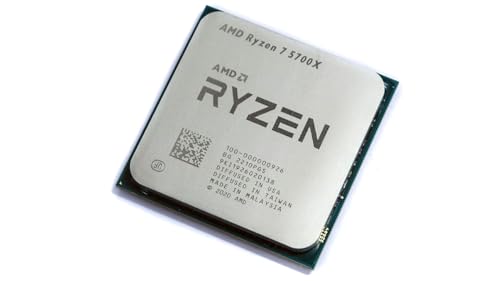
AMD Ryzen 7 5700X 8-Core
An 8-core, 16-thread AM4 processor at 4.6 GHz max boost with 36 MB cache and DDR4-3200 support, cooler not included.
View on Amazon
AMD Ryzen 7 5800X3D 8-core
An 8-core, 16-thread AM4 processor with 3D V-Cache, 100 MB cache and 4.5 GHz max boost, cooler not included.
View on Amazon
AMD Ryzen 9 9950X3D 16-Core Processor
A 16-core AM5 processor on Zen 5 architecture with 5.7 GHz max boost and 4.3 GHz base clock.
View on Amazon
AMD Ryzen 9 9900X 12-Core
A 12-core, 24-thread AM5 processor at 5.6 GHz max boost with 76 MB cache and DDR5-5600 support, cooler not included.
View on AmazonThese come from our ranked list Best CPU for Computer, which compares them spec by spec.
FAQ
Does an AM5 processor fit an AM4 motherboard?
No. The Ryzen 9 9950X3D and 9900X state Socket AM5, while the Ryzen 7 5700X and 5800X3D state Socket AM4. Match the processor socket to your motherboard, then confirm the exact model on the motherboard maker's support list.
Do these processors include a cooler?
The Ryzen 7 5700X, Ryzen 7 5800X3D and Ryzen 9 9900X each state that a cooler is not included. Check the box contents for any processor you buy and plan for a cooler that fits your socket and case.
What does cache do on a gaming processor?
Cache is fast memory on the processor that holds data close to the cores. The figures here run from 36 MB on the Ryzen 7 5700X to 100 MB on the Ryzen 7 5800X3D with 3D V-Cache. Compare the figure beside cores, threads and clock speed, and check the requirements published for your games.
Can I use DDR4 memory with an AM5 processor here?
The Ryzen 9 9900X states DDR5-5600 support, while the AM4 Ryzen 7 5700X and 5800X3D state DDR4-3200 support. Match your memory kit to the support figure stated for the processor and motherboard you choose.