How to Pick a CPU for Gaming
 By Theo LangUpdated
A gaming CPU handles the game logic and works with the graphics card, so the right one starts with the socket on your motherboard. The Ryzen 7 5700X and the Ryzen 7 5800X3D use Socket AM4, while the Ryzen 9 9950X3D and the Ryzen 9 9900X use Socket AM5. Match the socket first, then compare cores, boost clock and cache.
Match the socket to your motherboard
A CPU fits only the socket it is made for. The Ryzen 7 5700X and the Ryzen 7 5800X3D use Socket AM4, while the Ryzen 9 9950X3D and the Ryzen 9 9900X use Socket AM5. Check the socket on your motherboard before you buy, since an AM4 chip does not fit an AM5 board and an AM5 chip does not fit an AM4 board.
Count cores and threads
Cores and threads set how much work the chip handles at once. The Ryzen 9 9950X3D has 16 cores, the Ryzen 9 9900X has 12 cores and 24 threads, and the Ryzen 7 5700X and the Ryzen 7 5800X3D have 8 cores and 16 threads each. More cores help when streaming, recording or background apps share the chip with the game, so match the core count to the apps you keep open while you play.
Read the boost clock and the cache
Boost clock is the highest speed the chip reaches, and cache is the fast memory on the chip. The Ryzen 9 9950X3D has a max boost clock of up to 5.7 GHz with a 4.3 GHz base clock, the Ryzen 9 9900X has 5.6 GHz, the Ryzen 7 5700X has 4.6 GHz and the Ryzen 7 5800X3D has 4.5 GHz. Cache differs too: the 5800X3D has 100 MB, the 9900X has 76 MB and the 5700X has 36 MB. Compare both figures, and check the requirements published for your games before you choose.
Check memory, PCIe and the cooler
Memory and the board set what else the chip can use. The Ryzen 7 5700X and the Ryzen 7 5800X3D support DDR4-3200 and PCIe 4.0 on X570 and B550 motherboards, while the Ryzen 9 9900X supports DDR5-5600 and PCIe 5.0 on select motherboards. The 5800X3D recommends a high-performance cooler, so check what comes in the box and plan the cooler before you order. Shut the PC down and unplug it before you open the case, and follow the maker's manual.
What you need

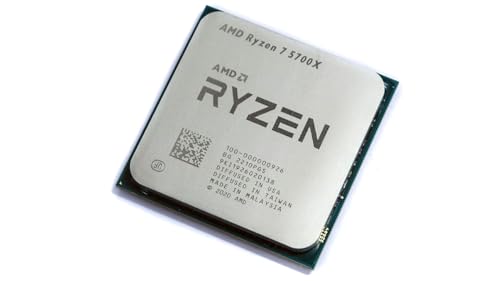
AMD Ryzen 7 5700X 8-Core
An 8-core, 16-thread chip with a 4.6 GHz max boost, 36 MB cache and DDR4-3200 support on Socket AM4, with no cooler in the box.
View on Amazon
AMD Ryzen 7 5800X3D 8-core
An 8-core, 16-thread chip with AMD 3D V-Cache, a 4.5 GHz max boost and 100 MB cache on Socket AM4, with a high-performance cooler recommended.
View on Amazon
AMD Ryzen 9 9950X3D 16-Core Processor
A 16-core chip with a max boost clock of up to 5.7 GHz and a 4.3 GHz base clock, built on Zen 5 for Socket AM5.
View on Amazon
AMD Ryzen 9 9900X 12-Core
A 12-core, 24-thread chip with a 5.6 GHz max boost, 76 MB cache and DDR5-5600 support on Socket AM5, with no cooler in the box.
View on AmazonThese come from our ranked list Best CPU for Computer, which compares them spec by spec.
FAQ
Does the CPU socket matter for gaming?
Yes. The CPU fits only the socket it is made for, so check the socket on your motherboard first. The Ryzen 7 5700X and the Ryzen 7 5800X3D use Socket AM4, while the Ryzen 9 9950X3D and the Ryzen 9 9900X use Socket AM5.
What does cache do in a gaming CPU?
Cache is fast memory on the chip that holds data the cores use often. The Ryzen 7 5800X3D has 100 MB of cache with AMD 3D V-Cache technology, the Ryzen 9 9900X has 76 MB and the Ryzen 7 5700X has 36 MB.
Do these CPUs come with a cooler?
The 5800X3D recommends a high-performance cooler. Check what comes in the box before you order, and follow the maker's manual when you install the cooler.