How to Connect a Modular Power Supply
 By Theo LangUpdated
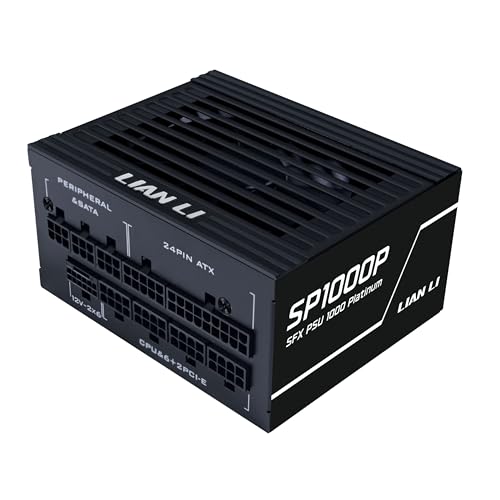
To connect a modular power supply, shut the computer down, unplug it, and plug in only the cables your parts need. Each cable plugs into the power supply at one end and into a part, such as the motherboard or a graphics card, at the other end. Check the labels on the power supply and follow its manual for your model.
Shut down and unplug first
Shut the computer down fully and unplug the power cord from the wall before you open the case. Press the power button once after unplugging to clear leftover charge, then remove the side panel. Read the manual for your power supply and your case before you touch any cable. If a device is under warranty, do not open it. Contact the maker instead.
Lay out the cables you need
A fully modular power supply lets you attach each cable separately, so lay out only the cables your parts need and leave the rest in the box. Match each cable to the part it feeds: motherboard power, CPU power, graphics card power and drive power. Keep the unused cables together so you can add one later if you install another part.
Plug in the power supply end
Look at the labels printed beside the sockets on the power supply. Each socket is marked for the cable type that fits it. Push the power supply end of each cable straight in until the latch clicks. Do not force a plug that does not fit, and do not use cables from a different power supply unless the manual for your model says they fit.
Connect the other end
Run each cable to its part and plug it in until it clicks. The motherboard cable goes to the main power socket on the motherboard. The CPU cable goes to the CPU power socket near the processor. A graphics card that uses a 12V-2x6 connector takes that cable directly from the power supply. Drive cables go to each drive you install.
Route cables and do a final check
Route cables along the back of the case where the case allows it, and keep them clear of fan blades. Check that every plug is fully seated and that no cable is pinched by the side panel. Put the panel back, plug the power cord in, and switch the computer on. If it does not start, shut it down, unplug it, and recheck each connection.
What you need

CORSAIR RM1000x ATX 3.1 PCIe 5.1 1000W Power Supply
A fully modular 1000 W power supply with a native 12V-2x6 connector, ATX 3.1 support and Cybenetics Gold efficiency.
View on Amazon
be quiet! Pure Power 13 M 1000W Power Supply
A fully modular 1000 W power supply with 80 PLUS Gold and Cybenetics Platinum ratings, a native 12V-2x6 connector and 4 PCIe 6+2-pin connectors.
View on Amazon
CORSAIR RM850e ATX 3.1 PCIe 5.1 Ready 850W Power Supply
A fully modular 850 W power supply with a native 12V-2x6 cable, ATX 3.1 support and a 120mm rifle bearing fan.
View on Amazon
MSI MAG A750GL PCIE5
A fully modular 750 W power supply with 80 PLUS Gold, ATX 3.1 and PCIe 5.1 support and a native dual-color 12V-2x6 cable.
View on AmazonThese come from our ranked list Best Modular Power Supply, which compares them spec by spec.
FAQ
Do I need to connect every modular cable?
No. Connect the cables your parts need and leave the rest in the box. Extra cables left unplugged do not affect the parts that are connected.
Can I use cables from another power supply?
Use the cables that came with your power supply. Cable ends that look alike can be wired differently, so check the manual for your model before you mix cables from two units.
What is the 12V-2x6 connector for?
It feeds power to a graphics card. On the power supplies here it connects the graphics card directly to the power supply, with no adapter in between.