How to Choose the Right Processor for Your PC
 By Theo LangUpdated
Choose a processor by matching it to your PC and the software you run. Start with the socket on your motherboard, then compare cores, threads, boost clock and cache, and check the memory and PCIe version the platform supports. The right processor is the one that fits your board and covers the software you run.
Start with what the PC does
List the software you run each day: browsing and office work, games, photo and video editing, or code and virtual machines. A processor spends its time on those tasks, so the choice follows the work, not the other way round. Write down the programs first, then look for a processor that fits the motherboard already in the PC or the board you plan to buy.
Match the socket to the motherboard
A processor only fits a board with the same socket, such as AM4 or AM5, so check the socket printed on the motherboard or in its manual first. The socket also decides the memory the board takes: AM4 boards use DDR4 and AM5 boards use DDR5, and the PCIe version follows the board as well. Buying a processor for the wrong socket wastes a return trip.
Read cores, threads and boost clock
Cores are the workers inside the processor, and threads are the streams of work they handle. More cores suit work that splits into parallel parts, while boost clock is the top speed the processor reaches under load. Cache is fast memory on the chip that holds data close to the cores. Compare all of these figures together, since a high number in one place does not tell the whole story.
Check cooling and power before fitting
A processor runs hot without cooling, and some boxes ship without a cooler, so check what comes in the box before you order. Look at the cooler mount for your socket and the space inside the case, and make sure the case has room for the cooler you pick. Shut the PC down and unplug it before opening the case, and follow the maker's manual for fitting.
Check the software requirements
Before buying, open the requirements page for the software or game you run each day and read the processor line there. Match the socket, cores and memory type on that page against the processor you are considering, and check the same page for the graphics card and storage it asks for. A processor that fits the board and matches the published requirements is the right place to start.
What you need

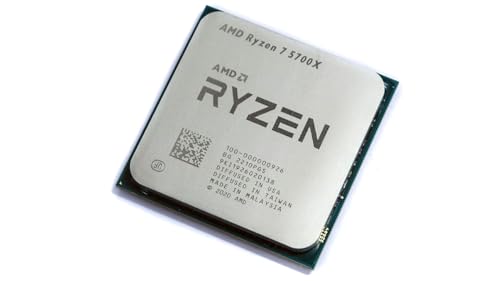
AMD Ryzen 7 5700X 8-Core
An 8-core, 16-thread unlocked processor with a 4.6 GHz max boost, 36 MB cache, DDR4-3200 support and PCIe 4.0 on Socket AM4.
View on Amazon
AMD Ryzen 7 5800X3D 8-core
An 8-core, 16-thread processor with AMD 3D V-Cache, a 4.5 GHz max boost, 100 MB cache and DDR4-3200 support on Socket AM4.
View on Amazon
AMD Ryzen 9 9950X3D 16-Core Processor
A 16-core processor with a 5.7 GHz max boost, a 4.3 GHz base clock, Zen 5 architecture and Socket AM5.
View on Amazon
AMD Ryzen 9 9900X 12-Core
A 12-core, 24-thread unlocked processor with a 5.6 GHz max boost, 76 MB cache, DDR5-5600 support and PCIe 5.0 on Socket AM5.
View on AmazonThese come from our ranked list Best CPU for Computer, which compares them spec by spec.
FAQ
Does a processor with more cores run games better?
More cores help when software splits work across them. Many games lean on a few fast cores, so check the requirements published for the game and compare boost clock and cache as well as core count.
Can I put any processor in my motherboard?
No. The processor must match the socket on the board, such as AM4 or AM5, and the board must support the memory type and PCIe version the processor uses. Check the motherboard manual before buying.
Do I need a separate cooler for a new processor?
Some processors ship without a cooler, so check the box contents first. If no cooler is included, buy one that fits the socket and your case, and follow the maker's manual when fitting it.