
Best Vertical Mouse for Mac (2026): Top 6 by the Specs
 By Theo LangUpdated
Choose the Logitech Lift Vertical Ergonomic Wireless Mouse for a Mac setup that needs a small to medium right-hand fit. Its 57-degree vertical shape, Bluetooth Low Energy or Logi Bolt USB connection, and 4 of 6 customizable buttons suit macOS desk work.
Your shortlist at a glance
PCKitHQ scores range from 9.2 to 9.8. See how we pick.
| Product and key specifications | Score and retailer |
|---|---|
01 Best Overall Logitech Lift Vertical Ergonomic Wireless Mouse | 9.8PCKitHQ scoreView on Amazon |
02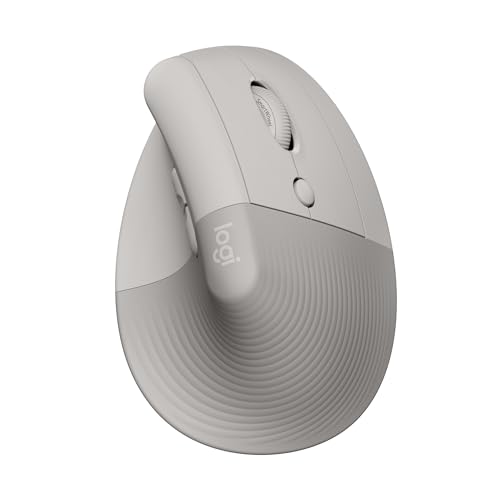 | 9.7PCKitHQ scoreView on Amazon |
03 | 9.6PCKitHQ scoreView on Amazon |
04 | 9.4PCKitHQ scoreView on Amazon |
05 Also Consider UGREEN Ergonomic Vertical Mouse | 9.3PCKitHQ scoreView on Amazon |
06 | 9.2PCKitHQ scoreView on Amazon |
A closer look at each configuration
Logitech Lift Vertical Ergonomic Wireless Mouse
score
The 57-degree vertical shape, Bluetooth Low Energy or Logi Bolt USB connection, and 4 of 6 customizable buttons fit macOS desk work.
- Wireless
- Yes
- Connection
- Bluetooth Low Energy or Logi Bolt USB
- Weight
- 0.28 lb
- Warranty
- 1 Year
This Off-White Lift connects to macOS over Bluetooth Low Energy or the included Logi Bolt USB receiver. Its 57-degree vertical shape suits small to medium right hands, with a softly textured grip and a thumb rest. Four of the six buttons are customizable, and the SmartWheel handles smooth scrolling. Logitech states up to two years of battery life. The mouse weighs 0.28 lb and carries a 1 Year Limited Hardware Warranty.
Choose it if
- You use a Mac and want a Bluetooth or Logi Bolt USB connection
- Your right hand measures small to medium
Consider another if
- You need a mouse shaped for 7.5 to 8.5 inch hands
- You need the 7200 DPI ceiling of the ProtoArc EM11 Pro
Logitech Lift Vertical Ergonomic Wireless Mouse
score
The Sand Lift pairs the 57-degree vertical shape with Bluetooth Low Energy or Logi Bolt USB and 4 of 6 customizable buttons for macOS.
- Wireless
- Yes
- Connection
- Bluetooth Low Energy or Logi Bolt USB
- Weight
- 0.28 lb
The Sand Lift is the same Logitech Lift configuration in Sand, with the same 57-degree vertical shape for small to medium right hands, the same softly textured grip and thumb rest, and the same Bluetooth Low Energy or Logi Bolt USB connection to macOS. Four of the six buttons are customizable, and the SmartWheel scrolls smoothly. Logitech states up to two years of battery life. The mouse weighs 0.28 lb.
Choose it if
- You use a Mac and want the Lift shape in Sand
- You want quiet clicks and a SmartWheel for scrolling
Consider another if
- You need the 2 year warranty of the ProtoArc EM11 Pro
- You need the side scroll wheel of the ProtoArc EM11 Pro
ProtoArc EM11 Pro Ergonomic Mouse for Large Hands
score
The EM11 Pro fits 7.5 to 8.5 inch hands, adds a side scroll wheel, and adjusts to 7200 DPI with browser-based customization for macOS 10.12 or later.
- Sensor resolution
- 7200 DPI
- Wireless
- Yes
- Weight
- 0.27 lb
- Warranty
- 2 Year
The EM11 Pro fits hand lengths of 19.0 to 21.5 cm, or 7.5 to 8.5 inches, with a larger contoured shape and a vertical design. A side scroll wheel moves across wide Excel sheets and video editing timelines. The browser-based tool configures 6 buttons and adjusts DPI up to 7200 without a software download. It connects to up to three devices through two Bluetooth 5.0 channels and one 2.4 GHz USB-A receiver for macOS 10.12 or later. A 500mAh rechargeable battery charges over the included USB Type-C cable. The mouse weighs 0.27 lb and carries a 2 Year warranty.
Choose it if
- Your hand measures 7.5 to 8.5 inches
- You work across wide spreadsheets and video timelines
Consider another if
- You need a mouse shaped for small to medium hands
- You need a mouse that runs on disposable batteries
POJTK Wireless Rechargeable Ergonomic Mouse
score
The POJTK pairs a 58-degree vertical shape with Bluetooth 5.3, USB-A and USB-C receivers, and DPI up to 4800 for MacBook use.
- Sensor resolution
- 4800 DPI
- Weight
- 0.24 lb
- Warranty
- 1 Year
The POJTK connects over Bluetooth 5.3, 2.4GHz USB-A, or USB-C, and switches between two devices without repeated plugging and unplugging. Its vertical design sits at 58 degrees to the desktop, and DPI adjusts across five levels up to 4800. Six buttons use a silent design, and the mouse is rechargeable. The maker states 1 to 3 months of use after a full charge, depending on usage habits. It works with macOS, Windows, Linux, and Unix. The mouse weighs 0.24 lb and carries a 1 Year Manufacturer warranty.
Choose it if
- You switch between two devices over Bluetooth or USB
- You want silent clicks and DPI up to 4800
Consider another if
- You need the front and back shortcut keys to work in macOS
- You need the side scroll wheel of the ProtoArc EM11 Pro
UGREEN Ergonomic Vertical Mouse
score
The UGREEN connects over Bluetooth or 2.4G to up to 3 devices, with DPI from 1000 to 4000 and a Windows/Mac mode switch.
- Wireless
- Yes
- Connection
- 2.4G wireless and Bluetooth
- Warranty
- 2 Year
The UGREEN uses 2.4G wireless and Bluetooth with support for up to 3 devices at once, and the USB-A receiver or Bluetooth keeps ports free. Its vertical handshake-style shape follows the palm, and five DPI levels from 1000 to 4000 adjust cursor movement. Five functional buttons, a dedicated DPI button, and a Windows/Mac mode switch provide control for Windows, macOS, Linux, ChromeOS, and Android. A built-in 500mAh rechargeable battery charges over USB-C, and UGREEN states up to 135 hours of continuous use on a full charge. It carries a 2 Year Manufacturer warranty.
Choose it if
- You switch among up to 3 devices from one mouse
- You want a Windows/Mac mode switch for your Mac
Consider another if
- You need 6 buttons instead of the 5 on this mouse
- You need the 7200 DPI ceiling of the ProtoArc EM11 Pro
TECKNET Ergonomic Wireless Mouse 2.4G Vertical Mouse Silent 4800 DPI
score
The TECKNET uses 2.4GHz wireless through a USB receiver, with DPI up to 4800 and a 52-degree shape for small to medium hands.
- Connection
- 2.4GHz wireless
- Weight
- 0.22 lb
- Warranty
- 18 Months
The TECKNET connects over 2.4GHz wireless through a USB receiver, with no driver needed, and works with Mac OS X 10.4. Its vertical shape sits at a 52-degree angle, and the rounded shape suits small to medium hands. Five DPI settings from 800 to 4800 adjust cursor speed, and six buttons include forward and back buttons for web browsing, though those side buttons are not supported on Mac OS. The mouse weighs 0.22 lb and carries an 18 Months warranty.
Choose it if
- You want a 2.4GHz USB receiver connection for your Mac
- Your hand measures small to medium
Consider another if
- You need a Bluetooth connection to your Mac
- You need the forward and back buttons to work in Mac OS
Make the choice for your setup
Match the shape to your hand
The Logitech Lift fits small to medium right hands with a 57-degree vertical shape, a softly textured grip, and a thumb rest. The ProtoArc EM11 Pro fits hand lengths of 19.0 to 21.5 cm, or 7.5 to 8.5 inches, with a larger contoured shape. The TECKNET suits small to medium hands with a rounded 52-degree shape, and the POJTK sits at 58 degrees to the desktop. The UGREEN uses a vertical handshake-style shape with a curved surface that follows the palm. Measure your hand before ordering, and match the stated hand range to your own hand rather than assuming one vertical shape fits every hand.
Choose the Mac connection
The Logitech Lift connects over Bluetooth Low Energy or the included Logi Bolt USB receiver, and the ProtoArc EM11 Pro connects to up to three devices through two Bluetooth 5.0 channels and one 2.4 GHz USB-A receiver. The POJTK adds Bluetooth 5.3 with USB-A and USB-C receivers and switches between two devices. The UGREEN uses Bluetooth or 2.4G wireless for up to 3 devices at once. Bluetooth keeps the USB-A port free on a MacBook, while the USB receiver suits a Mac with a spare port. Check the connection list against the ports on your Mac before ordering. The TECKNET connects over 2.4GHz wireless through a USB receiver only. If that fits your setup better, see our guide to the Best Vertical Mouse for MacBook Pro.
Set DPI and buttons for your work
The ProtoArc EM11 Pro adjusts up to 7200 DPI, configures 6 buttons through a browser-based tool, and adds a side scroll wheel for wide spreadsheets and video timelines. The POJTK and the TECKNET adjust up to 4800 DPI, and the UGREEN adjusts from 1000 to 4000 DPI with 1600 as the default. The POJTK keeps six silent buttons for quiet rooms, and the UGREEN adds a dedicated DPI button beside five functional buttons. The Logitech Lift makes 4 of its 6 buttons customizable and adds a SmartWheel for scrolling. Match the DPI range and the button count to the precision and shortcuts your Mac work calls for.
Comparing more options? See Best Mouse.
FAQ: Vertical Mouse for Mac
Which mouse fits small to medium hands?
The Logitech Lift fits small to medium right hands, and the TECKNET suits small to medium hands with a rounded 52-degree shape. The ProtoArc EM11 Pro fits hand lengths of 7.5 to 8.5 inches instead. Measure your hand and match it to the stated range before ordering.
Which mice connect to a Mac over Bluetooth?
The Logitech Lift connects over Bluetooth Low Energy or Logi Bolt USB. The ProtoArc EM11 Pro uses two Bluetooth 5.0 channels plus a 2.4 GHz USB-A receiver. The POJTK adds Bluetooth 5.3 with USB-A and USB-C receivers, and the UGREEN uses Bluetooth or 2.4G for up to 3 devices.
Which mouse has the highest stated DPI?
The ProtoArc EM11 Pro adjusts up to 7200 DPI. The POJTK and the TECKNET adjust up to 4800 DPI, and the UGREEN adjusts from 1000 to 4000 DPI with 1600 as the default. DPI figures are rated settings, not measured cursor speed.


