
Best Vertical Mouse for MacBook Air (2026): 4 Picks Compared
 By Theo LangUpdated
The seenda MOU-302 Wireless Bluetooth Ergonomic Vertical Mouse with Volume Knob suits MacBook Air owners who switch among three devices, with a 500mAh battery, a volume knob, and 1000, 1600, or 2400 DPI. The Logitech Lift for Mac runs on one AA battery with up to 2-year battery life; the LOONASA carries a 500mAh rechargeable battery and four DPI levels from 800 to 2400. The SHARE SUNSHINE offers DPI at 800, 1200, or 1600.
Your shortlist at a glance
PCKitHQ scores range from 9.2 to 9.8. See how we pick.
| Product and key specifications | Score and retailer |
|---|---|
01 | 9.8PCKitHQ scoreView on Amazon |
02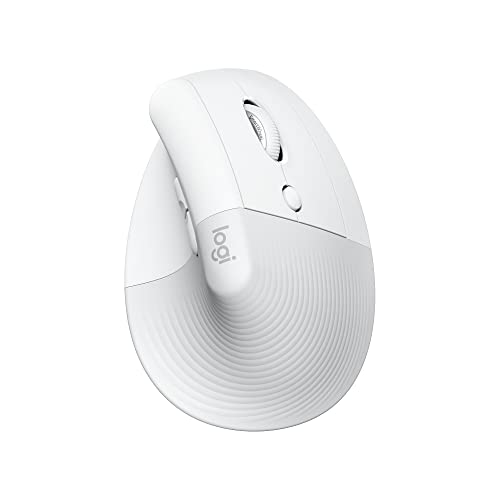 | 9.6PCKitHQ scoreView on Amazon |
03 Also Consider Ergonomic Wireless Vertical Mouse Pink | 9.4PCKitHQ scoreView on Amazon |
04 | 9.2PCKitHQ scoreView on Amazon |
A closer look at each configuration
seenda MOU-302 Wireless Bluetooth Ergonomic Vertical Mouse
score
The seenda MOU-302 combines 3-device switching, a volume knob, and 1000, 1600, or 2400 DPI in a vertical shape.
- Connection
- Bluetooth or the included 2.4G USB receiver
- Warranty
- 2 year warranty
The seenda MOU-302 uses a vertical shape with a handshake grip and suits small and medium hands. Its built-in volume control pauses, plays, and adjusts music from the mouse. It connects to three devices at once through the included 2.4G USB receiver, BT1, or BT2, and switching takes one click. Clicks stay silent, and DPI adjusts among 1000, 1600, and 2400. The built-in 500mAh battery charges over USB-C, and the manufacturer states up to 2 months per charge. It works with Windows, macOS, iOS, Android, and Chrome OS. The color is Light Pink, and the warranty runs 2 years.
Choose it if
- You switch a MacBook Air, a tablet, and a desktop through one mouse
- You want volume control on the mouse during calls and music
Consider another if
- You want the 800 DPI setting the LOONASA offers
- You want a single AA battery instead of a rechargeable battery
Logitech Lift for Mac Vertical Ergonomic Wireless Mouse
score
The Logitech Lift for Mac pairs a 57-degree vertical angle with Bluetooth Low Energy and four customizable buttons.
- Wireless
- Yes
- Connection
- Bluetooth Low Energy (BLE)
- Weight
- 0.28 lb
- Warranty
- 1 Year Limited Hardware Warranty
The Logitech Lift for Mac is a vertical mouse with a 57-degree angle and a handshake position, made for small to medium hands. It connects to Apple MacBook Pro, MacBook Air, iMac, and iPad models through Bluetooth Low Energy, with no USB receiver in the box. Its clicks are whisper-quiet, its magnetic SmartWheel scrolls silently, and it carries four customizable buttons. The design is ergo-certified under criteria set by leading ergonomists, and its plastic parts include 54 percent certified post-consumer recycled plastic. One included AA battery gives up to 2-year battery life. It weighs 0.28 lb, comes in Off White, and carries a 1 Year Limited Hardware Warranty.
Choose it if
- You use a MacBook Air or iPad over Bluetooth Low Energy
- You want a small to medium hand fit at a 57-degree angle
Consider another if
- You need a 2.4G USB receiver connection for your setup
- You want a rechargeable battery charged over USB-C
Ergonomic Wireless Vertical Mouse Pink
score
The LOONASA pairs Bluetooth 5.0, Bluetooth 4.0, and a 2.4G receiver with a USB-C adapter for modern ports.
- Wireless
- Yes
- Connection
- Bluetooth 5.0, Bluetooth 4.0, and a 2.4GHz USB receiver
- Weight
- 0.29 lb
- Warranty
- 2 Years
The LOONASA uses a vertical design with a handshake grip and suits small to medium-sized hands. It connects to up to three devices at once through Bluetooth 5.0, Bluetooth 4.0, or the 2.4GHz USB receiver, with one button for switching. The box includes a USB receiver and a USB-C adapter, so it connects to MacBook Air, MacBook Pro, and other USB-C laptops and tablets without added accessories. Its built-in 500mAh battery recharges through the included Type-C cable. Quiet left and right buttons keep clicks low, and DPI adjusts among 800, 1200, 1600, and 2400. It works with Windows, Mac OS, Linux, Android, and iOS 13 and above. Forward and Back buttons are not supported on Mac OS. It weighs 0.29 lb, comes in Pink, and carries a 2 Years warranty.
Choose it if
- You connect a MacBook Air through its USB-C port without extra accessories
- You want four DPI levels from 800 to 2400
Consider another if
- You want the 57-degree angle named for the Logitech Lift
- You want a single AA battery setup for your mouse
Wireless Mouse Pink Ergonomic Bluetooth & USB Dual Mode Mice
score
The SHARE SUNSHINE combines Bluetooth and 2.4G wireless with silent clicks at 30dB or less and three DPI settings.
- Wireless
- Yes
- Connection
- Bluetooth and 2.4G wireless
- Weight
- 0.28 lb
- Warranty
- one year warranty
The SHARE SUNSHINE is a vertical wireless mouse with a handshake shape for small or medium hands. It switches between Bluetooth and 2.4G wireless modes for use across Mac, PC, laptop, tablet, iPad, and MacBook Air and Pro. Its silent click design stays at 30dB or less, which suits offices, libraries, and late-night work. DPI adjusts among 800, 1200, and 1600 for cursor control across different tasks. The mouse is rechargeable and built for portable use, with a compact shape for travel and work away from a desk. It suits repetitive work such as spreadsheets, email, and graphs. The color is pink, it weighs 0.28 lb, and the warranty runs one year.
Choose it if
- You want a small or medium hand fit for a MacBook Air
- You switch between Bluetooth and 2.4G wireless modes
Consider another if
- You want the 2400 DPI setting the seenda and LOONASA offer
- You want the 2 year warranty the seenda carries
Make the choice for your setup
Match the connection to your MacBook Air
The seenda MOU-302 connects through Bluetooth or the included 2.4G USB receiver, and it links three devices at once through 2.4G USB, BT1, or BT2. The Logitech Lift for Mac connects only through Bluetooth Low Energy, with no USB receiver in the box, so it suits a setup that stays on Bluetooth. The LOONASA connects through Bluetooth 5.0, Bluetooth 4.0, or a 2.4GHz USB receiver, and it adds a USB-C adapter for MacBook Air ports. The SHARE SUNSHINE switches between Bluetooth and 2.4G wireless. Check which connection each pick names, then match it to the ports and wireless options your MacBook Air setup already uses.
Compare DPI settings across the picks
DPI settings decide how far the cursor moves for a given hand movement, and the three picks that name DPI levels differ. The seenda MOU-302 offers 1000, 1600, and 2400 DPI. The LOONASA offers four levels at 800, 1200, 1600, and 2400, the widest set in this guide. The SHARE SUNSHINE offers 800, 1200, and 1600. The Logitech Lift for Mac names four customizable buttons and a silent magnetic SmartWheel instead of DPI levels. Compare the named levels against the cursor speed you want, and keep the comparison to the figures each pick actually states. Keep each named level tied to the pick that states it, and do not treat a level from one pick as a feature of another. If that fits your setup better, see our guide to the Best Vertical Mouse with Customizable Buttons.
Weigh battery setup and warranty terms
The seenda MOU-302 carries a built-in 500mAh battery that charges over USB-C, and the manufacturer states up to 2 months per charge. The LOONASA also carries a built-in 500mAh battery that recharges easily through its included Type-C cable and removes the need for disposable batteries. The Logitech Lift for Mac runs on one included AA battery, with up to 2-year battery life. The SHARE SUNSHINE is rechargeable. Warranty terms differ too: the seenda carries a 2 year warranty, the LOONASA carries 2 Years, the Logitech carries a 1 Year Limited Hardware Warranty, and the SHARE SUNSHINE carries a one year warranty. Choose between a rechargeable battery you plug in and a single AA battery you swap, and check the warranty length before you choose.
For a wider shortlist, start with Best Mouse.
FAQ: Vertical Mouse for MacBook Air
Which of these mice connect over Bluetooth to a MacBook Air?
All four connect over Bluetooth. The seenda MOU-302 uses Bluetooth or the included 2.4G USB receiver. The Logitech Lift for Mac uses Bluetooth Low Energy only. The LOONASA uses Bluetooth 5.0 or 4.0, and the SHARE SUNSHINE uses Bluetooth or 2.4G wireless.
Which mouse includes a USB-C adapter for MacBook Air ports?
The LOONASA includes a USB receiver and a USB-C adapter, so it connects to MacBook Air and other USB-C laptops and tablets without added accessories. The seenda MOU-302 includes a 2.4G USB receiver for its own connection instead.
What battery setup does each of these mice use?
The seenda MOU-302 has a built-in 500mAh battery charged over USB-C, with the manufacturer stating up to 2 months per charge. The LOONASA has a built-in 500mAh battery charged over Type-C. The Logitech Lift for Mac runs on one included AA battery, and the SHARE SUNSHINE is rechargeable.


