
Best Ultrawide Monitor with KVM Switch (2026): 6 Picks Compared
 By Theo LangUpdated
Choose the Z Z-EDGE Z-Edge 49 inch Ultrawide Curved Computer Monitor if you want one screen that replaces two QHD monitors and switches between two computers with its built-in KVM. Its 5120x1440 panel, 165Hz refresh rate and PIP/PBP modes suit office multitasking and gaming on one curved display.
Your shortlist at a glance
PCKitHQ scores range from 9.2 to 9.8. See how we pick.
| Product and key specifications | Score and retailer |
|---|---|
01 | 9.8PCKitHQ scoreView on Amazon |
02 | 9.7PCKitHQ scoreView on Amazon |
03 | 9.6PCKitHQ scoreView on Amazon |
04 | 9.4PCKitHQ scoreView on Amazon |
05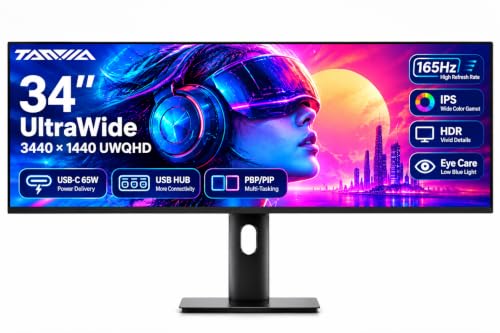 | 9.3PCKitHQ scoreView on Amazon |
06 | 9.2PCKitHQ scoreView on Amazon |
A closer look at each configuration
Z-Edge 49-inch Ultrawide Curved Computer Monitor UG49W
score
A 49-inch 5120x1440 curved panel at 165Hz with a built-in KVM, PIP/PBP modes and a height-adjustable stand.
- Resolution
- 5120x1440
- Native refresh rate
- 165 Hz
- Screen size
- 49 in
- Curved screen
- Yes
- Ultrawide screen
- Yes
- USB-C
- Yes
- HDMI
- Yes
- Warranty
- 1 Year Manufacturer
This Z-EDGE monitor pairs a 49-inch curved panel with 5120x1440 resolution, a 1500R curvature and a 32:9 aspect ratio, so it holds two QHD workspaces side by side. PIP and PBP modes show content from two input sources at once. The built-in KVM lets one keyboard and mouse control two devices. The stand adjusts for tilt and height, and the monitor has dual speakers. It carries a 1-year manufacturer warranty.
Choose it if
- You want a 49-inch screen that replaces two QHD monitors
- You control two computers with one keyboard and mouse
Consider another if
- You need a screen smaller than 49 inches
- You need a refresh rate above 165Hz
Deco Gear 49-inch Curved Monitor R1500
score
A 49-inch 5120x1440 curved VA panel at 120Hz with USB-C 65W charging, a KVM switch and PIP/PBP modes.
- Resolution
- 5120×1440
- Native refresh rate
- 120 Hz
- Screen size
- 49 in
- Panel
- VA
- Curved screen
- Yes
- Ultrawide screen
- Yes
- USB-C
- Yes
- HDMI
- Yes
- Weight
- 24.2 lb
- Warranty
- 1-Year Limited Manufacturer
This Deco Gear monitor has a 49-inch curved VA panel with 5120x1440 resolution, a 1500R curve and a 32:9 aspect ratio, so it replaces two screens. It runs at 120Hz with a 1ms MPRT response time and Adaptive Sync, and it supports HDR400 with 100% sRGB coverage and 3000:1 contrast. USB-C carries video and 65W power delivery for a laptop, and the built-in KVM switches between devices. PIP and PBP modes show more than one source at once. The stand adjusts for height, tilt and swivel, and the monitor has built-in speakers. It weighs 24.2 lb and carries a 1-year limited manufacturer warranty.
Choose it if
- You want a 49-inch 5120x1440 screen at 120Hz
- You charge a laptop through USB-C at 65W
Consider another if
- You need a refresh rate above 120Hz
- You need a screen smaller than 49 inches
LG 34-inch UltraWide Curved Monitor
score
A 34-inch 3440x1440 curved UltraWide at 144Hz with Dual Controller KVM and USB-C charging up to 65W.
- Native refresh rate
- 144 Hz
- Screen size
- 34 in
- Curved screen
- Yes
- Ultrawide screen
- Yes
- USB-C
- Yes
- HDMI
- Yes
- DisplayPort
- Yes
This LG monitor has a 34-inch 21:9 UltraWide WQHD display with 3440x1440 resolution and an 1800R curved screen, giving room for spreadsheets and side-by-side windows. It runs at 144Hz with a 5ms response time and AMD FreeSync Premium, and it supports HDR10 with up to 99% sRGB coverage. USB Type-C handles video, data transfer and up to 65W laptop charging through one cable, alongside HDMI and DisplayPort. The built-in Dual Controller KVM lets you operate two PCs with one monitor, keyboard and mouse. The height and tilt adjustable stand and Reader Mode round out the setup.
Choose it if
- You want a 34-inch 21:9 screen at 144Hz
- You run two PCs from one keyboard and mouse
Consider another if
- You need a 49-inch screen for two QHD workspaces
- You need a refresh rate above 144Hz
Samsung 34-inch ViewFinity S65UC
score
A 34-inch Ultra-WQHD curved display at 100Hz with a built-in KVM, USB-C, a LAN port and built-in speakers.
- Resolution
- Ultra-WQHD
- Native refresh rate
- 100 Hz
- Screen size
- 34 in
- Curved screen
- Yes
- Ultrawide screen
- Yes
- USB-C
- Yes
- Weight
- 11.46 lb
- Warranty
- 3-Year Manufacturer
This Samsung ViewFinity monitor has a 34-inch 1000R curved display with a 21:9 aspect ratio and Ultra-WQHD resolution. It runs at a 100Hz refresh rate with AMD FreeSync, and it supports HDR10. The built-in KVM switch connects and controls two sources at once with one keyboard and mouse, with split screen, Picture in Picture or Picture by Picture. A USB-C port powers a device and transmits data over one cable, and a LAN port connects a laptop without its own Ethernet. It weighs 11.46 lb and carries a 3-year manufacturer warranty.
Choose it if
- You want a 34-inch curved 21:9 screen at 100Hz
- You connect a LAN-less laptop through the LAN port
Consider another if
- You need a refresh rate above 100Hz
- You need a 49-inch screen for two QHD workspaces
TANXJIA 34-inch Ultrawide Monitor
score
A 34-inch 3440x1440 IPS panel at 165Hz over DisplayPort with USB-C 65W charging, a KVM switch and PBP/PIP.
- Resolution
- 3440x1440
- Native refresh rate
- 165 Hz
- Screen size
- 34 in
- Panel
- IPS
- Ultrawide screen
- Yes
- USB-C
- Yes
- HDMI
- Yes
- Weight
- 2.2 lb
This TANXJIA monitor has a 34-inch 21:9 Fast IPS display with 3440x1440 resolution, 100% sRGB and 95% DCI-P3 color coverage. It reaches up to 165Hz through DisplayPort and supports HDR, Adaptive Sync and FreeSync. USB-C delivers video, audio, data and 65W power delivery to a laptop over one cable. The built-in USB 3.0 hub has two USB-A ports and one USB-B port, and the KVM switch lets one keyboard and mouse control two devices. PBP/PIP modes show two devices at once. It has a height-adjustable stand and a built-in speaker.
Choose it if
- You want a 34-inch IPS screen at 165Hz
- You charge a laptop through USB-C at 65W
Consider another if
- You need 165Hz through HDMI instead of DisplayPort
- You need a 49-inch screen for two QHD workspaces
LG 34-inch Curved UltraWide WQHD Monitor
score
A 34-inch curved 3440x1440 display at 144Hz with USB-C 65W charging, a KVM switch and 99% sRGB coverage.
- Resolution
- 3440x1440
- Native refresh rate
- 144 Hz
- Screen size
- 34 in
- Curved screen
- Yes
- Ultrawide screen
- Yes
- USB-C
- Yes
This LG monitor has a 34-inch curved 21:9 UltraWide WQHD screen with 3440x1440 resolution for multitasking and gaming. It runs at 144Hz with AMD FreeSync Premium. HDR10 and 99% sRGB coverage bring rich, lifelike color to creative work, movies and games. USB Type-C carries video, data transfer and 65W laptop charging through one cable for a clean desk setup. The built-in KVM switch controls two devices with one keyboard and mouse, and the tilt and height adjustable stand sets a comfortable viewing position.
Choose it if
- You want a 34-inch curved screen at 144Hz
- You run two devices from one keyboard and mouse
Consider another if
- You need a refresh rate above 144Hz
- You need a 49-inch screen for two QHD workspaces
Make the choice for your setup
Match the screen to your desk
Start with size. The Z-EDGE and Deco Gear monitors measure 49 inches with 5120x1440 resolution and a 32:9 aspect ratio, matching two QHD screens side by side on one panel. The LG and TANXJIA monitors measure 34 inches with 3440x1440 resolution and a 21:9 aspect ratio, and the Samsung is a 34-inch 21:9 model with Ultra-WQHD resolution. A 49-inch curved panel needs more desk room than a 34-inch model. Curvature also differs: the Z-EDGE and Deco Gear use a 1500R curve, the LG Dual Controller model uses 1800R, and the Samsung uses 1000R. Pick the size that fits your desk.
Use the KVM and USB-C
Every monitor here has a built-in KVM switch, so one keyboard and mouse control two connected devices. The Z-EDGE, Deco Gear, Samsung and TANXJIA models add PIP and PBP modes that show two sources on one screen at once. USB-C charging differs by model: the Deco Gear, both LG models and the TANXJIA deliver 65W to a laptop through one cable, while the Z-EDGE lists USB-C among its connections. The Samsung USB-C port powers a device and transmits data, and it adds a LAN port for a laptop without Ethernet. Before buying, check that the laptop's USB-C port supports video output, since a port name alone does not prove it. Shoppers with a related need can compare our guide to the Best 1440p 240Hz Monitor G Sync.
Compare refresh rate and resolution
Refresh rate and resolution decide how motion looks. The Z-EDGE and TANXJIA run at 165Hz, the two LG models at 144Hz, the Deco Gear at 120Hz and the Samsung at 100Hz. The TANXJIA reaches 165Hz only through DisplayPort, so check the port before counting on that figure. Resolution runs from 3440x1440 on the LG and TANXJIA models to 5120x1440 on the 49-inch models. HDR support also varies: the Deco Gear lists HDR400, the LG models and the Samsung list HDR10, and the TANXJIA lists HDR. Match the refresh rate, resolution and HDR figure to the games and video you watch.
Comparing more options? See 24 vs 27 Inch Monitor.
FAQ: Ultrawide Monitor with KVM Switch
Do all six monitors have a KVM switch?
Yes. Each monitor in this guide has a built-in KVM switch, so one keyboard and mouse control two connected devices. The Z-EDGE, Deco Gear, Samsung and TANXJIA models also show two sources at once with PIP and PBP modes.
Which monitors charge a laptop over USB-C?
The Deco Gear, both LG models and the TANXJIA deliver 65W charging through USB-C, carrying video, data and power over one cable. The Samsung USB-C port powers a device and transmits data, and the Z-EDGE lists USB-C among its connections.
What refresh rates do these monitors offer?
The Z-EDGE and TANXJIA run at 165Hz, the two LG models at 144Hz, the Deco Gear at 120Hz and the Samsung at 100Hz. The TANXJIA reaches 165Hz only through DisplayPort, so check the port on your device before choosing for that figure.
