
Best 34 Inch Monitor with KVM (2026): Top 6 by the Specs
 By Theo LangUpdated
Buy the LG 34U640B-B 34-inch UltraWide WQHD 144Hz FreeSync Premium Curved Monitor if you run two PCs from one desk: its Dual Controller KVM switch controls two PCs with one keyboard and mouse, and the 3440 x 1440 screen at 144Hz splits into up to 6 sections through the Switch app. The Samsung ViewFinity, the two MSI screens, the TANXJIA and the Philips cover the 34-inch ultrawide ground with different refresh rates and charging wattage.
Your shortlist at a glance
PCKitHQ scores range from 9.2 to 9.8. See how we pick.
| Product and key specifications | Score and retailer |
|---|---|
01 | 9.8PCKitHQ scoreView on Amazon |
02 Second Pick Samsung 34-inch ViewFinity (S65TC) Ultra-WQHD 1000R Curved Computer MonitorUltra-WQHD, 100 Hz | 9.7PCKitHQ scoreView on Amazon |
03 | 9.6PCKitHQ scoreView on Amazon |
04 | 9.4PCKitHQ scoreView on Amazon |
05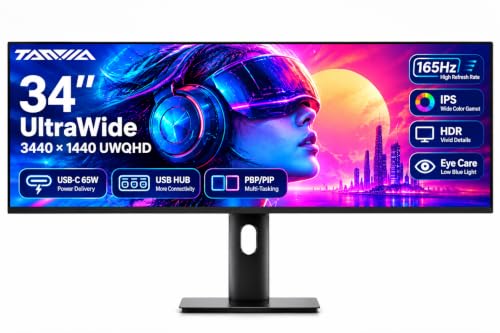 | 9.3PCKitHQ scoreView on Amazon |
06 | 9.2PCKitHQ scoreView on Amazon |
A closer look at each configuration
LG 34U640B-B 34-inch UltraWide WQHD FreeSync Curved Monitor
score
The 3440 x 1440 curved screen at 144Hz, Dual Controller KVM switch and USB-C with 65W charging define this LG configuration.
- Resolution
- 3440 x 1440
- Native refresh rate
- 144 Hz
- Screen size
- 34 in
- Curved screen
- Yes
- Ultrawide screen
- Yes
- USB-C
- Yes
- HDMI
- Yes
- DisplayPort
- Yes
- Weight
- 17 lb
- Warranty
- 1 Year Manufacturer
This LG configuration pairs a 34-inch 21:9 UltraWide WQHD screen at 3440 x 1440 with a 144Hz native refresh rate and a 5ms response time. The Dual Controller KVM switch controls two PCs with one keyboard and mouse, and files move between systems with drag-and-drop. USB-C carries display, data and up to 65W laptop charging through one cable, with DisplayPort, HDMI and two USB ports also on board. The Switch app splits the screen into up to 6 sections. HDR10 and up to 99% sRGB coverage are stated, and the tilt and height adjustable stand carries a 17 lb monitor under a 1 Year Manufacturer warranty.
Choose it if
- You control two PCs with one keyboard and mouse
- You want a 3440 x 1440 curved screen at 144Hz
Consider another if
- You need 90W laptop charging from USB-C
- You need a 165Hz native refresh rate
Samsung 34-inch ViewFinity (S65TC) Ultra-WQHD 1000R Curved Computer Monitor
score
The 1000R curved 34-inch screen, Thunderbolt 4 with 90W charging and built-in speakers define this Samsung configuration.
- Resolution
- Ultra-WQHD
- Native refresh rate
- 100 Hz
- Screen size
- 34 in
- Curved screen
- Yes
- Ultrawide screen
- Yes
- Weight
- 17.9 lb
- Warranty
- 1 year manufacturer
This Samsung configuration pairs a 34-inch 1000R curved screen in 21:9 with a 100Hz native refresh rate, HDR10 and AMD FreeSync. Thunderbolt 4 carries data and 90W charging, with HDMI, DisplayPort and a USB3 hub on board, and a LAN port connects laptops without an Ethernet port. The KVM switch controls 2 sources with one keyboard and mouse, with split screen, Picture-in-Picture or Picture-by-Picture through Easy Setting Box software. Built-in speakers free desk space, and the height-adjustable stand adds swivel and tilt. The monitor weighs 17.9 lb under a 1 year manufacturer warranty.
Choose it if
- You want Thunderbolt 4 with 90W laptop charging
- You want built-in speakers and a LAN port
Consider another if
- You need a 144Hz native refresh rate
- You need USB-C charging above 90W
MSI Modern MD342CQPW 34-inch VA (UWQHD) Computer Monitor
score
The 3440 x 1440 VA screen at 120Hz, USB-C with 98W power delivery and KVM define this MSI configuration.
- Resolution
- 3440 x 1440
- Native refresh rate
- 120 Hz
- Screen size
- 34 in
- Panel
- VA
- Curved screen
- Yes
- Ultrawide screen
- Yes
- USB-C
- Yes
- HDMI
- Yes
- Weight
- 17.81 lb
- Warranty
- 3 Year Manufacturer
This MSI configuration pairs a 34-inch 21:9 UWQHD screen at 3440 x 1440 with a 120Hz native refresh rate and a VA panel. Adaptive-Sync is stated, a speaker is built in, and the stand adjusts in height with VESA mounting stated. The monitor weighs 17.81 lb under a 3 Year Manufacturer warranty. The 21:9 screen is stated to improve multi-tasking and broaden horizons.
Choose it if
- You want USB-C with 98W laptop charging
- You want a 3440 x 1440 VA screen at 120Hz
Consider another if
- You need a 144Hz native refresh rate
- You need the 165Hz refresh rate of the TANXJIA
MSI PRO MP341CQPHG E12 34-inch VA (UWQHD) Computer Monitor
score
The 3440x1440 VA screen at 120Hz, Type-C with 98W power delivery and KVM switch define this MSI configuration.
- Resolution
- 3440x1440
- Native refresh rate
- 120 Hz
- Screen size
- 34 in
- Panel
- VA
- Curved screen
- Yes
- Ultrawide screen
- Yes
- HDMI
- Yes
- DisplayPort
- Yes
- Weight
- 27.4 lb
- Warranty
- 3 Years
This MSI configuration pairs a 34-inch 21:9 UWQHD screen at 3440x1440 with a 120Hz native refresh rate, a VA panel and a 1500R curve. Type-C carries 98W power delivery with display and a KVM switch, with HDMI and DisplayPort also stated. Adaptive-Sync is stated, a speaker is built in, and the stand adjusts in height with VESA mounting stated. The monitor weighs 27.4 lb under a 3 Years warranty. The 1500R curve is stated for work and amusement.
Choose it if
- You want Type-C with 98W power delivery
- You want a 1500R curved VA screen at 120Hz
Consider another if
- You need a 144Hz native refresh rate
- You need USB-C charging above 98W
TANXJIA 34-inch Ultrawide Monitor
score
The 3440x1440 Fast IPS screen at 165Hz via DisplayPort, USB-C with 65W charging and KVM define this TANXJIA configuration.
- Resolution
- 3440x1440
- Native refresh rate
- 165 Hz
- Screen size
- 34 in
- Panel
- IPS
- Ultrawide screen
- Yes
- USB-C
- Yes
- HDMI
- Yes
- Weight
- 2.2 lb
This TANXJIA configuration pairs a flat 34-inch 21:9 Fast IPS screen at 3440x1440 with a 165Hz native refresh rate supported only via DisplayPort, plus 100% sRGB and 95% DCI-P3 color coverage. USB-C carries video, audio, data and 65W power delivery through one cable. The built-in hub adds two USB-A 3.0 ports and one USB-B port, and the KVM switch controls two devices with one keyboard and mouse. HDMI 2.0 and DP 1.4 are stated, with PBP and PIP modes for two sources at once and a built-in speaker.
Choose it if
- You want a 165Hz native refresh rate via DisplayPort
- You want 100% sRGB and 95% DCI-P3 color coverage
Consider another if
- You need 90W laptop charging from USB-C
- You need a curved 34-inch screen
PHILIPS 34B2U3600C 34-inch Curved WQHD Monitor
score
The 3440x1440 curved VA screen, Smart KVM switching and USB-C docking with 90W charging define this Philips configuration.
- Resolution
- 3440x1440
- Screen size
- 34 in
- Panel
- VA
- Curved screen
- Yes
- Ultrawide screen
- Yes
- USB-C
- Yes
- DisplayPort
- Yes
- Weight
- 22.95 lb
- Warranty
- 4 Year Manufacturer
This Philips configuration pairs a 34-inch curved 21:9 WQHD VA screen at 3440x1440 in a 1500R curve with 300 cd/m² brightness, 3500:1 contrast and 1.07 billion colors. The refresh rate reaches up to 120Hz via USB-C or DisplayPort. Smart KVM switches keyboard and mouse control between two devices with a triple-tap Ctrl shortcut, and PBP and PIP modes show two sources at once. USB-C docking carries video, data and up to 90W power delivery, with RJ-45 Ethernet on board. The monitor weighs 22.95 lb under a 4-year advance replacement warranty.
Choose it if
- You want Smart KVM with a triple-tap Ctrl shortcut
- You want a 4-year advance replacement warranty
Consider another if
- You need a 144Hz native refresh rate
- You need the 165Hz refresh rate of the TANXJIA
Make the choice for your setup
Compare the KVM switching
Every monitor in this guide carries a KVM switch for two devices with one keyboard and mouse. The LG Dual Controller adds drag-and-drop file movement between systems, and the Samsung adds split screen, Picture-in-Picture and Picture-by-Picture through Easy Setting Box software. The two MSI screens state KVM switching with Type-C display, and the TANXJIA KVM works through a hub with two USB-A 3.0 ports and one USB-B port. The Philips Smart KVM switches with a triple-tap Ctrl shortcut. Match the switch to the way the two machines share the desk: file movement, split views or a shortcut key. The LG switch is named Dual Controller, while the Philips switch is named Smart KVM.
Compare charging wattage
Charging wattage runs from 65W to 98W across this guide. The LG states up to 65W laptop charging through USB-C. The TANXJIA states 65W power delivery through USB-C. The Philips states up to 90W power delivery through USB-C. The Samsung states 90W charging through Thunderbolt 4. The two MSI screens state 98W power delivery, the highest figure here. On the LG, USB-C carries display and data with charging. On the TANXJIA, USB-C carries video, audio and data with charging. On the Philips, USB-C carries video and data with charging. The Samsung adds a LAN port for laptops without an Ethernet port. Check the laptop charging figure against the monitor figure before choosing. A related shortlist covers the Best 34 Inch Monitor for Xbox Series X.
Compare refresh rates and panels
Native refresh rates run from 100Hz to 165Hz in this guide. The Samsung states 100Hz, the two MSI screens state 120Hz, the LG states 144Hz, and the TANXJIA states 165Hz supported only via DisplayPort. The Philips states up to 120Hz via USB-C or DisplayPort. The two MSI screens state VA panels. The Philips states a VA panel. The TANXJIA states a Fast IPS panel. Compare panel type against refresh rate: the Fast IPS panel carries the highest rate here, while the VA panels carry 120Hz. The LG screen is 3440 x 1440 at 144Hz with HDR10 and up to 99% sRGB coverage. HDR10 is stated on the LG and the Samsung.
For a wider shortlist, start with 24 vs 27 Inch Monitor.
FAQ: 34 Inch Monitor with KVM
Which monitors here control two PCs with one keyboard and mouse?
All six do. The LG uses its Dual Controller KVM switch, the Samsung uses a KVM switch with split screen and Picture-in-Picture modes, the two MSI screens state KVM switching, the TANXJIA uses a KVM switch through its USB hub, and the Philips uses Smart KVM with a triple-tap Ctrl shortcut.
What USB-C charging wattage does each monitor state?
The LG and the TANXJIA state 65W power delivery. The Samsung states 90W charging through Thunderbolt 4. The Philips states up to 90W power delivery. The two MSI screens state 98W power delivery, the highest figure in this guide.
Which monitor has the longest warranty term stated?
The Philips states a 4-year advance replacement warranty, the longest term here. The two MSI screens state 3-year terms, and the LG and the Samsung state 1-year terms. Warranty means whole-device coverage, so read the stated term before choosing.


