
Best 32 Inch Monitor with KVM (2026): Our 6 Picks Ranked
 By Theo LangUpdated
The BenQ MA320UG 32” 4K 120Hz Nano Gloss Monitor for Mac suits a Mac user who runs two computers through one screen, with Smart KVM, dual Thunderbolt 4 ports and a 4K panel at 120Hz.
Your shortlist at a glance
PCKitHQ scores range from 9.2 to 9.8. See how we pick.
| Product and key specifications | Score and retailer |
|---|---|
01 | 9.8PCKitHQ scoreView on Amazon |
02 | 9.7PCKitHQ scoreView on Amazon |
03 | 9.6PCKitHQ scoreView on Amazon |
04 | 9.4PCKitHQ scoreView on Amazon |
05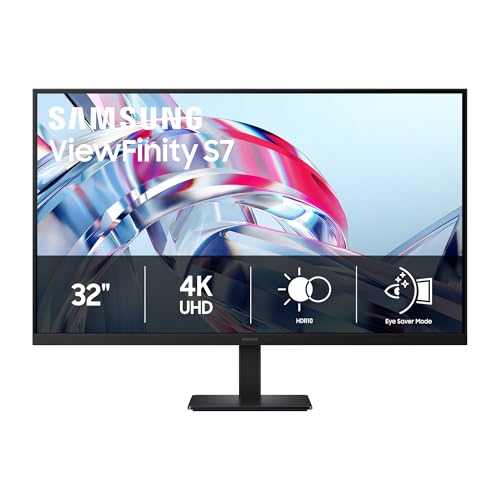 | 9.3PCKitHQ scoreView on Amazon |
06 | 9.2PCKitHQ scoreView on Amazon |
A closer look at each configuration
BenQ MA320UG 32-inch 4K Nano Gloss Monitor for Mac
score
A 32-inch 4K monitor at 120Hz with Smart KVM, dual Thunderbolt 4 ports and a Nano Gloss panel for Mac.
- Resolution
- 4K
- Native refresh rate
- 120 Hz
- Screen size
- 32 in
- USB-C
- Yes
- HDMI
- Yes
- Weight
- 35.73 lb
- Warranty
- 3 Years
This BenQ monitor runs 4K at 120Hz with dual Thunderbolt 4 ports, one delivering 96W and the other 15W, plus HDMI and USB-C ports and daisy-chain support. Smart KVM switches between two computers, and brightness and volume adjust from the Mac. The Nano Gloss panel carries a P3 color gamut, and the stand adjusts height, tilt, swivel and pivot. Weight is 35.73 lb, and warranty runs 3 years.
Choose it if
- You switch two computers through one screen with Smart KVM
- You connect a Mac over Thunderbolt 4 with 96W power delivery
Consider another if
- You need a 240Hz refresh rate for fast gaming
- You need a 6K resolution panel for fine detail
MSI MPG 321URXW 31.5-inch 4K UHD Gaming Monitor
score
A 31.5-inch 4K QD-OLED monitor at 240Hz with KVM, DisplayHDR True Black 400 and 99% DCI-P3 coverage.
- Resolution
- 3840 x 2160
- Native refresh rate
- 240 Hz
- Screen size
- 31.5 in
- Panel
- QD-OLED
- USB-C
- Yes
- HDMI
- Yes
- DisplayPort
- Yes
- Weight
- 26 lb
- Warranty
- 3 Year
This MSI monitor runs 3840 x 2160 at 240Hz with a 0.03ms response time on a QD-OLED panel with 10-bit color, 99% DCI-P3 and Delta E ≤2. DisplayHDR True Black 400 certification and up to 1000 nits peak brightness come with a 1500000:1 native contrast ratio. KVM 1.0 and PiP/PbP run through DisplayPort 1.4a, HDMI 2.1 and USB Type-C, with a USB hub and RGB lighting. Weight is 26 lb, and warranty runs 3 years.
Choose it if
- You play fast games on a 240Hz QD-OLED panel
- You switch two systems with KVM and PiP/PbP
Consider another if
- You need Thunderbolt 4 ports for a Mac setup
- You need a 6K panel for high-resolution work
GIGABYTE MO32U24 US
score
A 31.5-inch 4K QD-OLED monitor at 240Hz with Type-C KVM, FreeSync Premium Pro and G-SYNC compatibility.
- Resolution
- 3840x2160
- Native refresh rate
- 240 Hz
- Screen size
- 31.5 in
- Panel
- QD-OLED
- HDMI
- Yes
- Weight
- 23.4 lb
- Warranty
- 3 Year
This GIGABYTE monitor runs 3840 x 2160 at 240Hz with a 0.03ms response time on a QD-OLED panel, with AMD FreeSync Premium Pro and NVIDIA G-SYNC compatibility. Type-C KVM switches systems, and HDMI 2.1 carries the signal. GIGABYTE OLED Care runs in the background, and a graphene thermal film with four-sided ventilation cools the panel without a fan. Weight is 23.4 lb, and warranty runs 3 years.
Choose it if
- You play fast games at 240Hz with a 0.03ms response
- You switch systems through the Type-C KVM connection
Consider another if
- You need Thunderbolt 4 ports on the monitor
- You need a 6K resolution panel for fine detail
BenQ PD3226G 32-inch 4K UHD Monitor for Designers
score
A 32-inch 4K IPS monitor at 144Hz with a built-in KVM switch, 95% P3 and 90W Thunderbolt 4.
- Resolution
- 3840x2160
- Native refresh rate
- 144 Hz
- Screen size
- 32 in
- Panel
- IPS
- Weight
- 1 lb
- Warranty
- 3 Years
This BenQ monitor runs 3840 x 2160 at 144Hz on an IPS panel with 95% P3, 100% sRGB and Rec.709 coverage and factory-calibrated Delta E ≤ 2. A single Thunderbolt 4 port delivers up to 90W power and 40Gbps transfers, supports two 4K displays or one 8K display, and carries daisy-chain connections. The built-in KVM switch changes systems through the wireless Hotkey Puck, and the Nano Matte panel diffuses ambient light. Warranty runs 3 years.
Choose it if
- You calibrate color with Palette Master Ultimate software
- You switch two systems with the built-in KVM switch
Consider another if
- You need a 240Hz QD-OLED panel for fast gaming
- You need a 6K resolution panel for fine detail
Samsung 32-inch ViewFinity S7 (S70H) High-Resolution Monitor
score
A 32-inch 4K UHD monitor with HDR10, HDMI and DP ports, and KVM through Samsung Display Manager.
- Resolution
- 3840X2160
- Screen size
- 32 in
- HDMI
- Yes
- Weight
- 10.8 lb
- Warranty
- 1 Year
This Samsung monitor runs 4K UHD at 3840 x 2160 with HDR10 and a 178° wide viewing angle, with HDMI and DP ports. Samsung Display Manager gives access to split-screen setup, brightness adjustment, KVM, PIP/PBP and calibration. Eye Saver Mode is included. The 32-inch screen suits a desk where one display handles documents, video and split-screen work. Weight is 10.8 lb, and warranty runs 1 year.
Choose it if
- You want a 4K screen with HDR10 for everyday work
- You switch sources with KVM, PIP and PBP controls
Consider another if
- You need a 3-year warranty term
- You need a Thunderbolt 4 port on the monitor
ASUS ProArt PA32QCV 32-inch 6K DCI-P3 Thunderbolt 4 Monitor for Mac
score
A 31.5-inch 6K IPS monitor with Auto KVM, 98% DCI-P3, Calman Verified color and dual Thunderbolt 4.
- Resolution
- 6016 x 3384
- Screen size
- 31.5 in
- Panel
- IPS
- HDMI
- Yes
- DisplayPort
- Yes
- Weight
- 20.5 lb
- Warranty
- 3 years
This ASUS monitor runs 6016 x 3384 on a 31.5-inch IPS panel with LuxPixel AGLR, 98% DCI-P3 and 100% sRGB coverage and Calman Verified factory calibration at Delta E < 2. Dual Thunderbolt 4 ports deliver up to 96W power delivery with daisy-chaining, alongside HDMI 2.1, DisplayPort 1.4 and a built-in USB hub. Auto KVM switches between two connected laptops or PCs with one keyboard and mouse, and the M Model-P3 preset matches MacBook color. Warranty runs 3 years, with a 2-year extension on online registration.
Choose it if
- You edit color-critical work on a 6K panel
- You switch two laptops with the Auto KVM switch
Consider another if
- You need a larger screen than 31.5 inches
- You need a QD-OLED panel for deep blacks
Make the choice for your setup
KVM switching and connection types
Every monitor here switches between two systems, but the KVM setup differs. The BenQ MA320UG uses Smart KVM over dual Thunderbolt 4 ports, the ASUS ProArt uses Auto KVM over dual Thunderbolt 4, and the BenQ PD3226G uses a built-in KVM switch run from a wireless Hotkey Puck. The MSI uses KVM 1.0 with PiP/PbP, the GIGABYTE uses Type-C KVM, and the Samsung reaches KVM through Samsung Display Manager software. Thunderbolt 4 appears on the BenQ MA320UG, the BenQ PD3226G and the ASUS ProArt, while the MSI relies on DisplayPort and HDMI with USB-C, the GIGABYTE relies on DP and HDMI, and the Samsung uses HDMI and DP. Match the KVM route to the ports your two computers already have.
Resolution, panel type and refresh rate
All six monitors run 4K or higher, with the ASUS ProArt at 6016 x 3384 and the other five at 3840 x 2160 or 4K. The MSI and GIGABYTE QD-OLED panels run 240Hz with a 0.03ms response time. The BenQ PD3226G IPS panel runs 144Hz, and the BenQ MA320UG runs 120Hz. The BenQ PD3226G and the ASUS use IPS panels, and the BenQ MA320UG uses a Nano Gloss panel. The ASUS adds a 6K panel at 6016 x 3384, and the Samsung pairs 4K with HDR10 and a 178° wide viewing angle. Choose the refresh rate and panel your work actually uses. Shoppers with a related need can compare our guide to the Best 32 Inch Monitor OLED.
Color coverage and calibration
Color figures differ across the six monitors. The ASUS ProArt carries 98% DCI-P3 and 100% sRGB with Calman Verified factory calibration at Delta E < 2, and the BenQ PD3226G carries 95% P3 and 100% sRGB with factory-calibrated Delta E ≤ 2 and Palette Master Ultimate software calibration. The MSI carries 99% DCI-P3 with Delta E ≤2 and DisplayHDR True Black 400. The BenQ MA320UG names a P3 color gamut with Mac color matching, and the Samsung pairs 4K with HDR10. The GIGABYTE QD-OLED panel matches the MSI at 240Hz, and both sit above the 144Hz BenQ PD3226G. Compare the named coverage figures directly, since only the figures each monitor documents can be compared.
Comparing more options? See 24 vs 27 Inch Monitor.
FAQ: 32 Inch Monitor with KVM
Which of these monitors have a built-in KVM switch?
All six do. The BenQ MA320UG uses Smart KVM, the ASUS ProArt uses Auto KVM, and the BenQ PD3226G uses a built-in KVM switch with a Hotkey Puck. The MSI uses KVM 1.0, the GIGABYTE uses Type-C KVM, and the Samsung reaches KVM through Samsung Display Manager.
What refresh rates do these 32-inch monitors run at?
The MSI and GIGABYTE QD-OLED monitors run 240Hz with a 0.03ms response time. The BenQ PD3226G runs 144Hz, and the BenQ MA320UG runs 120Hz. The ASUS ProArt and the Samsung ViewFinity S7 are compared here on resolution, panel type and color coverage.
Which monitors connect over Thunderbolt 4?
The BenQ MA320UG has dual Thunderbolt 4 ports with 96W and 15W power delivery. The BenQ PD3226G has one Thunderbolt 4 port with up to 90W power delivery and 40Gbps transfers. The ASUS ProArt has dual Thunderbolt 4 ports with up to 96W power delivery and daisy-chaining.


