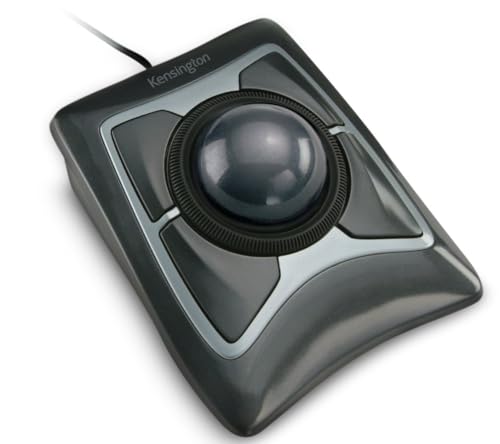
Best Trackball for Mac (2026): 4 Models Side by Side
 By Theo LangUpdated
Choose the Nulea Wireless Trackball Mouse Ergonomic 55mm Large Ball Ambidextrous for Mac users who want a 55mm ball with four DPI levels from 400 to 1600. It connects to up to three devices over Bluetooth or 2.4 GHz wireless, and its ambidextrous design swaps key functions for left- or right-handed use with a press of the mode switch. The Kensington Orbit adds a scroll ring, while the ELECOM Huge Plus adds ten programmable buttons.
Your shortlist at a glance
PCKitHQ scores range from 9.2 to 9.8. See how we pick.
| Product and key specifications | Score and retailer |
|---|---|
01 Best Overall Nulea Wireless Trackball Mouse Ergonomic 55mm Large Ball AmbidextrousSensor resolution: 1600 DPI | 9.8PCKitHQ scoreView on Amazon |
02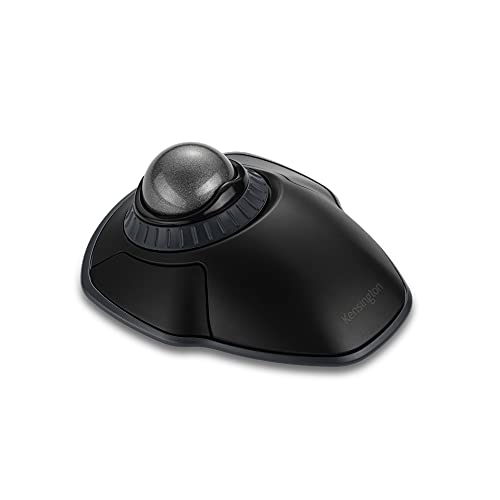 Second Pick Kensington Orbit Wireless Trackball | 9.6PCKitHQ scoreView on Amazon |
03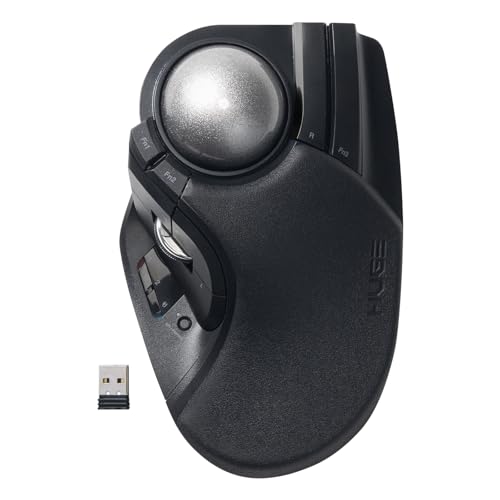 Also Consider ELECOM Huge Plus Wireless Trackball Mouse | 9.4PCKitHQ scoreView on Amazon |
04 Also Consider ELECOM IST Plus Wireless Trackball Mouse | 9.2PCKitHQ scoreView on Amazon |
A closer look at each configuration
Nulea Wireless Trackball Mouse Ergonomic 55mm Large Ball Ambidextrous
score
A 55mm ball, four DPI levels from 400 to 1600, and three-device Bluetooth or 2.4 GHz wireless define this ambidextrous Nulea trackball.
- Sensor resolution
- 1600 DPI
- Wireless
- Yes
- Connection
- Bluetooth or 2.4 GHz wireless
- Warranty
- 12 months
The Nulea runs a 55mm trackball for precise control, with four DPI levels at 400, 800, 1200 and 1600 for switching between browsing and detailed tasks. It connects to up to three devices over Bluetooth or 2.4 GHz wireless, and it works with Mac and PC. The ambidextrous design supports left- and right-handed use, with a mode switch that swaps key functions to match the dominant hand. A free spin scroll wheel and quiet clicks sit beside the large ball, and the rechargeable mouse suits long work hours in home offices and shared spaces. The warranty covers 12 months.
Choose it if
- You switch one trackball between three Mac devices
- You want a 55mm ball with four DPI levels
Consider another if
- You need a scroll ring for moving through pages
- You need a wired USB-C connection option
Kensington Orbit Wireless Trackball
score
A scroll ring, a 40mm ball, four DPI levels, and dual 2.4 GHz and Bluetooth wireless define this Kensington trackball.
- Wireless
- Yes
- Connection
- 2.4 GHz and Bluetooth
- Warranty
- 3 year
The Kensington Orbit pairs a 40mm ball with a scroll ring that spins to move up and down web pages or documents. Four DPI settings at 400, 800, 1200 and 1600 adjust cursor speed for precision editing or casual browsing. Dual wireless covers 2.4 GHz and Bluetooth 3.0 and LE with 128-bit AES encryption, and the ambidextrous design works for right- and left-handed users. Free KensingtonKonnect software assigns functions and shortcuts to the buttons and adjusts cursor and scrolling speed. A detachable wrist rest cushions the hand and wrist, and optical tracking delivers precise cursor movement. Mac and PC compatible, with a 3-year warranty.
Choose it if
- You scroll long pages with a ring
- You want a detachable wrist rest included
Consider another if
- You need a 55mm ball like the Nulea
- You need a wired USB-C connection option
ELECOM Huge Plus Wireless Trackball Mouse
score
A 52mm ball, ten programmable buttons, tri-mode connection, and up to 5 months per charge define this ELECOM trackball.
- Wireless
- Yes
- Connection
- Bluetooth, 2.4GHz wireless, or wired USB-C
- Warranty
- 2 Year
The ELECOM Huge Plus runs a 52mm trackball for precise, fluid control, with ten programmable buttons for customizable shortcuts. Tri-mode connection covers Bluetooth, 2.4GHz wireless and wired USB-C, switching between up to three devices. Swappable MinebeaMitsumi steel bearings offer smooth rotation and can be swapped or upgraded to ruby units. The built-in rechargeable lithium-ion battery provides up to 5 months of use per charge, and the mouse keeps working while charging over USB-C with the included USB-C to USB-A cable. Silent clicks keep button operation quiet, and the mouse works with Windows, macOS, iPadOS, Android and ChromeOS. The warranty covers 2 years.
Choose it if
- You want ten programmable buttons for shortcuts
- You need Bluetooth, 2.4GHz and wired USB-C
Consider another if
- You need a 55mm ball like the Nulea
- You need a 3-year warranty like the Kensington
ELECOM IST Plus Wireless Trackball Mouse
score
A 36mm thumb ball, DPI from 100 to 4000, three onboard profiles, and dual wireless define this ELECOM trackball.
- Wireless
- Yes
- Connection
- Bluetooth LE and USB 2.4GHz wireless
- Warranty
- 1 Year
The ELECOM IST Plus uses a 36mm thumb-operated ball in an angled shape for a natural hand position. DPI runs from 100 to 4000 through free ELECOM Mouse Assistant software, and three onboard profiles save button assignments and DPI so settings carry between registered devices. Dual wireless covers Bluetooth LE and USB 2.4GHz, registering up to three devices for instant switching with a side button and LED channel indicator. Silent switches sit on every button, and a patented 360 degree ball support reduces friction and resists debris buildup. It works with Windows, macOS, ChromeOS, iOS, iPadOS and Android. The warranty covers 1 year.
Choose it if
- You save button and DPI settings across three profiles
- You want silent switches on every button
Consider another if
- You need a 55mm ball like the Nulea
- You need a 3-year warranty like the Kensington
Make the choice for your setup
Match ball size to your hand
Ball size sets how the trackball feels under your hand. The Nulea runs a 55mm ball, while the ELECOM Huge Plus runs a 52mm ball. The Kensington Orbit runs a 40mm ball with a hard surface shaped as a perfect sphere, and the ELECOM IST Plus runs a 36mm thumb-operated ball. The Nulea and Huge Plus balls measure 55mm and 52mm, while the IST Plus ball sits under the thumb in an angled shape. The Kensington ball pairs with a scroll ring, and the Nulea ball pairs with a free spin scroll wheel. The Kensington ball is 40mm and the IST Plus ball is 36mm, so the four sizes span 36mm to 55mm. Pick the size and control style that matches how you move the cursor.
Count connections and devices
Every trackball here connects wirelessly, but the mix differs. The Nulea connects to up to three devices over Bluetooth or 2.4 GHz wireless. The Kensington covers 2.4 GHz and Bluetooth 3.0 and LE, with 128-bit AES encryption. The ELECOM Huge Plus adds a third path with wired USB-C beside Bluetooth and 2.4GHz wireless, switching between up to three devices. The ELECOM IST Plus pairs Bluetooth LE with USB 2.4GHz wireless and registers up to three devices at once. Check the ports on your Mac and count the devices you switch between before choosing, since only the Huge Plus offers a wired connection. If that fits your setup better, see our guide to the Best USB Trackball.
Weigh buttons, DPI and battery
DPI range and buttons decide how much control you get. The Nulea and the Kensington each offer four DPI levels at 400, 800, 1200 and 1600. The ELECOM IST Plus adjusts DPI from 100 to 4000 through free ELECOM Mouse Assistant software and saves settings across three onboard profiles. The ELECOM Huge Plus carries ten programmable buttons, while the Kensington uses free KensingtonKonnect software to assign functions and shortcuts to its buttons. Battery figures differ too: the Huge Plus provides up to 5 months of use per charge from its built-in rechargeable battery, and the Nulea is rechargeable. Compare DPI, buttons and charging before you buy.
Before you decide, also read Best Ergo Trackball Mouse.
FAQ: Trackball for Mac
Do all four trackballs work with Mac?
Yes. The Nulea works with Mac and PC, and the Kensington is Mac and PC compatible. The ELECOM Huge Plus works with macOS, and the ELECOM IST Plus works with macOS too. The Huge Plus also works with iPadOS, while the IST Plus works with iPadOS and iOS.
What ball sizes do these trackballs have?
The Nulea has a 55mm ball, the ELECOM Huge Plus has a 52mm ball, the Kensington Orbit has a 40mm ball, and the ELECOM IST Plus has a 36mm ball. The IST Plus ball is thumb-operated in an angled shape, while the Nulea ball pairs with a free spin scroll wheel.
Which trackballs connect to three devices at once?
The Nulea, the ELECOM Huge Plus and the ELECOM IST Plus. The Nulea connects to up to three devices over Bluetooth or 2.4 GHz wireless. The Huge Plus switches between up to three devices over Bluetooth, 2.4GHz wireless or wired USB-C. The IST Plus registers up to three devices over Bluetooth LE and USB 2.4GHz wireless.