Best Pen Tablet for 3D Modeling (2026): Top 5 by the Specs
 By Theo LangUpdated
Choose the Wacom Intuos Pro Large for 3D modeling work that benefits from a large drawing surface and shortcut controls. Its 14.8 x 9.9 inch active area pairs with 10 customizable ExpressKeys and 2 mechanical dials, and the Pro Pen 3 offers 8192 pressure levels with tilt support. The tablet connects over Bluetooth or USB and weighs 1.46 lb.
Your shortlist at a glance
PCKitHQ scores range from 9.2 to 9.8. See how we pick.
| Product and key specifications | Score and retailer |
|---|---|
01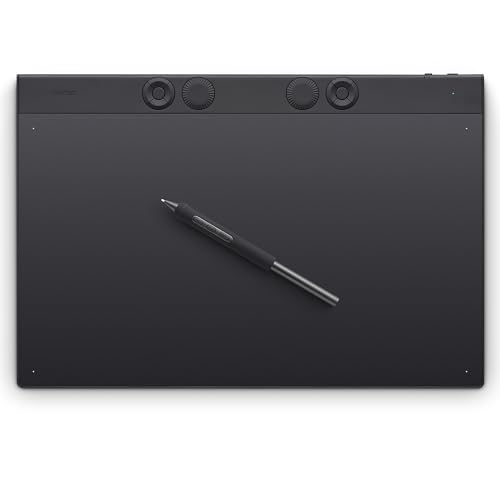 Best Overall Wacom Intuos Pro Large | 9.8PCKitHQ scoreView on Amazon |
02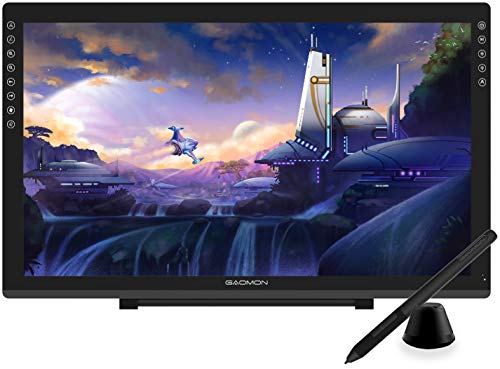 Second Pick GAOMON PD2200 Drawing Tablet | 9.7PCKitHQ scoreView on Amazon |
03 | 9.5PCKitHQ scoreView on Amazon |
04 | 9.3PCKitHQ scoreView on Amazon |
05 Also Consider HUION KAMVAS Pro 27 4K UHD Drawing Tablet | 9.2PCKitHQ scoreView on Amazon |
A closer look at each configuration
Wacom Intuos Pro Large
score
The 14.8 x 9.9 inch active area, Pro Pen 3 with 8192 pressure levels, and 10 ExpressKeys with 2 mechanical dials define this Wacom configuration.
- Active area
- 14.8 x 9.9
- Wireless
- Yes
- Weight
- 1.46 lb
- Warranty
- 2 year Manufacturer
The Wacom Intuos Pro Large has a 14.8 x 9.9 inch active area in a 16:9 format. The Pro Pen 3 offers 8192 pressure levels and tilt support, with a choice of slim, straight or flared grip. Ten customizable ExpressKeys and 2 mechanical dials sit at the top of the tablet. It connects by USB or Bluetooth, and the Bluetooth connection switches between multiple computers. The listed weight is 1.46 lb, and the warranty is a 2 year Manufacturer term.
Choose it if
- You want a 14.8 x 9.9 inch active area for modeling work
- You want Bluetooth and USB connections to multiple computers
Consider another if
- You need the 21.5-inch screen of the GAOMON PD2200
- You need the 27-inch screen of the HUION KAMVAS Pro 27
GAOMON PD2200 Drawing Tablet
score
The 21.5-inch full-laminated screen with 130% sRGB and a battery-free pen with 8192 pressure levels define this GAOMON display.
- Active area
- 476.64 x 268.11
- Weight
- 8.49 lb
- Warranty
- 1 year warranty under non human made damage
The GAOMON PD2200 is a 21.5-inch pen display with a full-laminated screen and 130% sRGB. Its display area measures 476.64 x 268.11 mm, and the battery-free AP32 pen offers 8192 pressure levels with tilt support. Eight touch shortcut keys are customizable in the GAOMON driver. The tablet is not a standalone tablet and must connect to a laptop or computer to work. It works with Windows 7/8/8.1 or above and Mac OS 10.12 or above. The listed weight is 8.49 lb, and the warranty is a 1 year warranty under non human made damage.
Choose it if
- You want a 21.5-inch screen for drawing directly on the display
- You want 8 touch shortcut keys and an adjustable stand
Consider another if
- You need the 14.8 x 9.9 inch active area of the Wacom Intuos Pro Large
- You need the 27-inch screen of the HUION KAMVAS Pro 27
VEIKK A15Pro Digital Drawing Tablet 10 x 6-inch Graphics Tablet
score
The 10 x 6 inch active area, 12 shortcut keys with 1 quick dial, and a battery-free pen with 8192 pressure levels define this VEIKK tablet.
- Active area
- 10x6
- Weight
- 2.01 lb
- Warranty
- 1 year
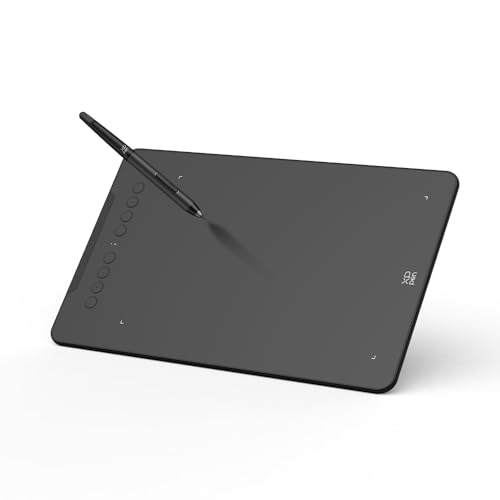
The VEIKK A15Pro has a 10 x 6 inch active area and a battery-free pen with 8192 levels of pressure sensitivity. The pen supports plus or minus 60 degrees of tilt after a firmware update. A quick dial and 12 customized express keys handle zooming the canvas, adjusting the brush and scrolling the page. The box includes 28 spare nibs, 1 pen holder and 1 artist glove. It is compatible with Mac 10.12 or above, Windows 11/10/8/7, Linux OS and Android 6.0 or above. The listed weight is 2.01 lb, and the warranty is 1 year.
Choose it if
- You want a 10 x 6 inch active area in a 2.01 lb tablet
- You want Mac, Windows, Linux and Android compatibility
Consider another if
- You need the 21.5-inch screen of the GAOMON PD2200
- You need the 14.8 x 9.9 inch active area of the Wacom Intuos Pro Large
Digital Drawing Tablet VEIKK A15Pro Graphics Pen Tablet 10 x 6-inch Graphics Tablet
score
The 10 x 6 inch active area, 12 shortcut keys with 1 quick dial, and a 1.32 lb body define this red VEIKK tablet.
- Active area
- 10x6
- Weight
- 1.32 lb
- Warranty
- 1 year
This red VEIKK A15Pro has a 10 x 6 inch active area and a battery-free pen with 8192 levels of pressure sensitivity. The pen supports plus or minus 60 degrees of tilt after a firmware update. A quick dial and 12 customized express keys handle zooming the canvas, adjusting the brush and scrolling the page. The box includes 28 spare nibs, 1 pen holder and 1 artist glove. It is compatible with Mac 10.12 or above, Windows 11/10/8/7, Linux OS and Android 6.0 or above. The listed weight is 1.32 lb, and the warranty is 1 year.
Choose it if
- You want a 10 x 6 inch active area in a 1.32 lb tablet
- You want a red tablet with Mac, Windows, Linux and Android compatibility
Consider another if
- You need the 21.5-inch screen of the GAOMON PD2200
- You need the 14.8 x 9.9 inch active area of the Wacom Intuos Pro Large
HUION KAMVAS Pro 27 4K UHD Drawing Tablet
score
The 27-inch 4K screen, PenTech 4.0 pens with 16384 pressure levels, and multi-touch gestures define this HUION display.
- Screen size
- 27 in
- Weight
- 17.64 lb
- Warranty
- 1 Year Warranty
The HUION KAMVAS Pro 27 has a 27-inch 4K screen. It covers 98% Adobe RGB and 3 color spaces: sRGB, Adobe RGB and DCI-P3. PenTech 4.0 supplies a standard pen and a slim pen, both activating with 2g of force, and the pens offer 16384 pressure levels with tilt auto-alignment. Multi-touch gestures cover swipe, pinch and rotate. The display is not a standalone product and connects by USB-C, with a classic connection option and a full-featured USB-C connection option. It is compatible with Windows 10 or later, Mac OS 10.12 or later, Android devices that support USB3.1 GEN1 and DP1.2. The listed weight is 17.64 lb, and the warranty is a 1 Year Warranty.
Choose it if
- You want a 27-inch screen for viewing 3D models from every angle
- You want multi-touch gestures for panning, zooming and rotating canvases
Consider another if
- You need the 14.8 x 9.9 inch active area of the Wacom Intuos Pro Large
- You need the 1.46 lb carrying weight of the Wacom Intuos Pro Large
Make the choice for your setup
Choose between a screen and a screenless tablet
The Wacom Intuos Pro Large and both VEIKK A15Pro tablets draw on a surface while the image appears on the connected computer monitor. The GAOMON PD2200 has a 21.5-inch screen, and the HUION KAMVAS Pro 27 has a 27-inch screen, so the drawing appears under the pen. A screen adds weight: the GAOMON PD2200 lists 8.49 lb and the HUION KAMVAS Pro 27 lists 17.64 lb, against 1.46 lb for the Wacom Intuos Pro Large, 2.01 lb for the blue VEIKK A15Pro and 1.32 lb for the red VEIKK A15Pro. A pen display suits work where drawing directly on the image matters.
Compare active area and screen size
The Wacom Intuos Pro Large has a 14.8 x 9.9 inch active area in a 16:9 format for multiple monitors and wide displays. Both VEIKK A15Pro tablets have a 10 x 6 inch active area. The GAOMON PD2200 has a display area of 476.64 x 268.11 mm on a 21.5-inch screen, and the HUION KAMVAS Pro 27 has a 27-inch screen. A larger active area gives more room for broad strokes, while a smaller area keeps hand movement short. Match the area to the desk space and to the monitor the tablet pairs with, and keep the active area figure separate from the overall tablet size. For a closely related choice, read our guide to the Best Pen Display for Vendor Events.
Check pressure levels, tilt and shortcut controls
The Wacom Intuos Pro Large pairs its Pro Pen 3 with 8192 pressure levels, tilt support and a choice of slim, straight or flared grip. The GAOMON PD2200 and both VEIKK A15Pro tablets also use 8192 pressure levels with tilt support: the GAOMON AP32 pen is battery-free, and the VEIKK pen supports plus or minus 60 degrees of tilt after a firmware update. The HUION KAMVAS Pro 27 uses PenTech 4.0 with 16384 pressure levels and tilt auto-alignment. For shortcuts, the Wacom has 10 ExpressKeys and 2 mechanical dials, the GAOMON has 8 touch shortcut keys, and each VEIKK A15Pro has 12 express keys and 1 quick dial.
Before you decide, also read Best Digital Pen Tablet.
FAQ: Pen Tablet for 3D Modeling
Which tablets in this guide have a built-in screen?
The GAOMON PD2200 has a 21.5-inch screen, and the HUION KAMVAS Pro 27 has a 27-inch 4K screen. The Wacom Intuos Pro Large and both VEIKK A15Pro tablets are graphics tablets that work with a connected computer monitor.
Which tablets in this guide offer 8192 pressure levels?
The Wacom Intuos Pro Large, the GAOMON PD2200 and both VEIKK A15Pro tablets offer 8192 pressure levels. The Wacom uses the Pro Pen 3, the GAOMON uses the battery-free AP32 pen, and each VEIKK uses a battery-free passive pen. The HUION KAMVAS Pro 27 uses PenTech 4.0 with 16384 pressure levels.
How does each tablet connect to a computer?
The Wacom Intuos Pro Large connects by USB or Bluetooth, and the Bluetooth connection switches between multiple computers. The GAOMON PD2200 must connect to a laptop or computer to work. Each VEIKK A15Pro connects through a type-C port. The HUION KAMVAS Pro 27 connects by USB-C.