
Best Oculink Egpu Enclosure (2026): 8 Picks Compared
 By Theo LangUpdated
The RGEEK OCuLink eGPU Dock PCIe 5.0 X4 128Gbps for External suits a laptop or mini PC owner who wants a PCIe 5.0 x4 OCuLink link, with bandwidth up to 128Gbps. That bandwidth decides this search: the RGEEK PCIe 4.0, VORZOKISPL, FVUUKOSIIT, UTLGAMENG and RIITOP docks run PCIe 4.0 at 64Gbps, while the AOOSTAR EG02 adds dual Thunderbolt 5 ports at up to 80Gbps beside its OCuLink PCIe 4.0 x4 interface.
Your shortlist at a glance
PCKitHQ scores range from 9.2 to 9.8. See how we pick.
| Product and key specifications | Score and retailer |
|---|---|
01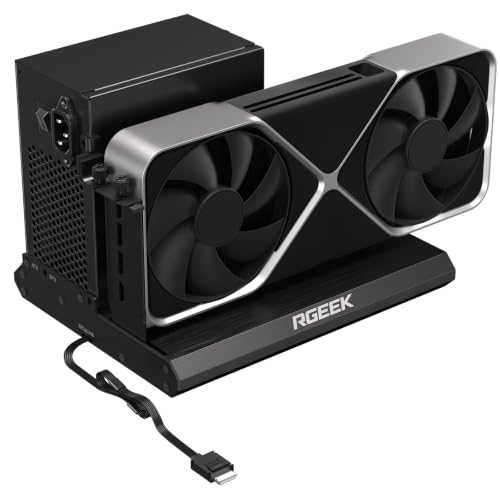 | 9.8PCKitHQ scoreView on Amazon |
02 Second Pick OCuLink eGPU Dock | 9.7PCKitHQ scoreView on Amazon |
03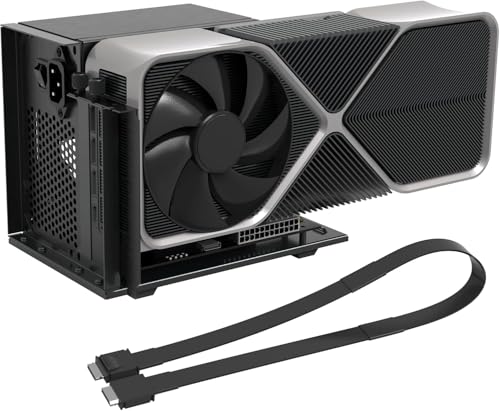 Also Consider OCuLink eGPU Dock | 9.6PCKitHQ scoreView on Amazon |
04 Also Consider PCIe 4.0 x4 64Gbps eGPU Dock | 9.5PCKitHQ scoreView on Amazon |
05 Also Consider OCuLink eGPU Dock for PC Laptop | 9.5PCKitHQ scoreView on Amazon |
06 Also Consider UTLGAMENG OCuLink eGPU Dock | 9.4PCKitHQ scoreView on Amazon |
07 | 9.3PCKitHQ scoreView on Amazon |
08 | 9.2PCKitHQ scoreView on Amazon |
A closer look at each configuration
RGEEK OCuLink eGPU Dock PCIe 5.0 X4 128Gbps for External Graphics Card eGPU
score
PCIe 5.0 x4 bandwidth up to 128Gbps and a full aluminum body define this dock.
- Interface
- PCIe 5.0 x4
- Warranty
- 2 year
This dock connects OCuLink to a PCIe x16 slot with PCIe 5.0 x4 bandwidth up to 128Gbps, backward compatible with 4.0 and 3.0. Full PCIe 5.0 speed needs an M.2 slot or a PCIe 5.0 to OCuLink adapter, not included. The full aluminum body supports heat dissipation. It supports NVIDIA and AMD cards, including the RTX 4090 and RX 7900, with no size restrictions, plus ATX, SFX and SFX-L power supplies. The graphics card and power supply are not included, and hot plugging is not supported.
Choose it if
- You want PCIe 5.0 x4 bandwidth up to 128Gbps
- You need a dock with no graphics card size restrictions
Consider another if
- You need hot plugging for cable changes
- You need the OCuLink adapter included in the package
OCuLink eGPU Dock
score
PCIe 4.0 x4 bandwidth up to 64Gbps and a 3-mode power switch define this RGEEK dock.
- Interface
- PCIe 4.0 x4
- Warranty
- 2 year
This RGEEK dock converts the SFF-8612 OCuLink interface to a PCIe x16 slot with PCIe 4.0 x4 transmission up to 64Gbps. The package includes the dock and a 60cm SFF-8611 cable, and the dock only works with that matched cable, custom-designed for this dock only. It uses a 24Pin power input and supports ATX, mATX and FLEX supplies, with a recommended supply at least 100W higher than the device draw. The ON/OFF/AUTO switch enables synchronous power with the host PC in AUTO mode. It is not hot-swappable.
Choose it if
- You want PCIe 4.0 x4 bandwidth up to 64Gbps
- You want AUTO power on and off with your host PC
Consider another if
- You need a cable that works with other docks
- You need hot swapping for cable changes
OCuLink eGPU Dock
score
A 50cm shielded cable and LED indicators define this VORZOKISPL dock for OCuLink hosts.
- Interface
- PCIe 4.0
This VORZOKISPL dock works only with devices having a native OCuLink port, or an M.2 NVMe slot with an adapter sold separately, and it is not compatible with USB-C, USB4 or Thunderbolt. It converts OCuLink to PCIe x16 with PCIe 4.0 at 64Gbps. The package includes the enclosure, a 50cm SFF-8611 cable and 12 screws, while the graphics card and ATX power supply are not included. LED indicators, auto-start and forced modes, and an ATX power bracket are included. Its open-frame structure fits any graphics card size. No hot-plugging is allowed, and some assembly is required.
Choose it if
- Your host has a native OCuLink port
- You want LED indicators for monitoring the dock
Consider another if
- You need USB-C, USB4 or Thunderbolt support
- You need a dock that needs no assembly
PCIe 4.0 x4 64Gbps eGPU Dock
score
A 75cm shielded cable and an independent side bracket define this VORZOKISPL dock.
- Interface
- PCIe 4.0x4
This VORZOKISPL dock converts OCuLink to PCIe x16 with PCIe 4.0 x4 bandwidth at 64Gbps. The package includes the enclosure dock, a 75cm SFF-8611 cable and 12 screws, while the graphics card and power supply are not included. The 0.5mm thin cable carries full shielding and EMI suppression. An independent side bracket holds the ATX power supply and graphics card, and the open-frame design supports any graphics card size. Hot-plugging is not supported, only ATX power is supported, and the supply wattage should sit about 40 percent higher than the graphics card full load.
Choose it if
- You want a 75cm OCuLink cable for placement
- You want LED indicators and auto-start mode
Consider another if
- You need hot plugging for cable changes
- You need a power supply other than ATX
OCuLink eGPU Dock for PC Laptop
score
A 3D-printed ASA-GF frame and hidden rear cable routing define this FVUUKOSIIT dock.
- Interface
- PCIe 4.0
- Weight
- 0.77 lb
This FVUUKOSIIT dock converts OCuLink to PCIe x16 with PCIe 4.0 at 64Gbps. The package includes the enclosure, one 50cm SFF-8611 cable and 12 screws, while the graphics card and ATX power supply are not included. It works only with a native OCuLink port or an M.2 NVMe slot with an adapter sold separately, and not with USB-C, USB4 or Thunderbolt. The 3D-printed ASA-GF frame includes LED indicators, auto-start and forced modes, and an ATX power bracket. Power cables route hidden at the rear. No hot-plugging is allowed, and some assembly is required. The dock weighs 0.77 lb.
Choose it if
- You want a 0.77 lb dock for a portable setup
- You want LED indicators and auto-start modes
Consider another if
- You need USB-C, USB4 or Thunderbolt support
- You need a dock that needs no assembly
UTLGAMENG OCuLink eGPU Dock
score
A shielded 50cm cable and an open frame with no length limits define this UTLGAMENG dock.
- Interface
- PCIe 4.0 x4
This UTLGAMENG dock converts OCuLink to PCIe x16 with PCIe 4.0 x4 bandwidth at 64Gbps. The package includes the enclosure, a 50cm SFF-8611 cable and a user manual, while the graphics card and standard ATX power supply are not included. The 50cm cable carries metal shielding and EMI-shielded conductive polymer. It supports NVIDIA, AMD and Intel graphics cards with no length limits, and it works exclusively with a standard ATX power supply. The OCuLink interface does not support hot-plugging, so power off the device completely before connecting or disconnecting the cable.
Choose it if
- You want PCIe 4.0 x4 bandwidth up to 64Gbps
- You own a standard ATX power supply already
Consider another if
- You need hot plugging for cable changes
- You need a power supply other than ATX
AOOSTAR EG02 OCuLink Dock External GPU Enclosure tb5 Interface Graphics Dock Station for PCIe 4.0 x4 Graphics Cards
score
Dual Thunderbolt 5 ports and 140W upstream power delivery define this AOOSTAR dock.
- Interface
- PCIe 4.0 x4
- Power delivery
- 140 W
- Weight
- 2.47 lb
- Warranty
- 1 year
This AOOSTAR EG02 dock carries an Intel JHL9480 controller with dual Thunderbolt 5 ports supporting up to 80Gbps, along with an OCuLink PCIe 4.0 x4 interface. It supports up to 140W PD 3.1 power delivery through its upstream Thunderbolt 5 connection, and its downstream port provides up to 15W for compatible peripherals. It accommodates ATX and SFX supplies, and the included 6-pin-to-DC cable supports up to 150W at 12V and 12.5A. The dock weighs 2.47 lb. The package includes an 80cm Thunderbolt 5 cable and a 60cm 6-pin-to-DC cable, while the graphics card, power supply and OCuLink cable are not included.
Choose it if
- You want dual Thunderbolt 5 ports up to 80Gbps
- You want 140W power delivery to your host
Consider another if
- You need the OCuLink cable included
- You need a power supply included in the package
RIITOP OCuLink eGPU Dock 64Gpbs Oculink SFF-8612 External GPU Enclosure for PCIe 4.0 x16 Graphics Cards
score
RTX 50 series support and Mac OS compatibility define this RIITOP dock.
- Interface
- PCIe 4.0 x16
- Warranty
- 1 Year Manufacturer
This RIITOP dock supports NVIDIA RTX 50 series graphics cards and AMD RX 7000 series graphics cards, and it requires an available OCuLink SFF-8612 port, a PCIe 4.0 x16 graphics card and an ATX or SFX power supply. The open design places no restrictions on graphics card size. On Mac OS 10.13.4 and above it supports AMD graphics cards only, and it does not support NVIDIA on Mac OS. The OCuLink interface does not support hot-plugging. The package includes one OCuLink SF-8611 4i cable; the graphics card and power supply are not included.
Choose it if
- You want RTX 50 series graphics card support
- You use Mac OS with an AMD graphics card
Consider another if
- You need NVIDIA support on Mac OS
- You need hot plugging for cable changes
Make the choice for your setup
Match the link speed to your host
The RGEEK OCuLink eGPU Dock PCIe 5.0 X4 128Gbps for External runs PCIe 5.0 x4 with bandwidth up to 128Gbps, while the RGEEK PCIe 4.0, VORZOKISPL, FVUUKOSIIT, UTLGAMENG and RIITOP docks run PCIe 4.0 at 64Gbps. Full PCIe 5.0 speed on the RGEEK PCIe 5.0 dock needs an M.2 slot or a PCIe 5.0 to OCuLink adapter, which is not included. The AOOSTAR EG02 adds dual Thunderbolt 5 ports at up to 80Gbps beside its OCuLink PCIe 4.0 x4 interface. Every other dock here connects only through OCuLink, and the VORZOKISPL dock with the 50cm cable and the FVUUKOSIIT dock state they are not compatible with USB-C, USB4 or Thunderbolt. Pick the interface your host already carries, since the dock cannot add a port your machine does not have.
Plan the power supply and assembly
Every dock in this guide needs a power supply that is not included, and each one accepts a standard ATX unit. The RGEEK PCIe 5.0 dock supports ATX, SFX and SFX-L supplies, the RGEEK PCIe 4.0 dock uses a 24Pin ATX input and recommends a supply at least 100W higher than the device draw, and the AOOSTAR EG02 accepts ATX and SFX supplies. The VORZOKISPL dock with the 75cm cable and the UTLGAMENG dock use ATX power only, the VORZOKISPL dock with the 50cm cable and the FVUUKOSIIT dock use ATX power, and the VORZOKISPL and FVUUKOSIIT docks call for about 40 percent extra wattage. The VORZOKISPL dock with the 50cm cable and the FVUUKOSIIT dock also need some assembly of about 15 minutes, while the FVUUKOSIIT package includes a screwdriver. For a closely related choice, read our guide to the Best External GPU M.2.
Check the cable and the graphics card
The RGEEK PCIe 5.0 dock includes a 50cm SFF-8611 cable, the RGEEK PCIe 4.0 dock includes a 60cm SFF-8611 cable that only works with that dock, and the VORZOKISPL docks include 50cm and 75cm cables. The FVUUKOSIIT dock includes a 50cm cable, the UTLGAMENG dock includes a 50cm shielded cable, and the RIITOP dock includes an OCuLink SF-8611 4i cable, while the AOOSTAR EG02 does not include an OCuLink cable. Graphics cards are not included with any dock, and several docks place no size restrictions on the card, including the RGEEK PCIe 5.0 dock and the open-frame VORZOKISPL, FVUUKOSIIT and RIITOP docks. The UTLGAMENG dock supports graphics cards with no length limits.
Comparing more options? See Best External GPU Dock.
FAQ: Oculink Egpu Enclosure
Which dock supports PCIe 5.0 x4 bandwidth?
The RGEEK OCuLink eGPU Dock PCIe 5.0 X4 128Gbps for External supports PCIe 5.0 x4 with bandwidth up to 128Gbps. Full PCIe 5.0 speed needs an M.2 slot or a PCIe 5.0 to OCuLink adapter, which is not included. The RGEEK PCIe 4.0, VORZOKISPL, FVUUKOSIIT, UTLGAMENG and RIITOP docks run PCIe 4.0 at 64Gbps, and the AOOSTAR EG02 has an OCuLink PCIe 4.0 x4 interface.
Which dock adds Thunderbolt 5 ports?
The AOOSTAR EG02 adds dual Thunderbolt 5 ports supporting up to 80Gbps beside its OCuLink PCIe 4.0 x4 interface, using an Intel JHL9480 controller. It also supports up to 140W power delivery upstream and 15W downstream. The other docks connect only through OCuLink, and the VORZOKISPL dock with the 50cm cable and the FVUUKOSIIT dock state they are not compatible with USB-C, USB4 or Thunderbolt.
Do these docks include a power supply?
No. Every dock here needs a power supply that is not included. The RGEEK PCIe 5.0 dock supports ATX, SFX and SFX-L supplies, and the AOOSTAR EG02 accepts ATX and SFX supplies. The VORZOKISPL 75cm and UTLGAMENG docks use ATX power only, and the VORZOKISPL 50cm and FVUUKOSIIT docks use ATX power.

