
Best Egpu Enclosure with Nvidia (2026): Top 4 by the Specs
 By Theo LangUpdated
Choose the RGEEK OCuLink eGPU Dock PCIe 5.0 X4 128Gbps for External if your laptop or mini PC has an OCuLink port or M.2 slot and you want the 128Gbps link for an NVIDIA card such as the RTX 4090. The VORZOKISPL dock runs at 64Gbps on PCIe 4.0 x4, and the GOLDSOUN dock connects over a 40Gbps Thunderbolt 4 port with 85W charging. Pick the RGEEK when speed is the deciding factor.
Your shortlist at a glance
PCKitHQ scores range from 9.2 to 9.8. See how we pick.
| Product and key specifications | Score and retailer |
|---|---|
01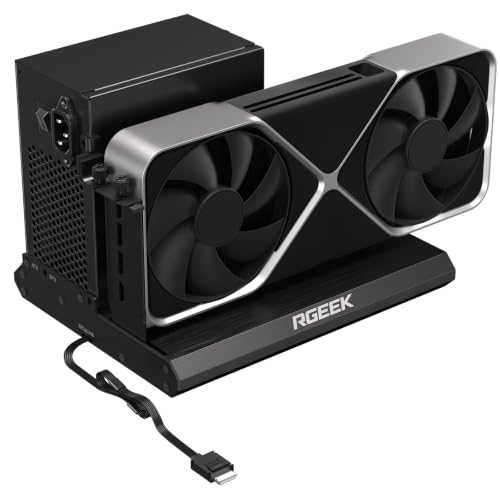 | 9.8PCKitHQ scoreView on Amazon |
02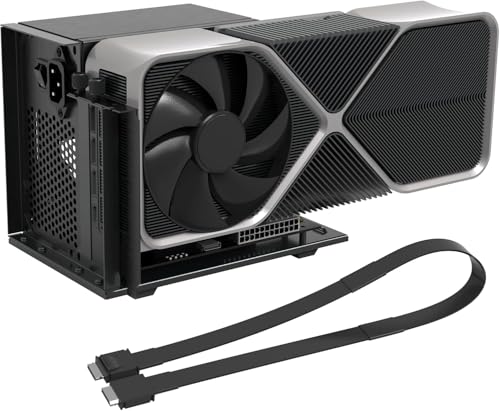 Second Pick OCuLink eGPU Dock | 9.6PCKitHQ scoreView on Amazon |
03 | 9.4PCKitHQ scoreView on Amazon |
04 Also Consider GOLDSOUN External eGPU Dock Compatible | 9.2PCKitHQ scoreView on Amazon |
A closer look at each configuration
RGEEK OCuLink eGPU Dock PCIe 5.0 X4 128Gbps for External Graphics Card eGPU
score
PCIe 5.0 x4 at 128Gbps, a full aluminum body, and no size restriction on the graphics card define this dock.
- Interface
- PCIe 5.0 x4
- Warranty
- 2 year
This RGEEK dock connects a graphics card over OCuLink at PCIe 5.0 x4 with up to 128Gbps of bandwidth, and it stays backward compatible with PCIe 4.0 and 3.0. Most existing OCuLink ports only support PCIe 4.0 with a maximum speed of 64Gbps, so reaching the full PCIe 5.0 speed calls for an M.2 slot or a PCIe 5.0 to OCuLink adapter, which is sold separately. The full aluminum body aids heat dissipation, and the factory-soldered cable avoids extra adapters with negligible signal loss. It supports mainstream NVIDIA and AMD graphics cards such as the RTX 4090 and RX 7900, and it suits gaming, 3D modeling, graphic rendering and AI computing. It takes ATX, SFX and SFX-L power supplies, and the graphics card and power supply are not included. A 2-year warranty covers the dock.
Choose it if
- You want PCIe 5.0 x4 at 128Gbps for an NVIDIA card
- You want an aluminum dock with no size restriction on graphics cards
Consider another if
- You need hot plugging when you connect the dock
- You need a power supply included in the box
OCuLink eGPU Dock
score
PCIe 4.0 x4 at 64Gbps, detachable ends, LED indicators and auto-start modes define this OCuLink dock.
- Interface
- PCIe 4.0 x4
This VORZOKISPL dock converts an OCuLink interface to PCIe x16 at PCIe 4.0 x4 with 64Gbps, and it works only with devices that have a native OCuLink port or a spare M.2 NVMe or desktop PCIe slot with an OCuLink adapter, which is sold separately. It is not compatible with USB-C, USB4 or Thunderbolt. The detachable ends aid portability, and the LED indicators monitor the connection, with auto-start and forced modes included. The 0.5mm ultra-thin cable is 19.7 inches long with EMI shielding, and the open-frame structure fits any GPU size. The package holds the SFF-8612 enclosure, a 50cm SFF-8611 cable and 12 screws, while the graphics card and ATX power supply are not included. Assembly takes about 15 minutes with a screwdriver, and hot plugging is not allowed.
Choose it if
- You want a PCIe 4.0 x4 OCuLink dock for a mini PC
- You want LED indicators and auto-start modes on the dock
Consider another if
- You need PCIe 5.0 x4 at 128Gbps
- You need a USB-C, USB4 or Thunderbolt connection
External eGPU Enclosure
score
Thunderbolt 4 with 85W charging, an included 240W power supply and a carrying case define this compact enclosure.
- Wattage
- 240 W
- Interface
- Thunderbolt 4
- Power delivery
- 85 W
- Warranty
- 1 Years
This RIGSTON enclosure connects over Thunderbolt 4 and 3 or USB4, and the kit includes the enclosure box, a 240W external power supply, a Thunderbolt 4 cable, an 8-pin PCIe power cable and a custom carrying case. One Thunderbolt port charges at 85W and a second at 15W, with a DP port included, and it supports PCIe 3.0 x16 data transfer. It fits most NVIDIA and AMD graphics cards up to 205mm long, 150mm high and 55mm wide, and it supports Windows 10 and 11 and Linux. The anodized aluminum shell is lightweight yet robust, and the carrying case suits laptops, mini PCs and gaming handhelds on the move. The graphics card is not included, and a 1-year warranty covers the enclosure.
Choose it if
- You want a Thunderbolt 4 dock with an included 240W power supply
- You want 85W charging for your laptop over one cable
Consider another if
- You need PCIe 5.0 x4 at 128Gbps
- You need room for a graphics card longer than 205mm
GOLDSOUN External eGPU Dock Compatible
score
A 40Gbps Thunderbolt 4 port with 85W charging, a USB-A port and a daisy chain port define this dock.
- Interface
- Thunderbolt 3/4 USB4
- Power delivery
- 85 W
- Warranty
- 30 DAYS
This GOLDSOUN dock connects over Thunderbolt 3 and 4 or USB4, and its 40Gbps Thunderbolt 4 port charges at 85W, with a USB-A port and a daisy chain port that let it serve as a hub for external devices. The officially certified JHL7440 controller module supports NVIDIA cards including the RTX 50 series 5090 D, 5080, 5070 Ti and 5070, and AMD cards including the RX 7000 series, for gaming, AI training and inference, 3D modeling and rendering. It suits NUCs, laptops and gaming machines with USB4, Thunderbolt 3 or Thunderbolt 4 interfaces and Windows 10 or 11. The ATX power supply and graphics card are not included, and a 30-day warranty covers the dock.
Choose it if
- You want a Thunderbolt 4 dock with 85W charging and USB-A
- You want JHL7440 support for RTX 50 series graphics cards
Consider another if
- You need an ATX power supply included in the box
- You need PCIe 5.0 x4 at 128Gbps
Make the choice for your setup
Match the connection to your device
Start with the port on your laptop, mini PC or handheld. The RGEEK and VORZOKISPL docks connect over OCuLink, so they need a native OCuLink port or an OCuLink adapter, which is sold separately. The RGEEK dock reaches full PCIe 5.0 speed with an M.2 slot or a PCIe 5.0 to OCuLink adapter, while the VORZOKISPL dock works with a spare M.2 NVMe or desktop PCIe slot. The VORZOKISPL dock is not compatible with USB-C, USB4 or Thunderbolt. The RIGSTON and GOLDSOUN docks connect over Thunderbolt 3 and 4 or USB4, so they suit devices with those ports, and a Type-C port without Thunderbolt 3 or 4 or USB4 support does not work with the RIGSTON enclosure. Check the port before you buy, because the wrong connection leaves the dock unusable.
Compare link speed and charging
Link speed separates these docks. The RGEEK dock runs at PCIe 5.0 x4 with up to 128Gbps, and reaching that speed calls for an M.2 slot or a PCIe 5.0 to OCuLink adapter, which is sold separately. The VORZOKISPL dock runs at PCIe 4.0 x4 with 64Gbps. The GOLDSOUN dock runs over a 40Gbps Thunderbolt 4 port, and the RIGSTON dock supports PCIe 3.0 x16 data transfer over Thunderbolt. Charging separates the Thunderbolt pair from the OCuLink pair: the RIGSTON and GOLDSOUN docks both charge a laptop at 85W over the host connection, while the RGEEK and VORZOKISPL docks take an ATX power supply for the graphics card. Weigh speed against charging when you choose.
Check card size and power before buying
Size and power decide whether a dock works with your card. The RGEEK and VORZOKISPL docks place no size restriction on graphics cards, and the VORZOKISPL open-frame structure fits any GPU size. The RIGSTON enclosure fits cards up to 205mm long, 150mm high and 55mm wide, so measure your card against those limits. Power differs too: the RIGSTON kit includes a 240W external power supply, while the RGEEK, VORZOKISPL and GOLDSOUN docks need a power supply of your own, with the VORZOKISPL dock calling for ATX power with 40% extra wattage. Warranty terms differ as well: the RGEEK dock carries a 2-year warranty, the RIGSTON enclosure a 1-year warranty, and the GOLDSOUN dock a 30-day warranty.
Before you decide, also read Best External GPU Dock.
FAQ: Egpu Enclosure with Nvidia
Which dock has the highest link speed here?
The RGEEK dock runs at PCIe 5.0 x4 with up to 128Gbps. The VORZOKISPL dock runs at PCIe 4.0 x4 with 64Gbps. The GOLDSOUN dock connects over a 40Gbps Thunderbolt 4 port. Reaching the full PCIe 5.0 speed calls for an M.2 slot or a PCIe 5.0 to OCuLink adapter, which is sold separately.
Which docks charge a laptop over the host cable?
The RIGSTON and GOLDSOUN docks both charge at 85W over the host connection, and the RIGSTON dock adds a second Thunderbolt port charging at 15W. The RGEEK and VORZOKISPL docks take an ATX power supply for the graphics card instead, so they suit setups where the laptop charges another way.
Which docks place no size restriction on graphics cards?
The RGEEK and VORZOKISPL docks place no size restriction on graphics cards, and the VORZOKISPL open-frame structure fits any GPU size. The RIGSTON enclosure fits cards up to 205mm long, 150mm high and 55mm wide, so check your card against those limits before you buy.

