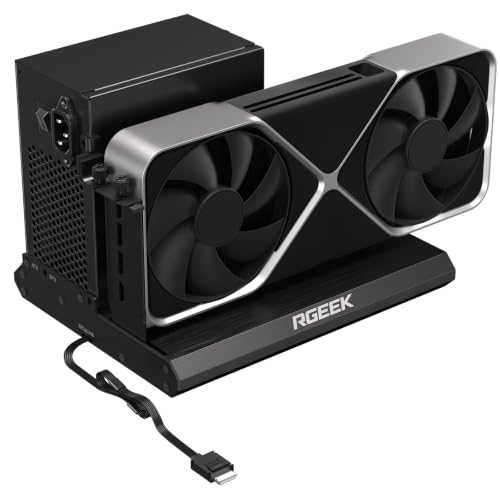
Best External GPU M.2 (2026): Our 4 Picks Ranked
 By Theo LangUpdated
Choose the 25 cm RGEEK M.2 NVME Pcie to OCuLink SFF-8612 Adapter with ReDriver if your motherboard has a spare PCIe 5.0 x4 M.2 NVMe slot and you want an OCuLink link for an external graphics card. Its ReDriver amplifier supports PCIe 5.0 x4 at 128 Gbps, and it stays compatible with PCIe 4.0 and 3.0. The three other adapters below differ in cable length, bandwidth, or included parts.
Your shortlist at a glance
PCKitHQ scores range from 9.2 to 9.8. See how we pick.
| Product and key specifications | Score and retailer |
|---|---|
01 Best Overall RGEEK M.2 NVME Pcie to OCuLink SFF-8612 Adapter | 9.8PCKitHQ scoreView on Amazon |
02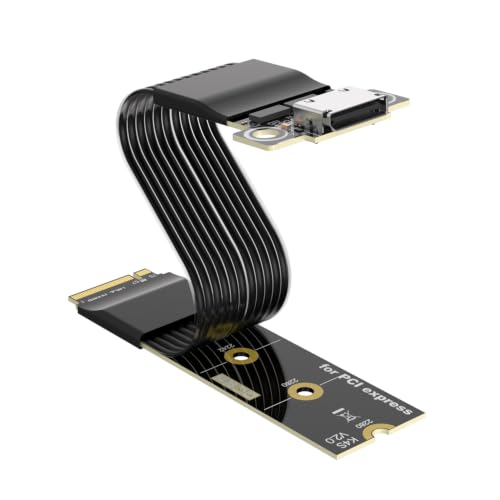 | 9.6PCKitHQ scoreView on Amazon |
03 Also Consider VORZOKISPL M.2 NVMe to OCuLink SFF-8612 Host Adapter | 9.4PCKitHQ scoreView on Amazon |
04 | 9.2PCKitHQ scoreView on Amazon |
A closer look at each configuration
RGEEK M.2 NVME Pcie to OCuLink SFF-8612 Adapter
score
The 25 cm RGEEK adapter pairs a PCIe 5.0 x4 link at 128 Gbps with a ReDriver amplifier for an OCuLink connection to an external graphics card.
- Interface
- PCIe 5.0 x4
- Warranty
- 2 year
This RGEEK adapter converts a motherboard M.2 NVMe M-key PCIe x4 port into a standard OCuLink SFF-8611/8612 interface, so it connects an external graphics card, a U.2 or U.3 SSD, or an eGPU docking station. The PCIe ReDriver signal amplifier supports PCIe 5.0 x4 with an effective bandwidth of 128 Gbps, and the adapter stays backward compatible with PCIe 4.0 and 3.0. It fits M.2 form factors in 2242, 2260, and 2280 sizes. The package includes the 25 cm adapter cable, and the adapter carries a 2-year warranty.
Choose it if
- You have a spare PCIe 5.0 x4 M.2 NVMe slot on your motherboard
- You want a 25 cm cable between the M.2 slot and the OCuLink device
Consider another if
- Your M.2 slot runs at PCIe x2 or accepts only SATA drives
- You need a cable shorter than 25 cm for a tight chassis layout
RGEEK M.2 NVME Pcie to OCuLink SFF-8612 Adapter
score
The 15 cm RGEEK adapter offers the same PCIe 5.0 x4 link at 128 Gbps in a shorter cable for closer OCuLink connections.
- Interface
- PCIe 5.0 x4
- Warranty
- 2 year
This RGEEK adapter is the 15 cm version of the PCIe 5.0 x4 M.2 to OCuLink adapter. It converts a motherboard M.2 NVMe M-key PCIe x4 port into a standard OCuLink SFF-8611/8612 interface for an external graphics card, a U.2 or U.3 SSD, or an eGPU docking station. The PCIe ReDriver signal amplifier supports PCIe 5.0 x4 with an effective bandwidth of 128 Gbps, and the adapter stays backward compatible with PCIe 4.0 and 3.0. It fits M.2 form factors in 2230, 2242, 2260, and 2280 sizes. The package includes the 15 cm adapter cable, and the adapter carries a 2-year warranty.
Choose it if
- Your motherboard has a spare PCIe x4 M.2 NVMe slot available
- You want a 15 cm cable for a short run to the OCuLink device
Consider another if
- Your only free M.2 slot is a PCIe x2 or SATA socket
- You need a 25 cm cable to reach the OCuLink device
VORZOKISPL M.2 NVMe to OCuLink SFF-8612 Host Adapter
score
The VORZOKISPL adapter runs PCIe 4.0 x4 at 64 Gbps through direct passthrough, with a 15 cm flexible cable and mounting pads.
- Interface
- PCIe 4.0 x4
- Weight
- 0.05 lb
- Warranty
- 2
This VORZOKISPL adapter delivers PCIe 4.0 x4 at up to 64 Gbps through direct PCIe passthrough, with no protocol conversion and no extra latency. It fits M.2 2230, 2242, 2260, and 2280 M-Key NVMe slots and works with Mini PCs, Steam Deck, Rog Ally, NAS servers, and small-form-factor builds. The built-in 15 cm flexible FPC cable bends around compact case interiors, and the OCuLink end includes mounting pads for a PCIe bracket, rear panel, or 3D-printed mount. It needs no driver installation. The package includes the adapter, a screwdriver, and an M.2 mounting screw, while the OCuLink SFF-8611 4i cable is sold separately. The adapter suits mid-range eGPU setups, and the maker recommends thermal pads or a small heatsink for best stability during long gaming sessions.
Choose it if
- You want a driver-free adapter for a Mini PC, Steam Deck, or Rog Ally
- Your build needs a 15 cm flexible cable that bends around tight interiors
Consider another if
- You need PCIe 5.0 x4 bandwidth above 64 Gbps
- You need the OCuLink SFF-8611 4i cable included in the box
Chenyang Oculink SFF-8612 to PCI-E 3.0/4.0 M.2 M-Key to SFF-8611 Host Adapter for eGPU/GPD Win Max2 External Graphics Card & SSD
score
The Chenyang adapter links an OCuLink SFF-8612 device to an M.2 slot at up to 32 Gbps and includes its cables.
- Interface
- PCI-E 3.0/4.0
- Weight
- 0.04 lb
This Chenyang adapter connects a device with an OCuLink SFF-8612 interface to an M.2 M-Key slot so it can add an external graphics card and SSD. It transmits PCI Express 4x signals using the NVMe protocol, with a data transfer rate of up to 32 Gbps and support for PCI-E 3.0 and 4.0. The package includes one OCuLink to NVMe adapter, one OCuLink cable, and one OCuLink to PCI-E x16 adapter. System requirements list Linux Kernel 4.3 or above and Windows 8.1, 8.1-64, 10, or 10-64. The adapter weighs 0.04 lb.
Choose it if
- Your device already has an OCuLink SFF-8612 interface for an eGPU
- You run Linux Kernel 4.3 or above, or Windows 8.1 or 10
Consider another if
- You need more than 32 Gbps of transfer rate
- You need an adapter that starts from an M.2 slot instead of OCuLink
Make the choice for your setup
Match the M.2 slot first
Every adapter here needs an M.2 NVMe M-key slot that runs at PCIe x4. The two RGEEK adapters work only with PCIe x4 M.2 NVMe slots and are incompatible with PCIe x2 and SATA M.2 sockets. The VORZOKISPL adapter is also not compatible with PCIe x2 slots, SATA-based M.2 sockets, or B-Key SSDs, and it asks buyers to verify the slot supports PCIe x4 NVMe before purchase. Check the slot type on the motherboard, Mini PC, or handheld before ordering, because a slot that runs at PCIe x2 will not carry the full link these adapters are built around. The Chenyang adapter takes the opposite direction: it starts from a device that already has an OCuLink SFF-8612 interface.
Compare bandwidth and cable length
The RGEEK adapters support PCIe 5.0 x4 with an effective bandwidth of 128 Gbps, and both stay backward compatible with PCIe 4.0 and 3.0. The VORZOKISPL adapter delivers PCIe 4.0 x4 at up to 64 Gbps through direct passthrough, with backward compatibility for PCIe 3.0 and 2.0. The Chenyang adapter supports PCI-E 3.0 and 4.0 with a data transfer rate of up to 32 Gbps. Cable length also differs: the top RGEEK adapter includes a 25 cm cable, while the second RGEEK adapter and the VORZOKISPL adapter each use a 15 cm cable. The Chenyang package includes an OCuLink cable and an OCuLink to PCI-E x16 adapter. Match the bandwidth and the cable length to the link and the layout in front of you. Shoppers with a related need can compare our guide to the Best Thunderbolt Egpu Box.
Check what comes in the box
The two RGEEK adapters each include one adapter cable, in 25 cm and 15 cm lengths, and each carries a 2-year warranty. The VORZOKISPL package includes the 15 cm FPC adapter, a screwdriver, and an M.2 mounting screw, but its OCuLink SFF-8611 4i cable is sold separately and must be purchased on its own. The Chenyang package includes one OCuLink to NVMe adapter, one OCuLink cable, and one OCuLink to PCI-E x16 adapter. The VORZOKISPL adapter also includes mounting pads on its OCuLink end for a PCIe bracket, rear panel, or 3D-printed mount, and it needs no driver installation. Read the package list for the adapter you choose before ordering the cable that connects it to the dock.
For a wider shortlist, start with Best External GPU Dock.
FAQ: External GPU M.2
Which adapter should I choose for PCIe 5.0 x4?
Choose the 25 cm RGEEK adapter if your motherboard has a spare PCIe 5.0 x4 M.2 NVMe slot. It supports PCIe 5.0 x4 at 128 Gbps with a ReDriver amplifier and stays backward compatible with PCIe 4.0 and 3.0. The 15 cm RGEEK adapter offers the same link in a shorter cable.
Do these adapters work with any M.2 slot?
No. The RGEEK adapters work only with PCIe x4 M.2 NVMe slots and are incompatible with PCIe x2 and SATA M.2 sockets. The VORZOKISPL adapter is also not compatible with PCIe x2 slots, SATA-based M.2 sockets, or B-Key SSDs. Verify the slot supports PCIe x4 NVMe before ordering.
What is included with the VORZOKISPL adapter?
The package includes the 15 cm FPC adapter, a screwdriver, and an M.2 mounting screw. The OCuLink SFF-8611 4i cable is not included and must be purchased separately. The adapter needs no driver installation and fits M.2 2230, 2242, 2260, and 2280 M-Key NVMe slots.