Best Monitor Touchscreen (2026): 5 Models Side by Side
 By Theo LangUpdated
If you tap cells in Excel and scroll timelines by hand, the CUNPU 27" 10-Point Touchscreen Monitor 1080P Nano IPS Business Office suits your desk: its 27-inch Nano IPS screen covers 100% sRGB, and its 10-point touch works with no drivers once you connect USB-B. The other four monitors trade screen size, resolution, and refresh rate against that combination, so the choice comes down to which of those three matters most to you.
Your shortlist at a glance
PCKitHQ scores range from 9.2 to 9.8. See how we pick.
| Product and key specifications | Score and retailer |
|---|---|
01 | 9.8PCKitHQ scoreView on Amazon |
02 | 9.7PCKitHQ scoreView on Amazon |
03 | 9.5PCKitHQ scoreView on Amazon |
04 | 9.3PCKitHQ scoreView on Amazon |
05 | 9.2PCKitHQ scoreView on Amazon |
A closer look at each configuration
CUNPU 27-inch 10-Point Touchscreen Monitor Nano Office
score
The 27-inch Nano IPS panel, 10-point touch, and 100% sRGB coverage define this CUNPU monitor for office work.
- Resolution
- FHD
- Native refresh rate
- 60 Hz
- Screen size
- 27 in
- Panel
- Nano IPS
- Touchscreen
- Yes
- HDMI
- Yes
- Weight
- 9.81 lb
This CUNPU monitor pairs a 27-inch Nano IPS panel with FHD resolution, a 60 Hz refresh rate, 100% sRGB coverage, and a 178-degree viewing angle. Its 10-point touchscreen supports pinch-to-zoom and two-finger rotate, and touch works through the USB-B connection. HDMI and VGA ports cover PCs, laptops, and workstations, while the 100 by 100 mm VESA mount and tilt adjustment set the screen angle. HDR10 mode is included, and the panel has 1000:1 contrast, 220 cd/m2 brightness, and 16.7 million colors. The monitor weighs 9.81 lb. Touch-to-wake on macOS is not supported.
Choose it if
- You want a 27-inch Nano IPS touchscreen for office work
- You connect a PC or laptop over HDMI and USB-B
Consider another if
- You need the 100Hz refresh rate of the FYHXele
- You need a 24-inch screen for a smaller desk
FYHXele 24-inch Touchscreen Monitor
score
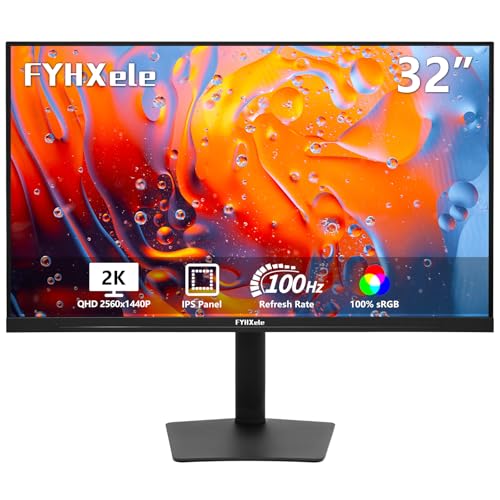
The 24-inch IPS panel at 100Hz with 10-point touch and FreeSync defines this FYHXele monitor.
- Resolution
- FHD 1080P
- Native refresh rate
- 100 Hz
- Screen size
- 24 in
- Panel
- IPS
- Touchscreen
- Yes
- HDMI
- Yes
This FYHXele monitor has a 24-inch IPS panel with FHD 1080P resolution, a 100 Hz refresh rate, and a 178-degree viewing angle. Its 10-point touchscreen works with a finger or a capacitive pen, and the screen supports a 180-degree horizontal flip for angle adjustment. HDMI, DP, and USB ports connect PCs and other devices, and the 100 by 100 mm VESA design supports wall mounting. FreeSync addresses stuttering and ghosting on the game screen.
Choose it if
- You want a 24-inch IPS touchscreen at 100Hz
- You connect over HDMI, DP, or USB
Consider another if
- You need the 27-inch screen of the CUNPU
- You need the 2560x1440 resolution of the Pisichen
CUNPU 24-inch 10-Point Touchscreen Monitor Office Warehouse
score
The 24-inch IPS panel at 75Hz with 10-point touch and a 1-year warranty defines this CUNPU monitor.
- Resolution
- FHD 1080P
- Native refresh rate
- 75 Hz
- Screen size
- 24 in
- Panel
- IPS
- Touchscreen
- Yes
- HDMI
- Yes
- Weight
- 9.15 lb
- Warranty
- 1 Year
This CUNPU monitor has a 24-inch IPS panel with FHD 1080P resolution, a 75 Hz refresh rate, and 100% sRGB coverage. Its 10-point capacitive touchscreen supports zoom, annotation, and navigation by finger gestures, with no drivers required. HDMI, VGA, and USB-B ports connect PCs, laptops, and industrial workstations, and touch requires the USB-B and HDMI connection. The tilt range runs from minus 5 degrees to 20 degrees, and the 100 by 100 mm VESA mount fits wall mounting. HDR10 is included, and the monitor weighs 9.15 lb with a 1-year warranty. Touch on macOS is not supported.
Choose it if
- You want a 24-inch IPS touchscreen for warehouse inventory work
- You connect a workstation over HDMI, VGA, and USB-B
Consider another if
- You need the 100Hz refresh rate of the FYHXele
- You need the 27-inch screen of the CUNPU 27-inch monitor
SKitphrati 18.5-inch Touchscreen Monitor HD
score
The 18.5-inch HD touchscreen at 75Hz and 6.2 lb defines this SKitphrati monitor for compact desks.
- Resolution
- 1366x768
- Native refresh rate
- 75 Hz
- Screen size
- 18.5 in
- Touchscreen
- Yes
- HDMI
- Yes
- Weight
- 6.2 lb
- Warranty
- 2 Year Manufactured
This SKitphrati monitor has an 18.5-inch touchscreen with 1366x768 resolution, a 75 Hz refresh rate, and 250 cd/m2 brightness. Its 10-point multi-touch screen supports smooth and accurate control by finger, and the display has a 95-degree viewing angle. Type-B, HDMI, and VGA ports connect PCs, laptops, and gaming consoles. The monitor weighs 6.2 lb, supports VESA wall mounting, and carries a 2-year manufactured warranty. Its smaller screen fits a compact desk.
Choose it if
- You want an 18.5-inch touchscreen at 6.2 lb
- You connect a PC, laptop, or console over HDMI or VGA
Consider another if
- You need FHD 1080P resolution for your spreadsheets
- You need the 24-inch screen of the FYHXele
Pisichen Touchscreen Monitor 27-inch 2K Gaming Monitor
score
The 27-inch 2K IPS panel at 100Hz with USB-C, HDMI, and DisplayPort defines this Pisichen monitor.
- Resolution
- 2560x1440
- Native refresh rate
- 100 Hz
- Screen size
- 27 in
- Panel
- IPS
- Touchscreen
- Yes
- USB-C
- Yes
- HDMI
- Yes
- DisplayPort
- Yes
This Pisichen monitor has a 27-inch IPS panel with 2560x1440 resolution and a 100 Hz refresh rate. Its 10-point touchscreen supports direct interaction for creative tasks, presentations, and interactive applications. USB-C, HDMI, and DisplayPort ports connect PCs and other devices, and the USB-C interface supports video input and data transfer in a single cable. Built-in speakers are included, and setup is plug and play across the HDMI and DisplayPort inputs. The 2K panel and 100 Hz refresh rate suit fast-paced content and gaming alongside office work.
Choose it if
- You want a 27-inch 2K touchscreen at 100Hz
- You connect over USB-C, HDMI, or DisplayPort
Consider another if
- You need a 24-inch screen for a smaller desk
- You need the 18.5-inch screen of the SKitphrati
Make the choice for your setup
Match screen size to your desk
The CUNPU 27-inch monitor and the Pisichen 27-inch monitor give you 27-inch screens in this guide, while the FYHXele and CUNPU 24-inch monitors sit in the middle and the SKitphrati 18.5-inch monitor takes the least space. A 27-inch screen shows more of a spreadsheet or timeline at once, and both 27-inch models pair that size with a touchscreen. The 24-inch models keep the same FHD 1080P resolution on a smaller panel, which suits a desk that already holds a second display. The 18.5-inch SKitphrati weighs 6.2 lb and has 1366x768 resolution, so it fits a compact desk but shows less detail than the FHD panels. Measure the space first, then pick the size that leaves room for a keyboard and mouse.
Compare resolution and refresh rate
Resolution and refresh rate split this guide into clear groups. The Pisichen stands alone at 2560x1440, while the CUNPU 27-inch, FYHXele, and CUNPU 24-inch monitors share FHD 1080P, and the SKitphrati lists 1366x768. The higher Pisichen resolution shows sharper text and finer detail on its 27-inch panel. For refresh rate, the FYHXele and Pisichen run at 100 Hz, the CUNPU 24-inch and SKitphrati at 75 Hz, and the CUNPU 27-inch at 60 Hz. A 100 Hz panel scrolls more smoothly than a 60 Hz panel, which matters when you move through long documents or fast-paced content. Weigh resolution against refresh rate: the Pisichen gives you both, the FYHXele pairs FHD with 100 Hz, and the CUNPU 27-inch pairs FHD with 60 Hz. For a closely related choice, read our guide to the Best USB C Monitor for MacBook.
Check ports and touch setup
Every monitor here has HDMI, and touch setup differs by model. The CUNPU 27-inch and CUNPU 24-inch monitors use a USB-B connection for touch, and the CUNPU 24-inch monitor states that touch needs USB-B plus HDMI. The FYHXele adds a DP port alongside HDMI and USB. The Pisichen adds USB-C and DisplayPort, with USB-C carrying video and data in one cable. The SKitphrati covers Type-B, HDMI, and VGA. Check the ports on your PC or laptop before you buy, and match the touch connection to the port your machine provides. The CUNPU 27-inch, FYHXele, CUNPU 24-inch, and SKitphrati monitors have VESA mounting, and the two CUNPU models add tilt adjustment for setting the screen angle.
Before you decide, also read 24 vs 27 Inch Monitor.
FAQ: Monitor Touchscreen
Which monitor has the highest resolution in this guide?
The Pisichen 27-inch monitor has 2560x1440 resolution, the highest here. The CUNPU 27-inch, FYHXele, and CUNPU 24-inch monitors list FHD 1080P, and the SKitphrati lists 1366x768. Pick the Pisichen when sharper text and finer detail on a 27-inch panel matter most.
Which monitors run at 100 Hz?
The FYHXele 24-inch monitor and the Pisichen 27-inch monitor both list a 100 Hz native refresh rate. The CUNPU 24-inch monitor and the SKitphrati list 75 Hz, and the CUNPU 27-inch monitor lists 60 Hz. Choose a 100 Hz model when smoother scrolling through documents and fast-paced content matters to you.
Do these monitors support touch on macOS?
The CUNPU 27-inch monitor does not support touch-to-wake on macOS, and the CUNPU 24-inch monitor states that macOS is not supported for touch. For the FYHXele, SKitphrati, and Pisichen monitors, check your Mac setup against their HDMI and USB connections before buying.