Best 1440p Editing Monitor (2026): Our 4 Picks Ranked
 By Theo LangUpdated
The KTC 32 Inch 2K Monitor 120Hz is the pick for editors who want a large 32-inch 1440p IPS screen with 109% sRGB color coverage. Its 120Hz panel and HDMI and DisplayPort connections suit editing and office work on a wide desk. The ETiansu adds a 180Hz panel at 24 inches, while the ASUS ProArt and ViewSonic ColorPro add USB-C docking at 27 inches.
Your shortlist at a glance
PCKitHQ scores range from 9.2 to 9.8. See how we pick.
| Product and key specifications | Score and retailer |
|---|---|
01 | 9.8PCKitHQ scoreView on Amazon |
02 | 9.6PCKitHQ scoreView on Amazon |
03 | 9.4PCKitHQ scoreView on Amazon |
04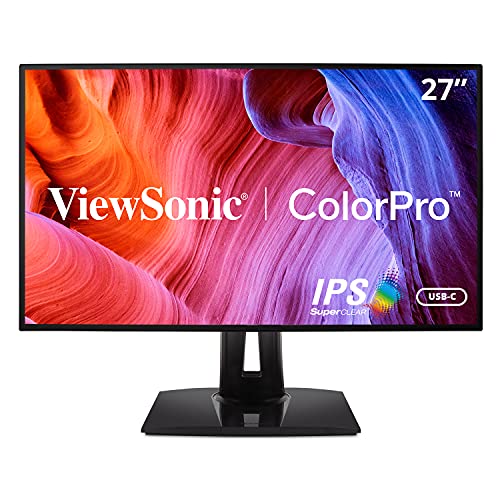 | 9.2PCKitHQ scoreView on Amazon |
A closer look at each configuration
KTC 32-inch 2K Monitor H32T13
score
A 32-inch 1440p IPS monitor at 120Hz with 109% sRGB coverage and HDMI and DisplayPort connections.
- Resolution
- 2560 x 1440
- Native refresh rate
- 120 Hz
- Screen size
- 32 in
- Panel
- IPS
- HDMI
- Yes
- DisplayPort
- Yes
- Warranty
- 3 Year Manufacturer
The KTC 32 Inch 2K Monitor 120Hz pairs a 32-inch IPS panel at 2560 x 1440 with a 120Hz refresh rate, 109% sRGB coverage, 16.7M colors, HDR, and 350 cd/m2 brightness. G-Sync and FreeSync support sits beside flicker-free technology and a low blue light mode. Connections include two HDMI 2.0 ports, one DisplayPort 1.4 port, and a headphone connection. The 16:9 panel runs at 350 cd/m2 brightness, and the ultra-thin bezel suits a multi-monitor desk. The stand tilts from -5 degrees to 15 degrees, the monitor mounts on VESA hardware, and the warranty runs 3 years.
Choose it if
- You want a 32-inch 1440p screen for editing
- You want 109% sRGB color coverage for your work
Consider another if
- You need a 180Hz panel like the ETiansu
- You need USB-C with 90W power like the ViewSonic
24-inch Gaming Monitor
score
A 24-inch 1440p IPS monitor at 180Hz with 100% sRGB and 95% DCI-P3 coverage and built-in speakers.
- Resolution
- 2560x1440
- Native refresh rate
- 180 Hz
- Screen size
- 24 in
- Panel
- IPS
- HDMI
- Yes
- DisplayPort
- Yes
- Warranty
- 36-month manufacturer's warranty
The ETiansu 24-inch QHD monitor pairs a 24-inch IPS panel at 2560 x 1440 with a 180Hz refresh rate through DisplayPort 1.4, a 1ms response time, and AMD FreeSync. Color coverage runs to 100% sRGB and 95% DCI-P3 with 178-degree viewing angles. The monitor has built-in speakers, HDMI 2.0 and DisplayPort 1.4 connections, VESA mounting, flicker-free DC dimming, and a Low Blue Light mode. The 178-degree viewing angles keep colors steady from the side. The box includes a stand, power cable, HDMI cable, DisplayPort cable, and a 36-month manufacturer warranty.
Choose it if
- You want a 180Hz panel on a 24-inch screen
- You want 100% sRGB and 95% DCI-P3 coverage
Consider another if
- You need a 32-inch screen like the KTC
- You need USB-C with 65W power like the ASUS
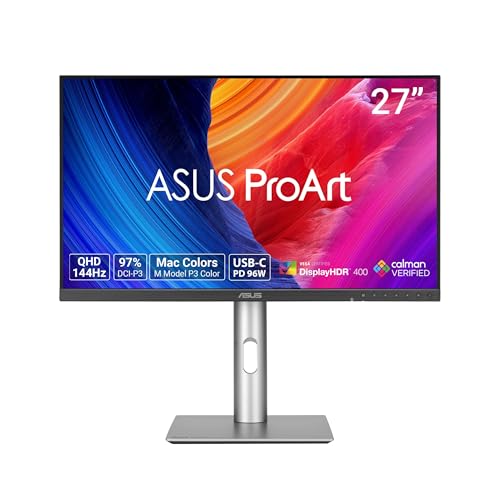
ASUS ProArt PA278CV 27-inch USB-C Professional Monitor
score
A 27-inch 1440p IPS monitor with Calman Verified color, Delta E under 2, and USB-C with 65W power delivery.
- Resolution
- 2560 x 1440
- Screen size
- 27 in
- Panel
- IPS
- USB-C
- Yes
- HDMI
- Yes
- DisplayPort
- Yes
- Weight
- 18.52 lb
- Warranty
- 3 years
The ASUS ProArt PA278CV pairs a 27-inch QHD IPS panel at 2560 x 1440 with Calman Verified color, Delta E under 2, 100% sRGB, and 100% Rec. 709 coverage. The USB-C port carries 65W power delivery and data over a single cable, and DisplayPort daisy-chaining connects up to four displays. The ergonomic stand pivots 90 degrees for a vertical setup. USB-C, HDMI, and DisplayPort cables come in the box with the power cord. The monitor also works as a USB hub, and a free 3-month Adobe Creative Cloud subscription comes with the purchase, valid to 8/31/2028. Coverage runs 3 years standard, plus 2 years extension available through online registration.
Choose it if
- You want Calman Verified color with Delta E under 2
- You want USB-C with 65W power delivery for a laptop
Consider another if
- You need a 180Hz panel like the ETiansu
- You need a 32-inch screen like the KTC
ViewSonic VP2768A 27-inch ColorPro Monitor 90W USB-C
score
A 27-inch 1440p IPS monitor at 60Hz with Pantone Validated color and USB-C with 90W power delivery.
- Resolution
- 2560 x 1440
- Native refresh rate
- 60 Hz
- Screen size
- 27 in
- Panel
- IPS
- USB-C
- Yes
- Weight
- 15.17 lb
- Warranty
- 3-Year limited warranty on parts, labor and backlight
The ViewSonic VP2768A pairs a 27-inch IPS panel at 2560 x 1440 with a 60Hz refresh rate, factory calibration to 100% sRGB and Rec. 709, Delta E under 2, and Pantone Validated color. The integrated USB-C docking hub carries 90W passthrough power and RJ45 Ethernet for a wired network over a single cable. The fully adjustable stand offers tilt, swivel, rotate, and height adjustment, and Flicker-Free technology and a Blue Light Filter are included. The warranty runs 3 years limited on parts, labor, and backlight.
Choose it if
- You want Pantone Validated color at 100% sRGB
- You want USB-C with 90W power delivery for a laptop
Consider another if
- You need a 120Hz panel like the KTC
- You need a 180Hz panel like the ETiansu
Make the choice for your setup
Screen size and color coverage
All four monitors run at 2560 x 1440 on IPS panels, so the choice turns on screen size and color coverage. The KTC has a 32-inch screen with 109% sRGB coverage, 16.7M colors, HDR, and 350 cd/m2 brightness. The ETiansu has a 24-inch screen with 100% sRGB and 95% DCI-P3 coverage and 178-degree viewing angles. The ASUS ProArt PA278CV has a 27-inch screen with 100% sRGB and 100% Rec. 709 coverage, Calman Verified color, and Delta E under 2. The ViewSonic VP2768A has a 27-inch screen with 100% sRGB and Rec. 709 coverage, Pantone Validated color, and Delta E under 2. The KTC panel runs at a 16:9 aspect ratio.
Refresh rate and connections
Refresh rate separates the gaming-leaning picks from the editing-leaning picks. The ETiansu runs at 180Hz through DisplayPort 1.4 with a 1ms response time and AMD FreeSync, and the KTC runs at 120Hz with G-Sync and FreeSync support. The ViewSonic VP2768A runs at 60Hz with Flicker-Free technology and a Blue Light Filter. The KTC supports G-Sync and FreeSync, which reduce motion blur and screen tearing during playback. For connections, the KTC has two HDMI 2.0 ports, one DisplayPort 1.4 port, and a headphone connection. The ETiansu has HDMI 2.0 and DisplayPort 1.4. The ASUS ProArt PA278CV has USB-C, HDMI, and DisplayPort. The ViewSonic VP2768A has USB-C with RJ45 Ethernet. The ETiansu ships with HDMI and DisplayPort cables. The ASUS ProArt PA278CV ships with USB-C, HDMI, and DisplayPort cables. A related shortlist covers the Best 4K Monitor Photo Editing.
Stands, USB-C docking and warranty
Stands and USB-C docking change how each monitor fits a desk. The KTC tilts from -5 degrees to 15 degrees and mounts on VESA hardware. The ETiansu mounts on VESA hardware, has built-in speakers, and ships with HDMI and DisplayPort cables. The ASUS ProArt PA278CV has an ergonomic stand with a 90-degree pivot, USB-C with 65W power delivery, and DisplayPort daisy-chaining for up to four displays. The ViewSonic VP2768A has a fully adjustable stand with tilt, swivel, rotate, and height adjustment, USB-C with 90W power delivery, and a 3-year limited warranty on parts, labor, and backlight. The KTC carries a 3-year manufacturer warranty, and the ETiansu carries a 36-month manufacturer warranty. ASUS coverage runs 3 years standard, plus 2 years extension available through online registration. The ETiansu box also holds a stand and a power cable.
For a wider shortlist, start with 24 vs 27 Inch Monitor.
FAQ: 1440p Editing Monitor
Which of these monitors connect to a laptop with USB-C?
The ASUS ProArt PA278CV uses USB-C with 65W power delivery, and the ViewSonic VP2768A uses USB-C with 90W power delivery. Both USB-C ports also carry data over the same cable. The KTC connects through two HDMI 2.0 ports and one DisplayPort 1.4 port, and the ETiansu connects through HDMI 2.0 and DisplayPort 1.4. The ViewSonic port also carries RJ45 Ethernet.
Which monitors carry color verification for editing work?
The ASUS ProArt PA278CV is Calman Verified with Delta E under 2 and 100% sRGB coverage. The ViewSonic VP2768A is Pantone Validated with Delta E under 2 and 100% sRGB coverage. The KTC gives 109% sRGB coverage, and the ETiansu gives 100% sRGB and 95% DCI-P3 coverage. Factory calibration keeps the color figures tied to the named monitor.
What screen sizes do these monitors have?
The KTC has a 32-inch screen. The ASUS ProArt PA278CV and the ViewSonic VP2768A each have a 27-inch screen. The ETiansu has a 24-inch screen, and all four monitors run at 2560 x 1440 resolution on IPS panels.