Best 1440p Monitor for Photo Editing (2026): 5 Picks Compared
 By Theo LangUpdated
You edit photos on a 27-inch screen and want colors you can trust, so choose the ASUS ProArt PA278CGRV 27 Inch 1440p USB-C Professional Monitor for your desk. Its 2560 x 1440 IPS panel covers 97% DCI-P3 and 100% sRGB with Calman Verified Delta E under 2, and USB-C carries up to 96W power delivery. The INNOCN, ASUS ProArt PA278QV, and two ViewSonic monitors trade size, refresh rate, and connections for different desks.
Your shortlist at a glance
PCKitHQ scores range from 9.2 to 9.8. See how we pick.
| Product and key specifications | Score and retailer |
|---|---|
01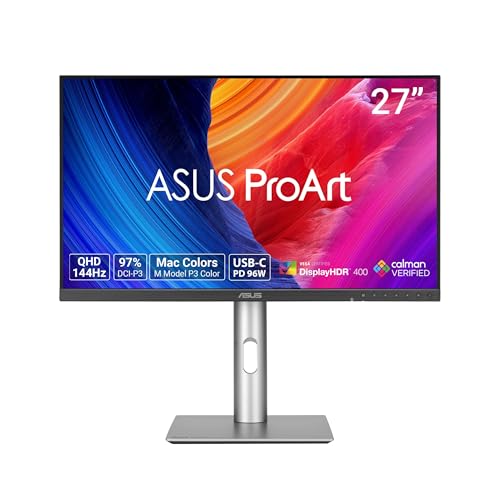 | 9.8PCKitHQ scoreView on Amazon |
02 | 9.7PCKitHQ scoreView on Amazon |
03 | 9.5PCKitHQ scoreView on Amazon |
04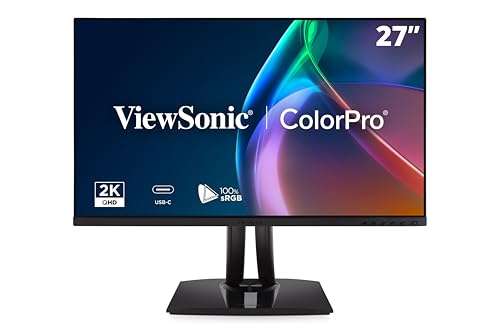 | 9.3PCKitHQ scoreView on Amazon |
05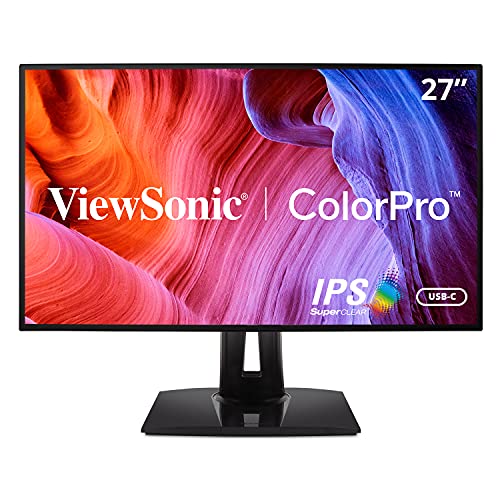 | 9.2PCKitHQ scoreView on Amazon |
A closer look at each configuration
ASUS ProArt PA278CGRV 27-inch USB-C Professional Monitor for Mac
score
The 27-inch 2560 x 1440 IPS panel at 144Hz pairs 97% DCI-P3 with Calman Verified Delta E under 2 and USB-C 96W power delivery.
- Resolution
- 2560 x 1440
- Native refresh rate
- 144 Hz
- Screen size
- 27 in
- Panel
- IPS
- USB-C
- Yes
- HDMI
- Yes
- DisplayPort
- Yes
- Weight
- 14.6 lb
- Warranty
- 3 years
This ASUS monitor has a 27-inch QHD (2560 x 1440) IPS panel with a 144Hz variable refresh rate and AMD FreeSync. Its 97% DCI-P3 and 100% sRGB gamut pairs with Calman Verified Delta E under 2 for color accuracy, and VESA DisplayHDR 400 certification covers brightness and contrast in compatible content. USB-C carries up to 96W power delivery, and HDMI and DisplayPort with daisy-chaining join a built-in USB hub. Auto KVM switches between two connected laptops or PCs with one keyboard and mouse. The P3 color temperature matches the color performance of a MacBook display. The monitor weighs 14.6 lb, and the 3-year warranty covers the monitor.
Choose it if
- You want a 27-inch 2560 x 1440 IPS panel at 144Hz
- You want USB-C with 96W power delivery for a laptop
Consider another if
- You need a 40-inch 21:9 screen like the INNOCN
- You need a 3440 x 1440 resolution like the INNOCN
INNOCN 40C1R Ultrawide Monitor 40-inch WQHD 3440 x FreeSync HDR400 21
score
The 40-inch 3440 x 1440 ultrawide ADS panel at 144Hz pairs 95% DCI-P3 with Delta E under 2 and PBP/PIP split-screen tools.
- Resolution
- 3440 x 1440
- Native refresh rate
- 144 Hz
- Panel
- ADS
- USB-C
- Yes
- HDMI
- Yes
- Warranty
- 1 year
This INNOCN monitor has a 40-inch 3440 x 1440 ADS panel with a 21:9 aspect ratio and a 144Hz refresh rate, or 100Hz through HDMI. Its 95% DCI-P3 gamut pairs with Delta E under 2 and a color calibration report, and HDR400 pairs with 500 nits brightness. PBP and PIP split-screen tools support multitasking for data analysis and photo and video editing. USB-C, two HDMI ports, and a 3.5mm audio jack cover laptops, Macs, phones, tablets, and game consoles. The monitor carries a 1-year warranty.
Choose it if
- You want a 40-inch 3440 x 1440 ultrawide panel
- You want 95% DCI-P3 with Delta E under 2
Consider another if
- You need a 27-inch screen like the ASUS ProArt
- You need a 2560 x 1440 resolution like the ASUS
ASUS ProArt PA278QV 27-inch Professional Monitor
score
The 27-inch 2560 x 1440 IPS panel pairs 100% sRGB with Calman Verified Delta E under 2 and DisplayPort, HDMI, and DVI-D connections.
- Resolution
- 2560 x 1440
- Screen size
- 27 in
- Panel
- IPS
- HDMI
- Yes
- DisplayPort
- Yes
- Weight
- 17 lb
- Warranty
- 3 years
This ASUS monitor has a 27-inch WQHD IPS display at 2560 x 1440 with 100% sRGB and 100% Rec. 709 coverage. Calman Verified Delta E under 2 supports color accuracy for photo editing, and the ProArt Preset and Palette adjust color, brightness, and black levels. DisplayPort, HDMI, DVI-D, and Mini DP ports join an integrated USB hub for laptops, desktops, and storage devices. Eye Care technology pairs a flicker-free backlight with a blue light filter and an anti-glare screen coating. The fully adjustable stand tilts, pivots, swivels, and adjusts in height. The monitor weighs 17 lb, and the 3-year warranty covers the monitor.
Choose it if
- You want a 27-inch 2560 x 1440 IPS panel
- You want 100% sRGB with Calman Verified color
Consider another if
- You need a 40-inch screen like the INNOCN
- You need a 3440 x 1440 panel like the INNOCN
ViewSonic VP2756A-2K 27-inch Monitor
score
The 27-inch 2560 x 1440 IPS panel at 120Hz pairs 100% sRGB with Pantone Validated color and a 90W USB-C docking connection.
- Resolution
- 2560 x 1440
- Native refresh rate
- 120 Hz
- Screen size
- 27 in
- Panel
- IPS
- USB-C
- Yes
- HDMI
- Yes
- DisplayPort
- Yes
- Weight
- 16 lb
- Warranty
- 3-Year limited warranty on parts, labor and backlight
This ViewSonic monitor has a 27-inch 2K (2560 x 1440) IPS display with a 120Hz refresh rate. Its 100% sRGB and Rec. 709 coverage pairs with factory calibration to Delta E under 2, and Pantone Validated certification covers the Pantone Matching System colors. A single USB-C cable carries data, audio, and video with 90W charging, and HDMI and DisplayPort with Daisy Chain support join a USB hub. The fully adjustable stand tilts, swivels, rotates, and adjusts in height. The monitor weighs 16 lb, and the 3-year limited warranty covers parts, labor, and backlight.
Choose it if
- You want a 27-inch 2560 x 1440 IPS panel at 120Hz
- You want 90W USB-C charging for a laptop
Consider another if
- You need a 144Hz refresh rate like the ASUS ProArt
- You need a 40-inch ultrawide screen like the INNOCN
ViewSonic VP2768A 27-inch ColorPro Monitor 90W USB-C
score
The 27-inch 2560 x 1440 IPS panel at 60Hz pairs 100% sRGB with Pantone Validated color and a 90W USB-C docking hub.
- Resolution
- 2560 x 1440
- Native refresh rate
- 60 Hz
- Screen size
- 27 in
- Panel
- IPS
- USB-C
- Yes
- HDMI
- Yes
- DisplayPort
- Yes
- Weight
- 15.17 lb
- Warranty
- 3-Year limited warranty on parts, labor and backlight
This ViewSonic monitor has a 27-inch 2K (2560 x 1440) IPS display with a 60Hz refresh rate. Its 100% sRGB and Rec. 709 coverage pairs with factory calibration to Delta E under 2, and Pantone Validated certification covers the Pantone Matching System colors. USB-C and RJ45 Ethernet form a docking hub with 90W passthrough power for laptop charging, and HDMI and DisplayPort with Daisy Chain support join the connection list. Flicker-Free technology and a Blue Light Filter sit alongside the fully adjustable stand. The monitor weighs 15.17 lb, and the 3-year limited warranty covers parts, labor, and backlight.
Choose it if
- You want a 27-inch 2560 x 1440 IPS panel at 60Hz
- You want Pantone Validated color with 100% sRGB
Consider another if
- You need a 144Hz refresh rate like the ASUS ProArt
- You need a 120Hz refresh rate like the ViewSonic VP2756A-2K
Make the choice for your setup
Compare resolution and panel size
Four monitors in this guide show 2560 x 1440 on 27-inch IPS panels: the ASUS ProArt PA278CGRV, the ASUS ProArt PA278QV, the ViewSonic VP2756A-2K, and the ViewSonic VP2768A. The INNOCN 40C1R shows 3440 x 1440 on a 40-inch ADS panel with a 21:9 aspect ratio, so it holds more horizontal pixels than the 2560 x 1440 panels. The 27-inch screens fit a standard desk, while the 40-inch ultrawide spans a wider workspace for side-by-side editing views. All five panels carry factory calibration to Delta E under 2. Match the resolution to the detail you edit and the screen size to the desk space you have.
Compare refresh rates and color
Refresh rates run 144Hz on the ASUS ProArt PA278CGRV and the INNOCN 40C1R, 120Hz on the ViewSonic VP2756A-2K, and 60Hz on the ViewSonic VP2768A. The INNOCN runs at 144Hz, or 100Hz through HDMI, while the ASUS pairs its 144Hz rate with AMD FreeSync variable refresh. Color coverage runs 97% DCI-P3 on the ASUS ProArt PA278CGRV and 95% DCI-P3 on the INNOCN, while the ASUS ProArt PA278QV and both ViewSonic monitors cover 100% sRGB. Calman Verified Delta E under 2 marks both ASUS monitors, and Pantone Validated color marks both ViewSonic monitors. Match the refresh rate to your motion needs and the gamut to your editing work. If that fits your setup better, see our guide to the Best Monitor Hz.
Compare connections and warranty
USB-C connections differ across this guide. The ASUS ProArt PA278CGRV carries USB-C with up to 96W power delivery, and both ViewSonic monitors carry 90W USB-C charging. The INNOCN 40C1R offers USB-C alongside two HDMI ports. The ASUS ProArt PA278QV connects through DisplayPort, HDMI, DVI-D, and Mini DP with an integrated USB hub. The ASUS ProArt PA278CGRV adds Auto KVM for switching between two laptops or PCs. The ViewSonic VP2768A adds RJ45 Ethernet. Warranty terms run 3 years on the ASUS monitors and both ViewSonic monitors, while the INNOCN carries a 1-year warranty. Check the port list against your laptop before choosing.
Before you decide, also read 24 vs 27 Inch Monitor.
FAQ: 1440p Monitor for Photo Editing
Which monitors here show 2560 x 1440 resolution?
The ASUS ProArt PA278CGRV, the ASUS ProArt PA278QV, the ViewSonic VP2756A-2K, and the ViewSonic VP2768A each show 2560 x 1440 on 27-inch IPS panels. The INNOCN 40C1R shows 3440 x 1440 on a 40-inch ADS ultrawide panel instead.
Which monitor here has the highest refresh rate?
The ASUS ProArt PA278CGRV and the INNOCN 40C1R each run at 144Hz. The ViewSonic VP2756A-2K runs at 120Hz, and the ViewSonic VP2768A runs at 60Hz. The INNOCN runs at 144Hz, or 100Hz through HDMI, on its 40-inch ultrawide panel.
Which monitors here use USB-C connections?
The ASUS ProArt PA278CGRV, the INNOCN 40C1R, the ViewSonic VP2756A-2K, and the ViewSonic VP2768A each connect through USB-C. The ASUS ProArt PA278QV connects through DisplayPort, HDMI, DVI-D, and Mini DP with a USB hub instead.