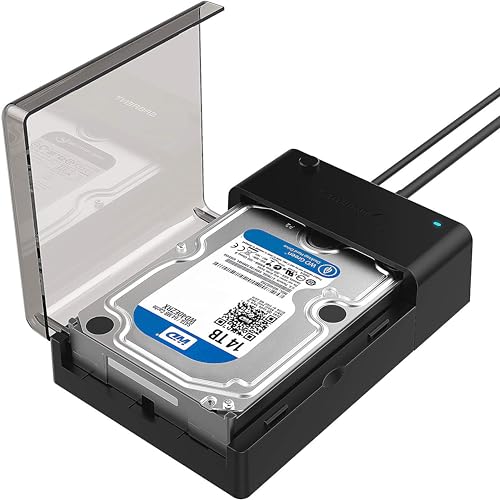
Best External Drive Enclosure 3.5 (2026): 6 Picks Compared
 By Theo LangUpdated
Choose the ORICO 3.5" External Hard Drive Enclosure SATA III to USB3.1 if you want a tool-free 3.5-inch enclosure for a SATA drive up to 20TB over USB 3.1 Type-C at up to 5Gbps with UASP. The CENMATE aluminum enclosure raises the ceiling to 30TB at 10Gbps, and the CENMATE 3-bay model holds three drives up to 20TB each.
Your shortlist at a glance
PCKitHQ scores range from 9.2 to 9.8. See how we pick.
| Product and key specifications | Score and retailer |
|---|---|
01 | 9.8PCKitHQ scoreView on Amazon |
02 | 9.7PCKitHQ scoreView on Amazon |
03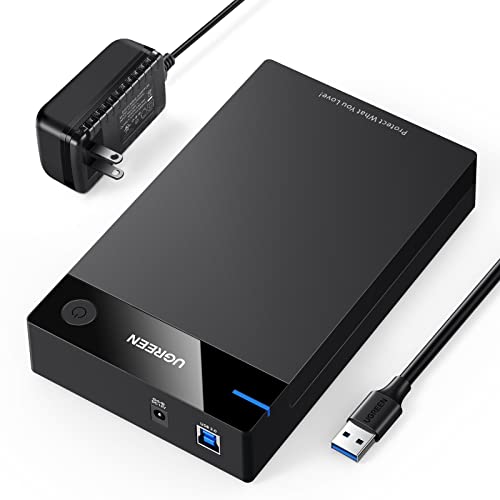 | 9.6PCKitHQ scoreView on Amazon |
04 | 9.4PCKitHQ scoreView on Amazon |
05 | 9.3PCKitHQ scoreView on Amazon |
06 Also Consider StarTech 3.5-inch SATA HDD Enclosure | 9.2PCKitHQ scoreView on Amazon |
A closer look at each configuration
ORICO 3.5-inch External Hard Drive Enclosure SATA III to USB3.1 Type C for HDD Tool-Free Installation Supports UASP and
score
Tool-free installation, a 20TB ceiling and a 5Gbps USB 3.1 Type-C link make this a simple home for a spare 3.5-inch SATA drive.
- Interface
- USB 3.1 Type C to SATA III
- Form factor
- 3.5 inch
- Weight
- 0.22 lb
- Warranty
- 1 year
The ORICO enclosure takes a 3.5-inch SATA hard drive up to 20TB and connects it over USB 3.1 Type-C to SATA III at up to 5Gbps, with UASP support. Installation needs no tools, and plug and play works with no drivers on Windows and Linux. A 12V power adapter supplies power, a shock-proof sponge protects the drive, and an LED shows drive activity. The enclosure weighs 0.22 lb and carries a 1-year warranty.
Choose it if
- You want tool-free installation for a 3.5-inch drive
- Your spare drive holds up to 20TB
Consider another if
- You need the 30TB ceiling of the CENMATE aluminum enclosure
- You need the 10Gbps link of the CENMATE aluminum enclosure
CENMATE Aluminum USB C 3.2 10Gbps Hard Drive Enclosure for 3.5-inch SATA HDD
score
A 10Gbps USB 3.2 link, a 30TB ceiling and an aluminum body suit a single large 3.5-inch desk drive.
- Interface
- USB 3.2
- Form factor
- 3.5 inches
- USB-C
- Yes
- Weight
- 0.57 lb
- Warranty
- 1 year
The CENMATE aluminum enclosure takes a 3.5-inch SATA hard drive up to 30TB and connects over USB 3.2 at up to 10Gbps under UASP control. The aluminum-alloy body and open-frame ABS tray are built to keep the drive from overheating. Hot swapping lets you change drives without powering off. It works with Windows 7 and above, Mac 8.6 and above, Linux, ChromeOS, PS5, PS4 and Xbox One, but not with IDE, mSATA or M.2 drives. The enclosure weighs 0.57 lb and carries a 1-year warranty.
Choose it if
- You want a 10Gbps USB 3.2 link for a drive
- Your drive holds up to 30TB
Consider another if
- You need three drive bays like the CENMATE 3-bay enclosure
- You need the 2-year warranty of the StarTech enclosure
UGREEN External Hard Drive Enclosure for 2.5/3.5-inch SATA HDD/SSD
score
A 2.5-inch and 3.5-inch bay, a 20TB ceiling and wide console support make this enclosure a flexible spare-drive dock.
- Interface
- USB 3.0 to SATA III
- Form factor
- 2.5/3.5-Inch
- Weight
- 1.04 lb
The UGREEN enclosure takes 2.5-inch and 3.5-inch SATA hard drives and SSDs up to 20TB and connects over USB 3.0 to SATA III at up to 5Gbps with UASP support. The ABS body holds the drive firmly, rubber strips guard against shocks, and heat emission holes aid heat dissipation. Installation is plug and play with no tools or driver. It works with Windows 11, 10, 8.1 and 7, Linux and MacOS 8.0 and above, and serves as extra storage for PS5, PS4, PS4 Pro, PS3, Xbox One and Xbox 360. The enclosure weighs 1.04 lb and ships with a 12V power adapter.
Choose it if
- You want one enclosure for 2.5-inch and 3.5-inch drives
- You want extra storage for a PS5 or Xbox
Consider another if
- You need the 10Gbps link of the CENMATE aluminum enclosure
- You need the 24TB ceiling of the RSHTECH enclosure
CENMATE 3 Bay Hard Drive Enclosure for 2.5“/3.5-inch SATA HDD/SSD
score
Three bays at up to 20TB each, hot swapping and tool-free loading suit a desktop with several drives in rotation.
- Interface
- USB 3.0
- Form factor
- 2.5/3.5 inches
- Weight
- 0.57 lb
- Warranty
- 1 year
The CENMATE 3-bay enclosure takes three 2.5-inch or 3.5-inch SATA hard drives or SSDs, up to 20TB for each drive, and connects over USB 3.0 at up to 5Gbps. Hot swapping lets you replace a drive without powering off, and loading needs no tools. It ships with a USB A/C 3.0 cable and works with Windows 7 and above, Mac 9.1 and above, and Linux. The enclosure weighs 0.57 lb and carries a 1-year warranty.
Choose it if
- You want three drive bays in one enclosure
- You swap drives without powering off
Consider another if
- You need the 10Gbps link of the CENMATE aluminum enclosure
- You need the eSATA port of the StarTech enclosure
RSHTECH Hard Drive Enclosure Upgraded Version 3.5-inch Aluminum USB C to SATA External Hard Drive Dock Case for 3.5-inch HDD & SSD up to
score
A 24TB ceiling, a 2-in-1 USB cable and a removable stand suit a 3.5-inch drive that moves between desk and shelf.
- Interface
- USB C to SATA
- USB-C
- Yes
- Warranty
- 18 months
The RSHTECH enclosure takes 2.5-inch and 3.5-inch SATA hard drives and SSDs up to 24TB and connects over USB-C to SATA at up to 5Gbps, with UASP support up to 6Gbps. The 3.3 ft 2-in-1 USB cable has USB-A and USB-C connectors and works with USB-A, USB-C and Thunderbolt port hosts, including laptops, PCs, PS4, Xbox One and smart TVs. It enters sleep mode after 10 minutes without data access, and two LEDs show power and drive activity. An aluminum housing with bottom vents aids heat dissipation, and a removable stand lets it lie flat or stand upright. The enclosure carries an 18-month warranty.
Choose it if
- You want a drive that stands upright on a desk
- You want a USB cable that fits USB-A and USB-C hosts
Consider another if
- You need the 30TB ceiling of the CENMATE aluminum enclosure
- You need the 2-year warranty of the StarTech enclosure
StarTech 3.5-inch SATA HDD Enclosure
score
An eSATA port, a trayless design and a 2-year warranty suit a 3.5-inch drive swapped for backups.
- Interface
- USB 3.0
- Form factor
- 3.5 in.
- Weight
- 1.15 lb
- Warranty
- 2 Year
The StarTech enclosure takes a 3.5-inch SATA hard drive and connects through USB 3.0 at up to 5Gbps or through eSATA, with UASP support, and it also works with SATA I and II drives. The trayless design lets you swap drives in and out, and the enclosure works with plug and play. A fanless design keeps it quiet, and the compact style takes up little space. It suits quick access to data and backing up, archiving or recovering files. The enclosure weighs 1.15 lb and carries a 2-year warranty with free lifetime 24/5 technical assistance.
Choose it if
- You want an eSATA connection beside USB 3.0
- You swap drives in and out for backups
Consider another if
- You need the 10Gbps link of the CENMATE aluminum enclosure
- You need three drive bays like the CENMATE 3-bay enclosure
Make the choice for your setup
Match the drive size and capacity
Every enclosure here takes a 3.5-inch SATA drive, and three of them also take a 2.5-inch drive: the UGREEN, the CENMATE 3-bay and the RSHTECH take both sizes, while the ORICO, the CENMATE aluminum enclosure and the StarTech take 3.5-inch drives only. Capacity ceilings run from 20TB on the ORICO, UGREEN and CENMATE 3-bay to 24TB on the RSHTECH and 30TB on the CENMATE aluminum enclosure. The CENMATE 3-bay holds three drives at up to 20TB each. Check the ceiling against the drive you already own, since a ceiling above your drive adds nothing and a ceiling below it rules the enclosure out.
Compare the interface and speed
The ORICO, UGREEN and StarTech enclosures connect over USB 3.0 or USB 3.1 at up to 5Gbps with UASP support, and the CENMATE 3-bay connects over USB 3.0 at up to 5Gbps. The CENMATE aluminum enclosure connects over USB 3.2 at up to 10Gbps under UASP control, the only 10Gbps link in this guide. The RSHTECH connects over USB-C to SATA at up to 5Gbps with UASP support up to 6Gbps. The StarTech adds an eSATA port beside USB 3.0. Rated speeds stay rated figures, so match the link to the port on your computer: a 10Gbps enclosure needs a USB 3.2 port to use its rated speed. Shoppers with a related need can compare our guide to the Best SSD Enclosure for Mac Mini.
Weigh power, cooling and warranty
The ORICO and UGREEN enclosures ship with a 12V power adapter, the CENMATE aluminum enclosure ships with a 24W power adapter, and the RSHTECH ships with a removable stand for upright use. The ORICO uses a shock-proof sponge, the UGREEN uses rubber strips and heat emission holes, the CENMATE aluminum enclosure uses an open-frame ABS tray, and the RSHTECH uses an aluminum housing with bottom vents. The ORICO and both CENMATE models carry a 1-year warranty, the RSHTECH carries an 18-month warranty, and the StarTech carries a 2-year warranty with free lifetime 24/5 technical assistance. The StarTech adds a fanless design built to keep the enclosure quiet.
Before you decide, also read Best SSD Enclosure.
FAQ: External Drive Enclosure 3.5
Which enclosures here take a 2.5-inch drive?
The UGREEN, the CENMATE 3-bay and the RSHTECH take 2.5-inch and 3.5-inch SATA drives and SSDs. The ORICO, the CENMATE aluminum enclosure and the StarTech take 3.5-inch drives only, so a 2.5-inch drive needs one of the other three.
Which enclosure lists the highest rated link speed?
The CENMATE aluminum enclosure connects over USB 3.2 at up to 10Gbps under UASP control. The RSHTECH reaches up to 6Gbps with UASP, and the ORICO, UGREEN, CENMATE 3-bay and StarTech connect at up to 5Gbps.
How many drives does the CENMATE 3-bay enclosure hold?
It holds three 2.5-inch or 3.5-inch SATA hard drives or SSDs, up to 20TB for each drive. Hot swapping lets you replace a drive without powering the enclosure off, and loading needs no tools. The enclosure connects over USB 3.0 at up to 5Gbps.