
Best External Hard Drive Enclosure USB C (2026): 7 Picks Compared
 By Theo LangUpdated
The CENMATE Aluminum USB C 3.2 10Gbps Hard Drive Enclosure for 3.5-inch SATA HDDs suits anyone moving a large desktop drive to USB-C, with support for up to 30TB and transfer speeds up to 10Gbps under UASP. Its aluminum-alloy shell and open-frame ABS tray address heat. It works with Windows, Mac, Linux, ChromeOS, PS5, PS4 and Xbox One.
Your shortlist at a glance
PCKitHQ scores range from 9.2 to 9.8. See how we pick.
| Product and key specifications | Score and retailer |
|---|---|
01 | 9.8PCKitHQ scoreView on Amazon |
02 Second Pick POSUGEAR 2.5'' External Hard Drive Enclosure | 9.7PCKitHQ scoreView on Amazon |
03 Also Consider POSUGEAR 2.5'' External Hard Drive Enclosure PS4 | 9.6PCKitHQ scoreView on Amazon |
04 | 9.5PCKitHQ scoreView on Amazon |
05 | 9.4PCKitHQ scoreView on Amazon |
06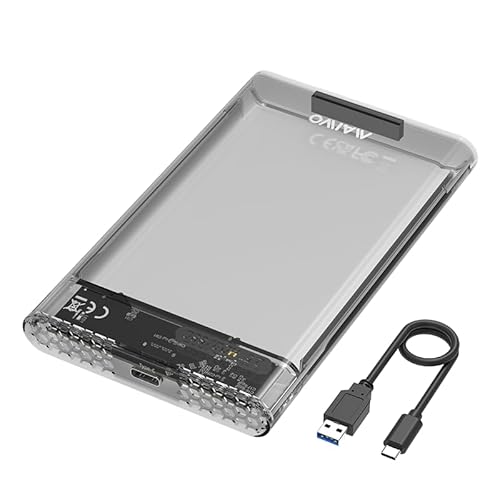 | 9.3PCKitHQ scoreView on Amazon |
07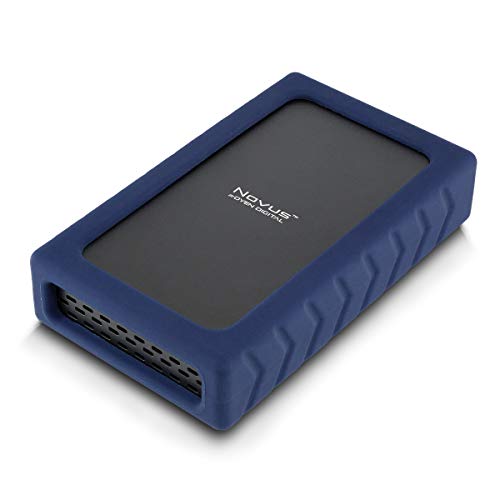 | 9.2PCKitHQ scoreView on Amazon |
A closer look at each configuration
CENMATE Aluminum USB C 3.2 10Gbps Hard Drive Enclosure for 3.5-inch SATA HDD
score
The CENMATE enclosure pairs a 10Gbps USB 3.2 interface with support for 3.5-inch SATA HDDs up to 30TB.
- Interface
- USB 3.2
- Form factor
- 3.5 inches
- USB-C
- Yes
- Weight
- 0.57 lb
- Warranty
- 1 year
This CENMATE enclosure takes 3.5-inch SATA HDDs up to 30TB and connects over USB 3.2 with a USB-C port, rated up to 10Gbps under UASP control. The aluminum-alloy shell and open-frame ABS tray are built to keep the drive cool during transfers. Compatibility covers Windows 7 and above, Mac 8.6 and above, Linux, ChromeOS, PS5, PS4 and Xbox One. It weighs 0.57 lb and carries a 1-year warranty.
Choose it if
- You need to house a 3.5-inch SATA HDD up to 30TB
- You want USB-C transfer speeds up to 10Gbps under UASP
Consider another if
- Your drive is a 2.5-inch SSD or HDD
- You need an enclosure without a separate power adapter
POSUGEAR 2.5'' External Hard Drive Enclosure
score
The clear POSUGEAR enclosure fits 2.5-inch SATA drives up to 4TB over USB C 3.1 Gen 2 at 6Gbps.
- Interface
- USB C 3.1 Gen 2
- Form factor
- 2.5 inch
- USB-C
- Yes
- Weight
- 0.17 lb
This POSUGEAR enclosure holds 2.5-inch SATA SSDs and HDDs in 7mm and 9.5mm thicknesses, up to 4TB, and connects over USB C 3.1 Gen 2 at 6Gbps with UASP and TRIM support. The clear PC and ABS shell lets the installed drive stay visible, and an EVA sponge steadies the drive against the SATA interface. The sliding cover opens without tools, and the enclosure needs no extra power supply. It weighs 0.17 lb.
Choose it if
- You need a tool-free case for a 2.5-inch SATA SSD or HDD
- You want to see the drive through a clear shell
Consider another if
- Your drive is a 3.5-inch HDD
- You need more than 4TB of capacity in one enclosure
POSUGEAR 2.5'' External Hard Drive Enclosure PS4
score
The black POSUGEAR enclosure fits 2.5-inch SATA drives up to 4TB over USB C 3.1 Gen 2 at 6Gbps.
- Interface
- USB C 3.1 Gen 2
- Form factor
- 2.5 inch
- USB-C
- Yes
- Weight
- 0.18 lb
This POSUGEAR enclosure holds 2.5-inch SATA SSDs and HDDs in 7mm and 9.5mm thicknesses, up to 4TB, and connects over USB C 3.1 Gen 2 at 6Gbps with UASP and TRIM support. The black PC and ABS shell resists drops and shocks, and an EVA sponge steadies the drive against the SATA interface. The sliding cover opens without tools, and the enclosure needs no extra power supply. It weighs 0.18 lb.
Choose it if
- You need a tool-free case for a 2.5-inch SATA SSD or HDD
- You want a black enclosure for drives from WD, Toshiba or Samsung
Consider another if
- Your drive is a 3.5-inch HDD
- You need more than 4TB of capacity in one enclosure
ORICO 2.5-inch USB C Hard Drive Enclosure USB 3.1 Gen 1 to SATA III External Hard Drive Case for SSD HDD 9.5 7mm Tool-Free
score
The ORICO enclosure fits 2.5-inch SATA SSDs and HDDs over USB 3.1 Gen 1 with UASP acceleration.
- Interface
- USB 3.1 Gen 1
- Form factor
- 2.5 inch
- USB-C
- Yes
- Weight
- 0.22 lb
- Warranty
- 12 Month
This ORICO enclosure connects 2.5-inch 7mm and 9.5mm SATA I, II and III SSDs and HDDs to a PC, laptop, TV, router, PS4 or Xbox over a USB 3.1 Gen 1 Type-C interface rated at 5Gbps with UASP. Tool-free installation lets the drive slide out in about 3 seconds, and hot swapping is supported with no driver needed. An EVA foam pad steadies the drive. It weighs 0.22 lb and carries a 12-month warranty.
Choose it if
- You need a tool-free case for 7mm or 9.5mm 2.5-inch SATA drives
- You want a 12-month warranty on the enclosure
Consider another if
- Your drive is a 3.5-inch HDD
- You want an aluminum shell rather than ABS
ACASIS 6Gbps Hard Drive Enclosure for 3.5/2.5-inch SATA SSD/HDD Aluminum Shell
score
The ACASIS enclosure holds 3.5-inch and 2.5-inch SATA drives up to 30TB over USB-C at 6Gbps.
- Interface
- USB C
- USB-C
- Yes
- Warranty
- 2 year manufacture
This ACASIS enclosure accepts 3.5-inch and 2.5-inch SATA SSDs and HDDs up to 30TB and connects over USB-C at 6Gbps with UASP. The aluminum shell and open-frame ABS tray are built to move heat away from the drive, and a 10-minute smart sleep mode saves energy when the drive is idle. An independent switch avoids repeated plugging, and a 12V/2A power adapter plus a 50cm USB-C to USB-C/A cable are included.
Choose it if
- You need one enclosure for both 3.5-inch and 2.5-inch SATA drives
- You want up to 30TB of capacity over USB-C
Consider another if
- You need a 10Gbps USB 3.2 interface
- You need a bus-powered enclosure with no power adapter
MAIWO External Hard Drive Enclosure for 7mm 9.5mm 2.5-inch SATA SSD/HDD
score
The MAIWO enclosure fits 2.5-inch SATA SSDs and HDDs up to 6TB over USB-C at 5Gbps.
- Interface
- USB C
- Form factor
- 2.5 inch
- USB-C
- Yes
- Warranty
- One Year Manufacturer Warranty
This MAIWO enclosure supports 2.5-inch SATA SSDs and HDDs in 7mm and 9.5mm sizes, up to 6TB, and connects over USB-C at up to 5Gbps with UASP support. The transparent black enclosure makes the installed drive easy to find among other cases, and the case measures 12.6 by 7.8 by 1.4cm. Tool-free setup needs no drivers, and an LED indicator shows working status. It carries a one-year manufacturer warranty.
Choose it if
- You need a slim 2.5-inch case for 7mm or 9.5mm SATA drives
- You want up to 6TB of extra storage over USB-C
Consider another if
- Your drive is a 3.5-inch HDD
- You need more than 6TB of capacity in one enclosure
Novus USB-C Rugged 3.5-inch External Hard Drive Enclosure
score
The Oyen Digital Novus is a rugged 3.5-inch enclosure with USB-C and a 3-year warranty.
- Interface
- USB-C
- Form factor
- 3.5-Inch
- USB-C
- Yes
- Weight
- 2 lb
- Warranty
- 3 YEAR WARRANTY
This Oyen Digital Novus enclosure fits 3.5-inch SATA HDDs and connects over USB-C, compatible with all USB and Thunderbolt 3 and 4. A silicon sleeve adds anti-slip grip and durability, and vented aluminum provides quiet cooling. The box includes a 12V/2A power adapter, a USB C-C cable and a USB C-A cable. It weighs 2 lb and carries a 3-year warranty. The rugged build suits a drive that travels between desks.
Choose it if
- You need a rugged enclosure for a 3.5-inch SATA HDD
- You want USB-C that works with Thunderbolt 3 and 4
Consider another if
- Your drive is a 2.5-inch SSD or HDD
- You need a lightweight enclosure under 1 lb
Make the choice for your setup
Match the enclosure to your drive size
Start with the drive you already own. The CENMATE and Oyen Digital Novus enclosures take 3.5-inch SATA HDDs, while the ACASIS enclosure takes both 3.5-inch and 2.5-inch SATA drives. The two POSUGEAR enclosures, the ORICO and the MAIWO take 2.5-inch SATA SSDs and HDDs in 7mm and 9.5mm thicknesses. A 3.5-inch drive will not fit a 2.5-inch enclosure, and a 2.5-inch drive does not match a 3.5-inch-only bay. Check the thickness of a 2.5-inch drive as well: the POSUGEAR, ORICO and MAIWO enclosures name 7mm and 9.5mm drives, so a thicker drive falls outside their stated fit. Power adapters ship with the 3.5-inch enclosures.
Compare USB-C speed and capacity
The CENMATE enclosure is the only one here with USB 3.2 at up to 10Gbps under UASP. The two POSUGEAR enclosures and the ACASIS enclosure are rated at 6Gbps, the ACASIS over USB-C with UASP and the POSUGEAR pair over USB C 3.1 Gen 2 with UASP and TRIM. The ORICO enclosure uses USB 3.1 Gen 1 rated at 5Gbps with UASP, and the MAIWO enclosure is rated at up to 5Gbps with UASP. Capacity runs from 4TB in the POSUGEAR enclosures to 6TB in the MAIWO and up to 30TB in the CENMATE and ACASIS enclosures. Match those figures to the drive you plan to install. If that fits your setup better, see our guide to the Best USB SSD Enclosure.
Weigh power, cooling and warranty
The 3.5-inch enclosures ship with a power adapter: the CENMATE with a 24W adapter and the ACASIS and Oyen Digital Novus with 12V/2A adapters. The POSUGEAR enclosures need no extra power supply, which keeps a 2.5-inch setup to a single cable. For cooling, the CENMATE and ACASIS use an aluminum shell with an open-frame ABS tray, and the Oyen Digital Novus uses vented aluminum with a silicon sleeve. Warranty terms differ: the Oyen Digital Novus carries a 3-year warranty, the ACASIS a 2-year manufacture warranty, the CENMATE a 1-year warranty, the ORICO a 12-month warranty and the MAIWO a one-year manufacturer warranty.
Comparing more options? See Best SSD Enclosure.
FAQ: External Hard Drive Enclosure USB C
Which enclosure fits a 3.5-inch SATA HDD?
The CENMATE enclosure fits 3.5-inch SATA HDDs up to 30TB, the ACASIS enclosure fits 3.5-inch and 2.5-inch SATA drives up to 30TB, and the Oyen Digital Novus fits 3.5-inch SATA HDDs. The POSUGEAR, ORICO and MAIWO enclosures fit 2.5-inch drives only.
Which enclosure is rated up to 10Gbps over USB-C?
The CENMATE enclosure is rated up to 10Gbps over USB 3.2 under UASP. The POSUGEAR and ACASIS enclosures are rated at 6Gbps, while the ORICO and MAIWO enclosures are rated at 5Gbps. Match those rated figures to your drive.
Do these enclosures need a separate power adapter?
The CENMATE, ACASIS and Oyen Digital Novus enclosures include a power adapter. The POSUGEAR enclosures need no extra power supply. Check the power setup of the ORICO and MAIWO enclosures against the drive you plan to install.


