Best Docking Station SATA (2026): 6 Models Side by Side
 By Theo LangUpdated
The SABRENT USB 3.0 to SATA Hard Drive Docking Station suits anyone who needs to read a bare 2.5-inch or 3.5-inch SATA I, II, or III hard drive or SSD through a USB 3.0 Type-A port. Its tool-free lay-flat bay takes one drive at a time, runs plug and play with no drivers on Windows 10/11, macOS, or Linux, and includes a 12V adapter for 3.5-inch drives.
Your shortlist at a glance
PCKitHQ scores range from 9.2 to 9.8. See how we pick.
| Product and key specifications | Score and retailer |
|---|---|
01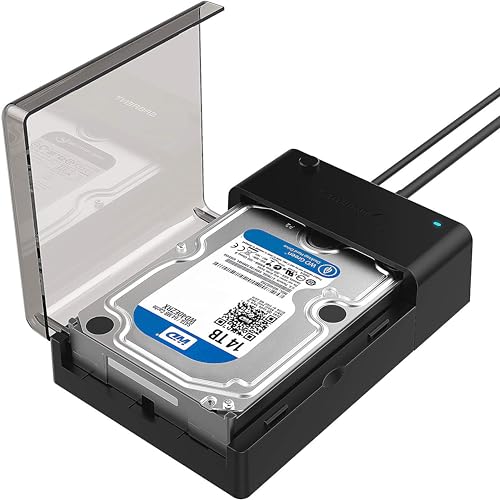 | 9.8PCKitHQ scoreView on Amazon |
02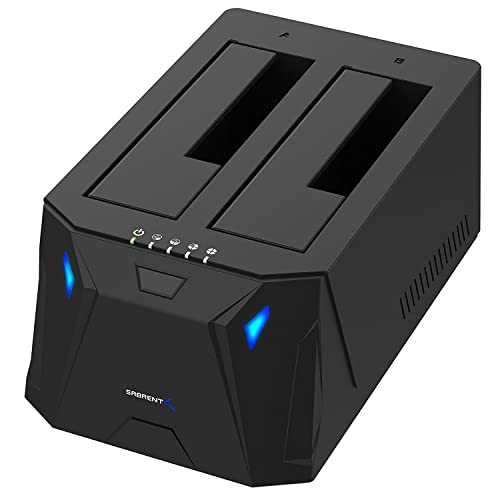 | 9.7PCKitHQ scoreView on Amazon |
03 | 9.6PCKitHQ scoreView on Amazon |
04 Also Consider M.2 NVMe & SATA Hard Drive Docking Station | 9.4PCKitHQ scoreView on Amazon |
05 | 9.3PCKitHQ scoreView on Amazon |
06 | 9.2PCKitHQ scoreView on Amazon |
A closer look at each configuration
SABRENT USB 3.0 to SATA Hard Drive Docking Station
score
A single-bay SATA dock with a Type-A cable, UASP support, and a 12V adapter for 3.5-inch drives.
- Interface
- USB 3.0
- Weight
- 0.47 lb
- Warranty
- 1 Year Limited
This dock accepts one bare 2.5-inch or 3.5-inch SATA I, II, or III hard drive or SSD in a lay-flat bay, with no drivers on Windows 10/11, macOS, or Linux. The included host cable ends in USB Type-A, so a computer with only USB-C ports needs a USB-C to USB-A adapter that is not included. USB 3.0 with UASP support gives typical mechanical hard drive transfer speeds of 100-160 MB/s, while SSD speeds vary up to the USB interface maximum. A 12V/2A adapter is included and required for 3.5-inch drives. An LED shows power and activity.
Choose it if
- You need to read a bare 2.5-inch or 3.5-inch SATA drive
- Your computer has a spare USB 3.0 Type-A port
Consider another if
- You need to read two drives at the same time
- You need a USB-C host cable included in the box
SABRENT USB 3.0 Dual Bay Hard Drive Docking Station & Cloner (EC-HD2B)
score
A dual-bay SATA dock with offline cloning, 10TB drive support, and transfer speeds up to 5Gbps over USB 3.0.
- Interface
- USB 3.0
- Weight
- 1.19 lb
- Warranty
- 1-year warranty
This dual-bay dock takes two 2.5-inch or 3.5-inch SATA hard drives or SSDs, with support for hard drives up to 10TB. Its offline cloning copies one drive to another at up to 60Mbps without a computer, and transfer speeds reach up to 5Gbps over USB 3.0, 480Mbps over USB 2.0, and 12Mbps over USB 1.1. Setup is plug and play with no drivers needed. It weighs 1.19 lb and carries a 1-year warranty that extends to 2 years when the product is registered.
Choose it if
- You want to read or clone two SATA drives at once
- Your drives are 10TB or smaller
Consider another if
- You need the 10Gbps interface of the WAVLINK dock
- You need to read a drive larger than 10TB
WAVLINK Hard Drive Docking Station NVMe M.2 to SATA 2.5/3.5 SSD/HDD
score
A dual-bay dock that pairs 10Gbps USB 3.2 Gen 2 with M.2 NVMe and SATA slots plus offline cloning.
- Interface
- USB 3.2 Gen 2
This dual-bay dock reads M.2 NVMe SSDs in 2230, 2242, 2260, and 2280 form factors alongside standard 2.5-inch and 3.5-inch SATA hard drives and SSDs. Its USB 3.2 Gen 2 interface delivers transfer speeds up to 10Gbps, and the built-in offline clone function copies data between M.2 NVMe drives and SATA drives in both directions without a computer. Its aluminum alloy shell is scratch-resistant and built to dissipate heat. It works with Windows, Mac, and Linux.
Choose it if
- You need to read both M.2 NVMe and SATA drives
- You want 10Gbps transfers over USB 3.2 Gen 2
Consider another if
- You need the 44TB capacity of the ORICO dock
- You need a single-bay dock for one drive only
M.2 NVMe & SATA Hard Drive Docking Station
score
A single-bay dock for M.2 NVMe and SATA drives with a 10Gbps USB-C connection and a 2-year warranty.
- Interface
- USB 3.2 Gen 2
- USB-C
- Yes
- Warranty
- 2 year
This single-bay dock works with 3.5-inch hard drives, 2.5-inch SSDs, and M.2 NVMe SSDs, using the JMS581DL chipset and USB 3.2 Gen 2 for transfer speeds up to 10Gbps. The screwless, open-vertical design swaps drives without tools, and the open-air layout keeps drives cool during long transfers. An 80cm 2-in-1 USB-C to C+A cable is included, so it connects to Thunderbolt and USB-C laptops as well as traditional USB-A ports. It works with Windows, macOS, Linux, and Android.
Choose it if
- You need a USB-C connection for a modern laptop
- You want to read M.2 NVMe and SATA drives
Consider another if
- You need two bays for two drives at once
- You need the 48TB capacity of the MAIWO dock
ORICO Dual Bay Hard Drive Docking Station Hard Drive Cloner
score
A dual-bay SATA dock with offline cloning, 44TB capacity, and a 36W power supply for two drives.
- Interface
- USB 3.0
- Weight
- 1.21 lb
- Warranty
- 1-Year
This dual-bay dock supports 44TB in total, with two 22TB bays for 2.5-inch and 3.5-inch SATA I, II, and III hard drives and SSDs. Its offline clone function duplicates one drive to another without a computer by pressing the CLONE button for about 3 seconds, and the target disk must be larger than the source disk. A 36W 12V/3A power supply feeds both bays, and the dock sleeps automatically after 10 minutes with no activity. UASP and Trim support bring transfer speeds up to 5Gbps over USB 3.0.
Choose it if
- You need 44TB of capacity across two SATA drives
- You want to clone a drive without a computer
Consider another if
- You need the 10Gbps interface of the WAVLINK dock
- You need a dock that powers on without a drive
MAIWO Hard Drive Docking Station Cloner for 2.5 3.5-inch SATA HDD SSD
score
A dual-bay SATA dock with 48TB capacity, offline cloning, and three extra USB 3.0 hub ports.
- Interface
- USB 3.0
- Weight
- 1.61 lb
- Warranty
- One Year Manufacturer Warranty
This dual-bay dock supports two 2.5-inch and 3.5-inch SATA hard drives and SSDs, with each port supporting a 24TB drive for 48TB of capacity in total. Its offline cloning backs up a source drive to a target drive without a computer, and LED indicators show clone progress at 25%, 50%, 75%, and 100%. The USB 3.0 interface provides 5Gbps of bandwidth. Three extra USB 3.0 Type-A hub ports accept USB flash drives, and one of those ports supports 2.4A power charging for a mobile phone.
Choose it if
- You need 48TB of capacity across two SATA drives
- You want extra USB 3.0 ports beside the dock
Consider another if
- You need the 10Gbps interface of the WAVLINK dock
- You need a dock that weighs 0.47 lb
Make the choice for your setup
Match the dock to your drive type
Start with the drive you need to read. The SABRENT EC-DFLT, the SABRENT EC-HD2B, and the ORICO docks take 2.5-inch and 3.5-inch SATA I, II, and III hard drives and SSDs only, while the MAIWO dock takes 2.5-inch and 3.5-inch SATA hard drives and SSDs, so check that your drive has the wide flat L-shaped SATA edge connector before ordering. The WAVLINK dock adds an M.2 NVMe SSD slot beside the SATA bay, taking 2230, 2242, 2260, and 2280 form factors, while the ICY BOX dock has a single bay that takes either an M.2 NVMe SSD or a 2.5-inch or 3.5-inch SATA drive. A dock that only takes SATA drives cannot read an M.2 NVMe stick, and a bare SATA drive is not the same as a drive already in a USB enclosure.
Choose one bay or two, with cloning
One bay suits reading a single drive at a time, which is what the SABRENT EC-DFLT and the ICY BOX dock offer. Two bays suit reading two drives at once or copying one drive to another without a computer. The SABRENT EC-HD2B clones offline at up to 60Mbps, the ORICO clones by pressing the CLONE button for about 3 seconds with the target disk larger than the source, and the MAIWO shows clone progress with LED indicators at 25%, 50%, 75%, and 100%. The WAVLINK clones in both directions between M.2 NVMe drives and SATA drives. Pick the bay count and cloning direction your task needs. For a closely related choice, read our guide to the Best External Hard Drive Docking Station.
Check power, ports, and transfer speed
The SABRENT EC-DFLT includes a 12V/2A adapter, and its 3.5-inch drives cannot run on USB power alone. The ORICO uses a 36W 12V/3A supply, and the MAIWO uses a 12V 3A supply. Check the host cable: the SABRENT EC-DFLT ships with a USB Type-A cable, so a computer with only USB-C ports needs a separate adapter, while the ICY BOX includes an 80cm 2-in-1 USB-C to C+A cable. For speed, the SABRENT EC-HD2B, ORICO, and MAIWO docks reach up to 5Gbps over USB 3.0, while the WAVLINK and ICY BOX reach up to 10Gbps over USB 3.2 Gen 2. Typical mechanical hard drive transfers on the SABRENT EC-DFLT run 100-160 MB/s, which is the drive's own limit.
Before you decide, also read Best Docking Station.
FAQ: Docking Station SATA
Which of these docks read M.2 NVMe drives?
The WAVLINK dock reads M.2 NVMe SSDs in a slot beside its SATA bay, taking 2230, 2242, 2260, and 2280 form factors. The ICY BOX dock has a single bay that takes either an M.2 NVMe SSD or a 2.5-inch or 3.5-inch SATA drive.
Do 3.5-inch drives need a separate power adapter?
Yes. The SABRENT EC-DFLT includes a 12V/2A adapter, and its 3.5-inch drives cannot run on USB power alone. The ORICO uses a 36W 12V/3A supply, and the MAIWO uses a 12V 3A supply. A wall outlet is needed for the SABRENT EC-DFLT adapter.
Which docks clone a drive without a computer?
The SABRENT EC-HD2B, WAVLINK, ORICO, and MAIWO docks clone offline. The EC-HD2B clones at up to 60Mbps, the ORICO clones SATA drives with its CLONE button, and the MAIWO shows clone progress with LED indicators. Only the WAVLINK clones between M.2 NVMe and SATA drives, in both directions.