Best External Hard Drive Docking Station (2026): 5 Picks Compared
 By Theo LangUpdated
Choose the SABRENT USB 3.0 to SATA Hard Drive Docking Station if you dock bare 2.5-inch and 3.5-inch SATA drives through a USB Type-A host cable. Its included 12V/2A adapter covers 3.5-inch drives, and USB 3.0 with UASP is the deciding connection here. The other picks add dual or triple bays, offline cloning, USB-C, or M.2 NVMe support.
Your shortlist at a glance
PCKitHQ scores range from 9.2 to 9.8. See how we pick.
| Product and key specifications | Score and retailer |
|---|---|
01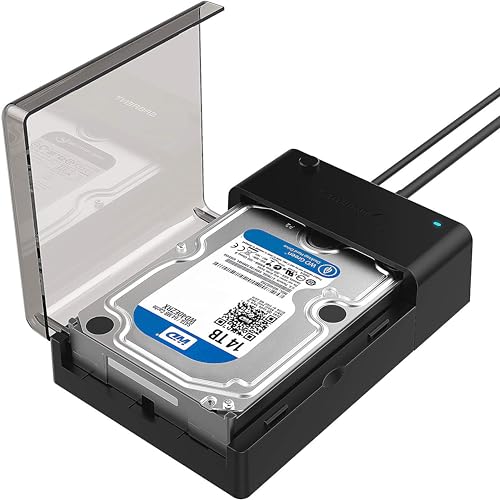 | 9.8PCKitHQ scoreView on Amazon |
02 | 9.7PCKitHQ scoreView on Amazon |
03 Also Consider M.2 NVMe & SATA SSD/HDD Hard Drive Docking Station | 9.5PCKitHQ scoreView on Amazon |
04 | 9.3PCKitHQ scoreView on Amazon |
05 | 9.2PCKitHQ scoreView on Amazon |
A closer look at each configuration
SABRENT USB 3.0 to SATA Hard Drive Docking Station
score
The SABRENT EC-DFLT docks bare 2.5-inch and 3.5-inch SATA drives over USB 3.0 with UASP and an included 12V/2A adapter.
- Interface
- USB 3.0
- Weight
- 0.47 lb
- Warranty
- 1 Year Limited
This SABRENT dock works with SATA I/II/III hard drives and SSDs in 2.5-inch and 3.5-inch sizes, with a lay-flat, tool-free bay and hot-swap support. The included host cable ends in USB Type-A, so a computer with only USB-C ports needs a USB-C to USB-A adapter that is not included. USB 3.0 with UASP requires a UASP-capable host, and typical mechanical HDD transfer speeds are stated as 100-160 MB/s. A 12V/2A AC adapter is included and required for 3.5-inch drives, while 2.5-inch drives are generally bus-powered. It runs without drivers on Windows 10/11, macOS, and Linux, weighs 0.47 lb, and carries a 1 Year Limited warranty. The drive is not included.
Choose it if
- You dock bare 2.5-inch and 3.5-inch SATA drives
- You have a USB 3.0 Type-A port for the host cable
Consider another if
- You need to dock an M.2 NVMe drive
- You need up to 10 Gbps from USB 3.2 Gen 2
SABRENT USB 3.0 Dual Bay Hard Drive Docking Station & Cloner (EC-HD2B)
score
The SABRENT EC-HD2B is a dual bay USB 3.0 dock for 2.5-inch and 3.5-inch SATA drives with offline cloning.
- Interface
- USB 3.0
- Weight
- 1.19 lb
- Warranty
- 1-year
This SABRENT dual bay dock supports standard desktop 2.5-inch and 3.5-inch SATA hard drives and SSDs, with support for hard drives up to 10TB. It is plug and play with no drivers needed. Offline cloning is stated at up to 60Mbps, and transfer speeds are stated at up to 5Gbps on USB 3.0, 480Mbps on USB 2.0, and 12Mbps on USB 1.1. Those speed figures are rated interface figures for the connection in use. The dock weighs 1.19 lb. Warranty coverage is 1-year without registration, with registration extending coverage to 2 years.
Choose it if
- You dock two 2.5-inch or 3.5-inch SATA drives
- You clone drives offline at up to 60Mbps
Consider another if
- You need up to 10 Gbps from USB 3.2 Gen 2
- You need to dock an M.2 NVMe drive
M.2 NVMe & SATA SSD/HDD Hard Drive Docking Station
score
The ICY BOX triple bay dock connects M.2 NVMe and 2.5-inch or 3.5-inch SATA drives over USB 3.2 Gen 2.
- Interface
- USB 3.2 Gen 2
- USB-C
- Yes
- Weight
- 0.65 lb
- Warranty
- 2 year
This ICY BOX dock has three independent slots for M.2 PCIe NVMe SSDs and 2.5-inch and 3.5-inch SATA SSDs and HDDs, with a tool-free design for swapping drives. One-touch offline cloning starts without software installation, and cloning runs between NVMe to NVMe or SATA to NVMe. USB 3.2 Gen 2 transfer speeds are stated at up to 10 Gbps, and the included dual-purpose cable covers USB-C to USB-C and USB-C to USB-A connections. It works with Windows and macOS systems on PCs, laptops, and game consoles. A power adapter is included, the dock weighs 0.65 lb, and warranty coverage is 2 year.
Choose it if
- You dock M.2 PCIe NVMe and SATA drives
- You clone from SATA to NVMe or NVMe to NVMe
Consider another if
- You need four or more drive bays
- You need a dock weighing under 0.47 lb
WAVLINK USB 3.0 and USB C to SATA Dual-Bay External Hard Drive Docking Station for 2.5/3.5-inch HDD/SSD
score
The WAVLINK dual-bay dock connects 2.5-inch and 3.5-inch SATA drives with UASP and offline cloning at up to 60Mbps.
- Interface
- USB 3.0
- USB-C
- Yes
- Weight
- 0.73 lb
This WAVLINK dock supports USB 3.0 external and SATA-I/II/III internal connections for 2.5-inch and 3.5-inch SATA HDDs and SSDs, with 16TB X2 support. Transfer speeds are stated at up to 6Gbps by the UASP transfer protocol, and at up to 5Gbps on USB 3.0, 480Mbps on USB 2.0, and 12Mbps on USB 1.1. Offline cloning runs at up to 60Mbps from source disk to target disk, with the target disk larger or equivalent to the source disk. Power is 12V, 3A, with automatic sleep after 30 minutes of inactivity. It supports Windows 10 through XP, Mac OS X, and Linux or Unix, weighs 0.73 lb, and supports hot-swapping.
Choose it if
- You dock two 2.5-inch or 3.5-inch SATA drives
- You clone offline from source disk to target disk
Consider another if
- You need up to 10 Gbps from USB 3.2 Gen 2
- You need to dock an M.2 NVMe drive
ORICO Dual Bay Hard Drive Docking Station Hard Drive Cloner
score
The ORICO dual bay dock connects 2.5-inch and 3.5-inch SATA drives over USB 3.0 with offline cloning and UASP.
- Interface
- USB 3.0
- Weight
- 1.21 lb
- Warranty
- 1-Year
This ORICO dual bay dock supports 44TB (2*22TB) with 2.5-inch and 3.5-inch SATA I/II/III HDDs and SSDs, and includes 3ft (1m) USB-A cables and a universal power adapter. Offline cloning duplicates a drive without a computer by pressing the CLONE button for about 3 seconds, with the target disk larger than the source disk. Power supply is 36W (12V/3A), with automatic sleep after 10 minutes inactive. USB 3.0 with UASP and Trim states transfer speeds of up to 5Gbps, with tool-less hot-swapping and LED indicators. It works with Windows, Mac, Linux, iPad OS, and Android, weighs 1.21 lb, and carries a 1-Year warranty.
Choose it if
- You dock two 2.5-inch or 3.5-inch SATA drives
- You clone offline by pressing the CLONE button
Consider another if
- You need up to 10 Gbps from USB 3.2 Gen 2
- You need to dock an M.2 NVMe drive
Make the choice for your setup
Drive types and bay count
Drive type decides the first cut. The SABRENT EC-DFLT and the SABRENT EC-HD2B take 2.5-inch and 3.5-inch SATA drives, and the EC-DFLT works with SATA I/II/III drives in a lay-flat bay. The WAVLINK and ORICO docks also take 2.5-inch and 3.5-inch SATA drives in dual bays. The ICY BOX dock adds M.2 PCIe NVMe SSDs across three independent slots, alongside 2.5-inch and 3.5-inch SATA SSDs and HDDs. Capacity figures differ by pick: the SABRENT EC-HD2B supports hard drives up to 10TB, the WAVLINK supports 16TB X2, and the ORICO supports 44TB (2*22TB). Match the bare drive connector and size to the bay before ordering.
Host connection and rated speed
Host connection separates these picks by cable and rated speed. The SABRENT EC-DFLT uses a USB Type-A host cable on USB 3.0 with UASP, and typical mechanical HDD transfer speeds are stated as 100-160 MB/s. The SABRENT EC-HD2B states up to 5Gbps on USB 3.0, 480Mbps on USB 2.0, and 12Mbps on USB 1.1. The WAVLINK states up to 6Gbps by UASP and up to 5Gbps on USB 3.0, while the ORICO states up to 5Gbps on USB 3.0 with UASP and Trim. The ICY BOX uses USB 3.2 Gen 2 at up to 10 Gbps with a USB-C to USB-C and USB-C to USB-A cable. Keep each figure with its named connection. Shoppers with a related need can compare our guide to the Best Docking Station for 4 Monitors.
Offline cloning and power
Offline cloning and power figures vary across the lineup. The SABRENT EC-HD2B and the WAVLINK each state offline cloning at up to 60Mbps, and the WAVLINK requires the target disk to be larger or equivalent to the source disk. The ORICO starts offline cloning by pressing the CLONE button for about 3 seconds, with the target disk larger than the source disk. The ICY BOX starts cloning with one touch and clones NVMe to NVMe or SATA to NVMe. For power, the SABRENT EC-DFLT includes a 12V/2A adapter required for 3.5-inch drives, the WAVLINK uses 12V, 3A, and the ORICO uses 36W (12V/3A).
Before you decide, also read Best Docking Station.
FAQ: External Hard Drive Docking Station
Which docks here clone drives without a computer?
The SABRENT EC-HD2B states offline cloning at up to 60Mbps, and the WAVLINK states offline cloning at up to 60Mbps from source disk to target disk. The ICY BOX uses one-touch offline cloning between NVMe and SATA drives. The ORICO uses a CLONE button press of about 3 seconds, with the target disk larger than the source disk.
Which dock works with M.2 NVMe drives?
The ICY BOX triple bay dock supports M.2 PCIe NVMe SSDs alongside 2.5-inch and 3.5-inch SATA SSDs and HDDs, with cloning from NVMe to NVMe or SATA to NVMe. The SABRENT EC-DFLT is for SATA drives only and does not support M.2 NVMe, M.2 SATA, IDE/PATA, or SAS drives. Check the drive connector before ordering.
What power figures do these docks state?
The SABRENT EC-DFLT includes a 12V/2A AC power adapter required for 3.5-inch drives. The ICY BOX includes a power adapter with its triple bay cloner and combo cable. The WAVLINK uses a 12V, 3A DC power source, and the ORICO uses a 36W (12V/3A) power supply with a universal power adapter in the box.