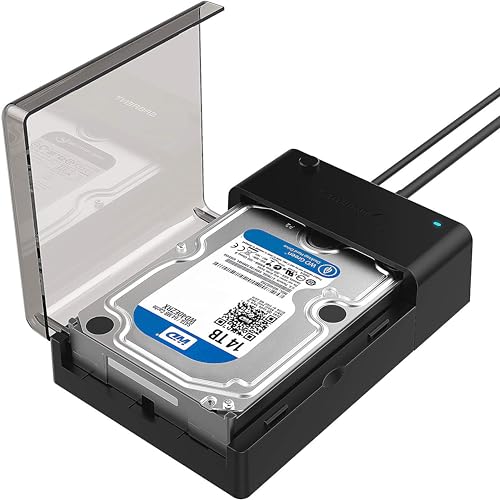
Best Docking Station HDD Enclosure (2026): 4 Picks Compared
 By Theo LangUpdated
Choose the SSK USB 3.0 to SATA Hard Drive Docking Station Adapter if your 2.5-inch or 3.5-inch SATA drive holds up to 24TB and you want USB 3.0 at up to 5Gbps with UASP. The VSVABEFV dock supports 6TB drives in its dual SATA and IDE bays, while the ORICO hub adds an M.2 bay beside its SATA bay. The Thermaltake BlacX Duet holds two SATA drives in its dual bays.
Your shortlist at a glance
PCKitHQ scores range from 9.2 to 9.8. See how we pick.
| Product and key specifications | Score and retailer |
|---|---|
01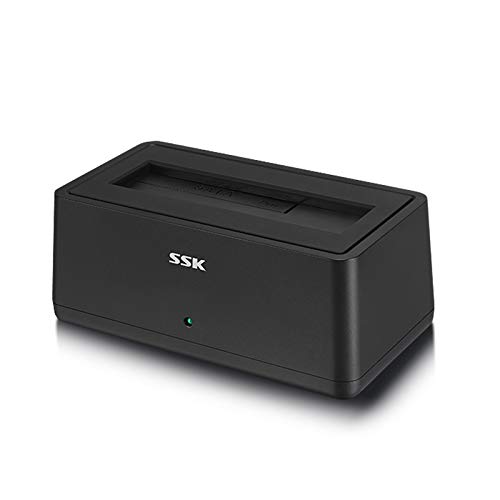 | 9.8PCKitHQ scoreView on Amazon |
02 | 9.6PCKitHQ scoreView on Amazon |
03 Also Consider ORICO 12-in-1 USB C Hub | 9.4PCKitHQ scoreView on Amazon |
04 | 9.2PCKitHQ scoreView on Amazon |
A closer look at each configuration
SSK USB 3.0 to SATA Hard Drive Docking Station Adapter for 2.5/3.5-inch HDD SSD
score
The 24TB capacity, 5Gbps USB 3.0 link with UASP, and tool-free single bay define this SSK dock.
- Interface
- USB 3.0
- Weight
- 0.88 lb
This SSK dock takes one 2.5-inch or 3.5-inch SATA I, II or III hard drive or SSD up to 24TB, with a USB 3.0 link at up to 5Gbps and UASP support. It reads desktop and laptop hard drives alike. It is tool-free and plug and play, so a drive slides in and mounts without assembly, and an LED shows its status. The shockproof, vibration-resistant plastic case has a heat sink, and auto-sleep starts after 10 minutes without operation. The box includes a USB 3.0 cable and a 12V, 2A power adapter. It works with Windows XP, Vista, 7, 8, 8.1 and 10, Mac OS 10.4 to 10.11, and Linux Kernel 2.4.2 or higher. It weighs 0.88 lb.
Choose it if
- Your 2.5-inch or 3.5-inch SATA drive holds up to 24TB
- You want a tool-free dock with plug and play mounting
Consider another if
- You need two drive bays at once
- Your drive uses an IDE interface
VSVABEFV IDE Hard Drive HDD Docking Station Hard Drive Dock Reader
score
The IDE and SATA bays, one-touch cloning, and card slots define this dual-bay VSVABEFV dock.
- Interface
- USB 3.0
This VSVABEFV dock has two bays for 2.5-inch and 3.5-inch SATA and IDE hard drives, with 6TB drive support, and reads one IDE and one SATA drive at the same time. It does not read two SATA drives at the same time. Its USB 3.0 link runs at up to 5Gbps, and one-touch cloning copies a source drive to a target drive without a computer, with one-touch backup as well. Six slots take SD, MMC, MS, TF, CF and M2 cards up to 32GB. It is tool-free, needs no driver, and supports hot plug, with an LED showing read, write and power status.
Choose it if
- Your old IDE drive needs a USB 3.0 dock
- You want to clone one drive to another without a computer
Consider another if
- You need to read two SATA drives at the same time
- Your drive is a 3.5-inch WD IDE hard drive
ORICO 12-in-1 USB C Hub
score
The M.2 and SATA bays, 4K at 60Hz HDMI, and 10Gbps ports define this ORICO hub.
- Interface
- USB 3.2 Gen 2
- Weight
- 0.66 lb
This ORICO hub holds an M.2 SSD and a 2.5-inch or 3.5-inch SSD or HDD in two built-in bays, with an independent power switch controlling both bays at once. Drives are not included. Its two 10Gbps Type-C ports and three 10Gbps USB-A ports sit beside an HDMI port with 4K at 60Hz video output for a video-enabled USB-C host, a Gigabit Ethernet port, and an SD and TF 3.0 reader. The USB 3.2 Gen 2 ports are rated to transfer 1GB of files in 1 second. PD 100W pass-through charging charges a MacBook Pro to 80% in 30 minutes. A turbo fan starts above 50 degrees Celsius, and an M.2 heatsink prevents overheating. It works with Windows 10 and 11, Mac OS 10.13 and higher, Linux, Android, iPad Pro, and mini PCs. It weighs 0.66 lb.
Choose it if
- Your M.2 SSD and SATA drive need one enclosure
- You want 4K at 60Hz video from the same hub
Consider another if
- Your drive uses an IDE interface
- You need a USB-C port on your computer
Thermaltake ST0014U-D USA Direct BlacX Duet 2.5-inch/3.5-inch Sata I/II/III USB 3.0 External Hard Drive Enclosure Docking Station 2.5-inch
score
The dual SATA bays and USB 3.0 link at up to 5.0 Gbps define this Thermaltake dock.
- Interface
- USB 3.0
- Weight
- 1.07 lb
- Warranty
- 2 Year Warranty
This Thermaltake BlacX Duet is a dual-bay dock for 2.5-inch and 3.5-inch SATA I, II and III hard drives, with a USB 3.0 SuperSpeed link at up to 5.0 Gbps, 10 times faster than USB 2.0. Two bays take two SATA drives at once, so one dock covers a pair of drives without swapping. It weighs 1.07 lb, and its 2 Year Warranty covers the whole dock.
Choose it if
- You want two SATA bays in one dock
- You want a 2 year warranty on the dock
Consider another if
- You need three drive bays at once
- You want a dock under 1.07 lb
Make the choice for your setup
Match the bays to the drives
Bay count and drive type decide the dock first. The SSK dock has one bay for a 2.5-inch or 3.5-inch SATA drive up to 24TB. The VSVABEFV dock has two bays for SATA and IDE drives, with 6TB drive support, and reads one IDE and one SATA drive at the same time. The ORICO hub holds an M.2 SSD beside a 2.5-inch or 3.5-inch SATA drive, with a power switch for both bays. The Thermaltake BlacX Duet holds two SATA drives in its dual bays. Check the drive interface and size before choosing, since only the VSVABEFV dock takes an IDE drive.
Compare speed and connections
Every dock here uses USB 3.0 except the ORICO hub, which uses USB 3.2 Gen 2 at 10Gbps. The SSK, VSVABEFV and Thermaltake docks run at up to 5Gbps, and the SSK adds UASP support. The ORICO hub adds two 10Gbps Type-C ports, three 10Gbps USB-A ports, HDMI with 4K at 60Hz video, Gigabit Ethernet, and an SD and TF reader. The VSVABEFV dock adds six card slots for SD, MMC, MS, TF, CF and M2 cards up to 32GB. The VSVABEFV dock also clones one drive to another without a computer, while the ORICO hub charges through PD 100W. Match the ports to the drives and the computer. For a closely related choice, read our guide to the Best External Hard Drive Enclosure for Laptop.
Weigh power, cooling and extras
Power and cooling differ across these docks. The SSK dock ships with a 12V, 2A power adapter, a heat sink, and auto-sleep after 10 minutes without operation, with an LED showing drive status. The VSVABEFV dock supports hot plug and one-touch backup and cloning, with an LED showing read, write and power status. The ORICO hub uses an independent power switch for both bays, a turbo fan above 50 degrees Celsius, and an M.2 heatsink, plus PD 100W pass-through charging. The Thermaltake dock carries a 2 Year Warranty. Weights differ too: the ORICO hub weighs 0.66 lb, the SSK dock 0.88 lb, and the Thermaltake dock 1.07 lb.
Before you decide, also read Best SSD Enclosure.
FAQ: Docking Station HDD Enclosure
Which dock takes a 24TB SATA drive?
The SSK dock takes one 2.5-inch or 3.5-inch SATA drive up to 24TB, and the VSVABEFV dock supports 6TB drives in its dual bays. Match the drive to the bay size before ordering, since the SSK bay holds one 24TB drive and the VSVABEFV bays hold two 6TB drives.
Which dock reads an IDE hard drive?
The VSVABEFV dock reads IDE and SATA drives in its two bays, one IDE and one SATA drive at the same time. The SSK and Thermaltake docks take SATA drives only, and the ORICO hub takes M.2 and SATA drives, so an IDE drive needs the VSVABEFV dock. It does not read two SATA drives at the same time.
Which dock adds video output and charging?
The ORICO hub adds HDMI with 4K at 60Hz video output and PD 100W pass-through charging, which needs a video-enabled USB-C host. The SSK, VSVABEFV and Thermaltake docks serve drive access, so a monitor connection and charging call for the ORICO hub.