
Best Docking Station for MacBook Pro Dual Monitor (2026): 5 Picks Compared
 By Theo LangUpdated
Choose the Plugable Thunderbolt 4 Dock for M4/M5 MacBook Air & Pro for two 4K 60Hz HDMI displays from a MacBook Pro with no drivers to install. Its 13 ports include a downstream Thunderbolt 4 port at 40Gbps, four USB-A ports, SD and microSD UHS-II slots, Ethernet and 100W charging. The other docks cover the same search with different port counts, charging wattage and refresh rates.
Your shortlist at a glance
PCKitHQ scores range from 9.2 to 9.8. See how we pick.
| Product and key specifications | Score and retailer |
|---|---|
01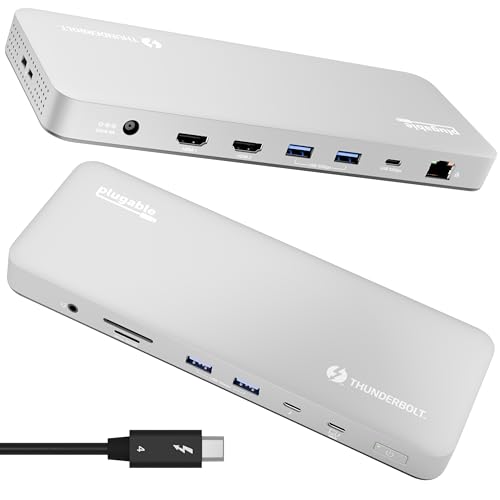 | 9.8PCKitHQ scoreView on Amazon |
02 | 9.7PCKitHQ scoreView on Amazon |
03 | 9.5PCKitHQ scoreView on Amazon |
04 | 9.3PCKitHQ scoreView on Amazon |
05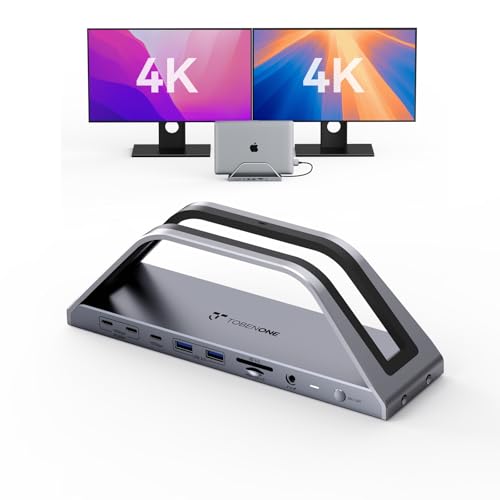 | 9.2PCKitHQ scoreView on Amazon |
A closer look at each configuration
Plugable Thunderbolt 4 Dock for M4/M5 MacBook Air & Pro
score
Two 4K 60Hz HDMI displays, 100W charging and 13 ports suit a dual-monitor MacBook Pro desk with no drivers.
- Power delivery
- 100 W
- Interface
- Thunderbolt 4
- HDMI
- Yes
- Ethernet
- Yes
- USB-C
- Yes
- Weight
- 2.85 lb
The TBT-UDM connects over Thunderbolt 4 and carries 13 ports: a downstream Thunderbolt 4 port at 40Gbps, a USB-C port, four USB-A ports, SD and microSD UHS-II slots, Ethernet and 3.5mm audio, with 100W charging. It supports two 4K 60Hz HDMI displays on M4 and M5 systems, Pro and Max M-series Macs, and M3 Macs in clamshell mode. Base M1 and M2 MacBooks support a single external display, and base M3 Macs support dual displays in clamshell mode only. The dock weighs 2.85 lb and carries a 2 Year Limited Parts and Labor warranty.
Choose it if
- You run two 4K 60Hz HDMI monitors from an M4 or M5 MacBook
- You want 100W charging, Ethernet and SD slots in one dock
Consider another if
- You need dual 4K displays at 120Hz on both monitors
- You need dual displays from a base M1 or M2 MacBook
MOKiN MacBook Pro Docking Station Dual Monitor MacBook Pro/Air
score
A 0.23 lb portable 9-port adapter with 100W charging and dual HDMI, for a MacBook Pro that moves between desks.
- Power delivery
- 100 W
- Interface
- Thunderbolt 3
- HDMI
- Yes
- Ethernet
- Yes
- USB-C
- Yes
- Weight
- 0.23 lb
The MOKiN adapter adds 9 ports through a Thunderbolt 3 connection: two HDMI ports, two USB 3.0 ports, a USB 2.0 port, SD and microSD card readers, Gigabit Ethernet and 100W power delivery. One HDMI display runs at up to 4K at 60Hz; with both in use, each runs at up to 4K at 30Hz, in mirror or extend mode. Data moves at up to 5Gbps, and the SD and TF card reader runs at up to 104 Mbps. The adapter weighs 0.23 lb and carries a 2-year warranty. It fits MacBook Pro and Air models from 2017 to 2021 with two Thunderbolt 3 ports on one side.
Choose it if
- You carry your dock between home and office in a bag
- You want 100W charging with dual HDMI from a Thunderbolt 3 port
Consider another if
- You need dual 4K displays at 60Hz on both monitors
- Your MacBook has a single USB-C port on one side
TobenONE 15-in-2 MacBook Pro Docking Station
score
Fifteen ports, dual 4K displays and a VGA output suit a MacBook desk that still uses an older monitor.
- Power delivery
- 85 W
- Interface
- USB-C
- HDMI
- Yes
- Ethernet
- Yes
- USB-C
- Yes
- Weight
- 1.06 lb
The TobenONE 15-in-2 dock connects over USB-C and offers 2 HDMI ports, a VGA port, 4 USB 3.0 ports, a 5Gbps USB-C port, 2 USB 2.0 ports, Gigabit Ethernet, audio and mic jacks, and PD 3.0 charging. One HDMI display runs at up to 4K at 60Hz; two run at up to 4K at 30Hz each, or one at 4K at 60Hz with 1080p at 60Hz over VGA. It accepts up to 100W PD input and delivers up to 85W to the MacBook; the power adapter is not included. It weighs 1.06 lb and carries a 24-month warranty, with a dual USB-C cable included.
Choose it if
- You run two displays from one dock over dual HDMI or HDMI plus VGA
- You want 15 ports with Ethernet, audio and VGA
Consider another if
- You need 100W charging delivered to your MacBook
- You need a dock that works with a Windows laptop
iVANKY 12-in-2 FusionDock 1 for M6/M5 MacBook Pro Docking Station
score
Dual 4K at 120Hz and 96W charging suit Pro and Max MacBooks that drive fast, high-refresh monitors.
- Power delivery
- 96 W
- Ethernet
- Yes
- USB-C
- Yes
- Weight
- 1.12 lb
- Warranty
- 24-month
The iVANKY FusionDock 1 ships with a 150W adapter and charges a laptop at up to 96W. M4 and M5 base MacBooks and M1 through M5 Pro and Max MacBooks support dual 4K at 120Hz; M1, M2 and M3 base MacBooks support a single 4K at 120Hz, and Intel MacBooks from 2016 to 2020 support dual 4K at 60Hz. Four USB 3.0 ports move data at up to 5Gbps, the SD and TF slot runs at up to 104 Mbps, and the RJ45 Ethernet port runs at 1000 Mb/s. The dock weighs 1.12 lb and carries a 24-month warranty.
Choose it if
- You run dual 4K displays at 120Hz from a Pro or Max MacBook
- You want a 150W adapter included with 96W charging
Consider another if
- You need dual displays from a base M1, M2 or M3 MacBook
- You need a dock that works with a Windows laptop
TobenONE Macbook Pro Docking Station Dual 4K Monitor M1-M6
score
Seventeen ports, dual 4K at 60Hz and 2.5G Ethernet suit a MacBook Pro desk that also charges phones fast.
- Power delivery
- 100 W
- HDMI
- Yes
- Ethernet
- Yes
- USB-C
- Yes
The TobenONE 17-in-2 dock stand integrates 2 HDMI ports at 4K at 60Hz, a 150W adapter, 7 USB ports at up to 10Gbps, two 30W PD ports, 2.5G Ethernet and an SD and microSD 4.0 reader. The included 150W adapter delivers up to 100W to the MacBook, while the two front PD ports charge an iPhone or iPad at 30W each. The SD 4.0 reader supports 312MB/s read and write. The dock works with Intel and M1 Pro through M6 MacBooks, and is not compatible with Windows, Chrome OS, Mac Studio, Mac mini, Mac Pro or iMac. The middle slot measures about 0.8 inches, so a MacBook in a protective case may not fit, and it carries a 2 Year Warranty.
Choose it if
- You want 2.5G Ethernet and a fast SD 4.0 card reader
- You charge an iPhone and iPad at 30W each from the dock
Consider another if
- Your MacBook wears a protective case when docked
- You need a dock that works with a Windows laptop
Make the choice for your setup
Match the dock to your MacBook chip
Dual-monitor support depends on the MacBook chip, not the dock alone. The Plugable dock drives two 4K 60Hz HDMI displays on M4 and M5 systems, Pro and Max M-series Macs, and M3 Macs in clamshell mode, while base M1 and M2 MacBooks support a single external display. The iVANKY dock drives dual 4K at 120Hz on M4 and M5 base MacBooks and on Pro and Max MacBooks, with a single display on base M1, M2 and M3 MacBooks. The TobenONE 15-in-2 dock supports dual monitors on Intel and M1 Pro through M5 Pro and Max chips, with a single monitor on base M1, M2 and M3 chips.
Compare refresh rates at dual 4K
Dual 4K looks the same until you check the refresh rate. The Plugable dock and the TobenONE 17-in-2 dock run two 4K displays at 60Hz, and the iVANKY dock runs two 4K displays at 120Hz on M4 and M5 base MacBooks and on Pro and Max MacBooks. The MOKiN adapter and the TobenONE 15-in-2 dock run a single display at 4K at 60Hz, and two displays at 4K at 30Hz each. At 30Hz, a second display still serves documents and email. At 60Hz or 120Hz, both screens run at the stated refresh rate, with 120Hz available only on the iVANKY dock. Shoppers with a related need can compare our guide to the Best USB Docking Station for Laptop.
Count charging wattage and ports
Charging wattage is the number to compare when the dock must keep a MacBook Pro powered while it drives two monitors. The Plugable dock, the MOKiN adapter and the TobenONE 17-in-2 dock deliver 100W charging to the MacBook, the iVANKY dock delivers 96W from its included 150W adapter, and the TobenONE 15-in-2 dock delivers 85W when connected to your own USB-C power adapter, which is not included. Port counts run from 9 on the MOKiN adapter to 17 on the TobenONE stand dock, with the Plugable dock at 13, the TobenONE 15-in-2 at 15 and the iVANKY dock at 12. Count the monitors, drives and keyboard you will plug in, then check the total against the port list.
Before you decide, also read Best Docking Station.
FAQ: Docking Station for MacBook Pro Dual Monitor
Can a base M1 MacBook run two external monitors?
No. Base M1 and M2 MacBooks support a single external display, and base M3 Macs support dual displays in clamshell mode only. A Pro or Max chip, or an M4 or M5 MacBook, supports two displays.
Do these docks need drivers for dual monitors?
The Plugable dock is driverless, the MOKiN adapter needs no driver or software, and the TobenONE docks are plug and play with no drivers or software required. The MOKiN adapter supports mirror mode and extend mode for its two HDMI displays.
Which dock charges a MacBook Pro at 100W?
The Plugable dock, the MOKiN adapter and the TobenONE 17-in-2 dock each deliver 100W charging to the MacBook. The iVANKY dock delivers 96W from its included 150W adapter, and the TobenONE 15-in-2 dock delivers 85W when connected to your own USB-C power adapter. Check the wattage against your MacBook Pro model before choosing.


