
Best Docking Station for Dell Pro Max 16 (2026): 8 Picks Compared
 By Theo LangUpdated
Its 2.5GbE Ethernet and USB-A ports suit a multi-display workspace. The Dell Pro Dock WD25 adds a second 100W option with four WQHD displays, while the Dell Pro Thunderbolt 4 Smart Dock raises power delivery to 130W.
Your shortlist at a glance
PCKitHQ scores range from 9.2 to 9.8. See how we pick.
| Product and key specifications | Score and retailer |
|---|---|
01 | 9.8PCKitHQ scoreView on Amazon |
02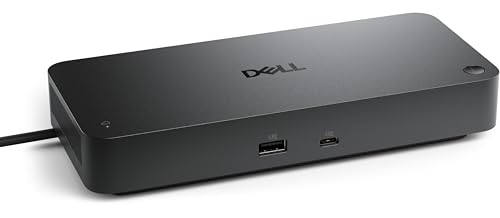 | 9.7PCKitHQ scoreView on Amazon |
03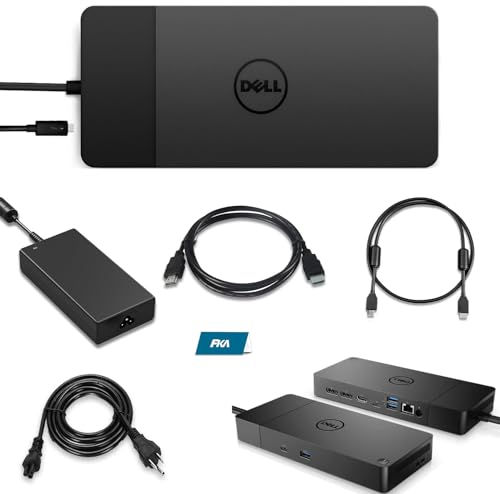 | 9.6PCKitHQ scoreView on Amazon |
04 | 9.5PCKitHQ scoreView on Amazon |
05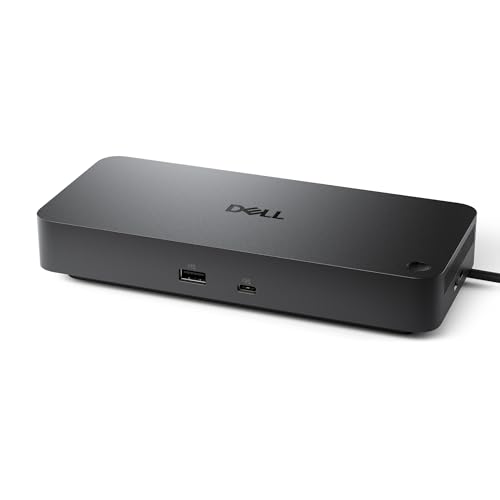 | 9.5PCKitHQ scoreView on Amazon |
06 | 9.4PCKitHQ scoreView on Amazon |
07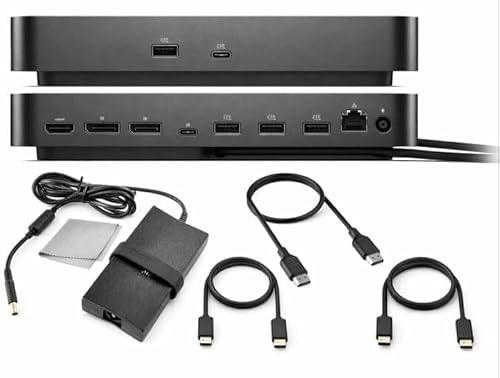 | 9.3PCKitHQ scoreView on Amazon |
08 | 9.2PCKitHQ scoreView on Amazon |
A closer look at each configuration
Dell Pro Dock WD25 USB-C Laptop Docking Station
score
The ANYHDD Dell Pro Dock WD25 pairs 100W power delivery with dual 4K displays, 2.5GbE Ethernet and a full cable set.
- Power delivery
- 100 W
- Interface
- USB-C
- HDMI
- Yes
- DisplayPort
- Yes
- Ethernet
- Yes
- USB-C
- Yes
- Weight
- 3.35 lb
- Warranty
- 1 Year Warranty
This ANYHDD Dell Pro Dock WD25 configuration delivers up to 100W of power to laptops and 96W to devices. It connects over USB-C with 1 HDMI 2.1 port, 2 DisplayPort 1.4 ports and 1 USB-C multi-function display port for dual 4K displays. The hub adds 4 USB-A 3.2 Gen 2 ports and 1 USB-C 3.2 Gen 2 port, plus a 2.5GbE Ethernet port. The box includes HDMI, DisplayPort and USB-C cables and a cloth. It weighs 3.35 lb, and the warranty is 1 Year Warranty.
Choose it if
- You want 100W power delivery with dual 4K displays
- You want 2.5GbE Ethernet with USB-A and USB-C ports
Consider another if
- You need more than 100W power delivery
- You need a dock lighter than 3.35 lb
Dell Pro Smart Dock SD25 USB-C Docking Station
score
The Dell Pro Smart Dock SD25 pairs 130W power delivery with four-display support and remote management over Wi-Fi.
- Power delivery
- 130 W
- Interface
- USB-C
- USB-C
- Yes
- Weight
- 1.24 lb
This Dell Pro Smart Dock SD25 configuration delivers 130W power delivery over USB-C and supports four displays, with remote management from the Dell Device Management Console over Wi-Fi. The dock uses enterprise-grade WPA-3 192-bit encryption for Wi-Fi communication and tamper-resistant, hardware-based encryption. Its ambidextrous USB-C cable routes left or right, and scheduled updates run during off-hours with fleetwide firmware compliance. The dock is built with at least 65% post-consumer recycled materials and packaged with 100% recycled or renewable packaging. It weighs 1.24 lb.
Choose it if
- You want 130W power delivery with four-display support
- You manage docks remotely from the Dell Device Management Console
Consider another if
- You need more than 130W power delivery
- You need a dock lighter than 1.24 lb
WD19S Dell Docking Station
score
The FKA WD19S pairs 130W power delivery with dual 4K displays, triple QHD support and a 180W power adapter.
- Power delivery
- 130 W
- Interface
- USB-C/USB-A
- HDMI
- Yes
- DisplayPort
- Yes
- Ethernet
- Yes
- USB-C
- Yes
- Warranty
- 3 Year Warranty
This FKA WD19S configuration delivers 130W power delivery with a 180W power adapter, and it connects over USB-C or USB-A. It carries 2 DisplayPort ports, 1 HDMI port, 1 USB-C 3.2 Gen 2 port with DisplayPort and 1 USB-C 3.2 Gen 2 port, plus 2 USB 3.2 Gen 1 Type A ports and 1 USB 3.2 Gen 1 port with Power Share. It supports dual 4K displays at 60Hz and three QHD displays at 60Hz, with a Gigabit Ethernet RJ-45 port. The warranty is 3 Year Warranty.
Choose it if
- You want 130W power delivery with dual 4K at 60Hz
- You want USB-C and USB-A connections on one dock
Consider another if
- You need more than 130W power delivery
- You need 2.5GbE Ethernet instead of Gigabit Ethernet
Dell WD19TB Thunderbolt Docking Station
score
The Dell WD19TB pairs 130W power delivery with Thunderbolt 3, dual DisplayPort ports and a 180W adapter.
- Power delivery
- 130 W
- Interface
- Thunderbolt 3
- HDMI
- Yes
- DisplayPort
- Yes
- Ethernet
- Yes
- USB-C
- Yes
- Weight
- 1.29 lb
- Warranty
- 3 YEARS MANUFACTURER
This Dell WD19TB configuration delivers 130W power delivery over Thunderbolt 3, with a 180W AC power adapter in the box. It carries 2 DisplayPort ports, 1 HDMI 2.0B port and 1 USB-C multifunction DisplayPort, plus 1 USB-C Gen 2 port, 2 USB-A Gen 1 ports and 1 USB-A Gen 1 port with Power Share. It has a Gigabit Ethernet RJ45 port, a combo audio and headset port and an audio out port. It weighs 1.29 lb, and the warranty is 3 YEARS MANUFACTURER.
Choose it if
- You want Thunderbolt 3 with 130W power delivery
- You want two DisplayPort ports and HDMI 2.0B
Consider another if
- You need more than 130W power delivery
- You need a dock lighter than 1.29 lb
Dell Pro Dock WD25 Docking Station
score
The Dell Pro Dock WD25 pairs 100W charging with four WQHD displays, 6 USB ports and 2.5GbE Ethernet.
- Power delivery
- 100 W
- Interface
- USB-C
- HDMI
- Yes
- Ethernet
- Yes
- USB-C
- Yes
- Weight
- 1.21 lb
This Dell Pro Dock WD25 configuration provides up to 100W to Dell systems and 96W to other devices. It supports up to four WQHD 3440x1440 displays through HDMI 2.1, dual DP 1.4 and multi-function USB-C ports. It carries 6 USB 3.2 Gen 2 ports with 4 USB-A and 2 USB-C ports, plus a 2.5GbE RJ45 Ethernet port. It offers Pass-Through MAC, PXE boot, power button synchronization and updates through Dell Display Manager. It weighs 1.21 lb.
Choose it if
- You want 100W charging with four WQHD displays
- You want 6 USB 3.2 Gen 2 ports on one dock
Consider another if
- You need more than 100W power delivery
- You need a dock lighter than 1.21 lb
Dell Pro Thunderbolt 4 Smart 130W Docking Station
score
The Dell Pro Thunderbolt 4 Smart Dock pairs 130W power delivery with four 4K displays and 40Gbps Thunderbolt 4.
- Power delivery
- 130 W
- Interface
- Thunderbolt 4
- HDMI
- Yes
- DisplayPort
- Yes
- Ethernet
- Yes
- USB-C
- Yes
This Dell Pro Thunderbolt 4 Smart Dock configuration delivers up to 130W power delivery for supported Dell laptops and up to 96W for non-Dell systems, with 40Gbps data transfer through Thunderbolt 4. It supports up to four 4K displays at 60Hz, with 2 DisplayPort 1.4 ports, 1 HDMI 2.1 port and Thunderbolt 4 and USB-C video output. It carries 4 USB-A 3.2 Gen 2 ports at 10Gbps, 2 USB-C 3.2 Gen 2 ports, 2 Thunderbolt 4 downstream ports and 2.5 Gigabit Ethernet, plus audio.
Choose it if
- You want four 4K displays at 60Hz from one dock
- You want Thunderbolt 4 with 40Gbps data transfer
Consider another if
- You need more than 130W power delivery
- You need more than four 4K displays
Dell Pro Smart Dock SD25 Bundle
score
The Dell Pro Smart Dock SD25 Bundle pairs 130W charging with four-display support and a full cable kit.
- Power delivery
- 130 W
- Interface
- USB C
- HDMI
- Yes
- DisplayPort
- Yes
- Ethernet
- Yes
- USB-C
- Yes
- Warranty
- 3 Year
This Dell Pro Smart Dock SD25 Bundle configuration delivers 130W charging over USB-C and supports up to four displays at once, with a single 6K display or dual WQHD displays through HDMI 2.1 and dual DisplayPort 1.4. It carries USB-A and USB-C ports, 2.5GbE Ethernet and an audio output for a full workspace. The bundle includes an HDMI cable, a USB-C data and video cable and a DisplayPort cable, plus a cleaning cloth. It offers a 30-day return guarantee, and the warranty is 3 Year.
Choose it if
- You want 130W charging with a single 6K display
- You want HDMI, USB-C and DisplayPort cables included
Consider another if
- You need more than 130W power delivery
- You need dual 4K displays at 60Hz
WD25 Dell Pro Dock USB-C Docking Station
score
The Koncept WD25 pairs 100W power delivery with HDMI 2.1, dual DisplayPort 1.4 and 2.5GbE Ethernet.
- Power delivery
- 100 W
- Interface
- USB-C
- HDMI
- Yes
- DisplayPort
- Yes
- Ethernet
- Yes
- USB-C
- Yes
This Koncept WD25 configuration supports up to 100W power delivery for Dell laptops and 96W for other USB-C devices. It carries 1 HDMI 2.1 port, 2 DisplayPort 1.4 ports and 1 USB-C multi-function display port for multi-display setups. It adds 4 USB-A 3.2 Gen 2 ports and 1 USB-C 3.2 Gen 2 port for fast data transfer and powering peripherals. Its built-in 2.5GbE Ethernet port offers faster and more stable wired internet than standard Gigabit ports.
Choose it if
- You want 100W power delivery with dual DisplayPort 1.4
- You want 2.5GbE Ethernet with USB-A and USB-C ports
Consider another if
- You need more than 100W power delivery
- You need more than 4 USB-A ports
Make the choice for your setup
Compare power delivery and display counts
Power delivery is 100W on the ANYHDD Dell Pro Dock WD25, the Dell Pro Dock WD25 and the Koncept WD25, and 130W on the Dell Pro Smart Dock SD25, the FKA WD19S, the Dell WD19TB and the Dell Pro Smart Dock SD25 Bundle. The Dell Pro Thunderbolt 4 Smart Dock also delivers 130W, and up to 96W to non-Dell systems. The FKA WD19S delivers 130W to non-Dell systems, and the 100W docks deliver 96W to other devices. Display counts differ: the ANYHDD dock supports dual 4K displays, the Dell Pro Dock WD25 supports four WQHD displays, and the SD25 and the SD25 Bundle support four displays. The Thunderbolt 4 Smart Dock supports four 4K displays at 60Hz.
Match video ports to your monitors
The ANYHDD dock carries 1 HDMI 2.1 port, 2 DisplayPort 1.4 ports and 1 USB-C multi-function display port. The Dell Pro Dock WD25 connects through HDMI 2.1, dual DP 1.4 and multi-function USB-C ports. The Koncept WD25 carries the same video ports. The FKA WD19S carries 2 DisplayPort ports, 1 HDMI port and 1 USB-C 3.2 Gen 2 port with DisplayPort. The Dell WD19TB carries 2 DisplayPort 1.4 ports, 1 HDMI 2.0B port and 1 USB-C multifunction DisplayPort. The Thunderbolt 4 Smart Dock carries 2 DisplayPort 1.4 ports, 1 HDMI 2.1 port and Thunderbolt 4 video output, and the SD25 Bundle connects through HDMI 2.1 and dual DisplayPort 1.4. Shoppers with a related need can compare our guide to the Best Laptop Docking Station.
Check networking, USB ports and extras
The ANYHDD dock, the Dell Pro Dock WD25, the SD25 Bundle and the Koncept WD25 each carry 2.5GbE Ethernet, while the FKA WD19S and the Dell WD19TB carry Gigabit Ethernet. The Thunderbolt 4 Smart Dock also carries 2.5GbE Ethernet. USB counts differ: the ANYHDD dock and the Koncept WD25 each carry 4 USB-A 3.2 Gen 2 ports and 1 USB-C 3.2 Gen 2 port, and the Dell Pro Dock WD25 carries 6 USB 3.2 Gen 2 ports. The Thunderbolt 4 Smart Dock carries 4 USB-A 3.2 Gen 2 ports, 2 USB-C 3.2 Gen 2 ports and 2 Thunderbolt 4 downstream ports. The SD25 adds remote management over Wi-Fi. The ANYHDD dock includes HDMI, DisplayPort and USB-C cables in the box.
Comparing more options? See Best Docking Station.
FAQ: Docking Station for Dell Pro Max 16
Which docks deliver 130W power delivery?
The Dell Pro Smart Dock SD25, the FKA WD19S, the Dell WD19TB and the Dell Pro Smart Dock SD25 Bundle each deliver 130W power delivery. The Dell Pro Thunderbolt 4 Smart Dock also delivers 130W. The ANYHDD Dell Pro Dock WD25, the Dell Pro Dock WD25 and the Koncept WD25 deliver 100W.
Which docks support four displays?
The Dell Pro Smart Dock SD25, the Dell Pro Dock WD25 and the Dell Pro Smart Dock SD25 Bundle each support four displays. The Dell Pro Dock WD25 supports four WQHD displays. The Dell Pro Thunderbolt 4 Smart Dock also supports four displays, at 4K and 60Hz.
Which docks carry 2.5GbE Ethernet?
The ANYHDD Dell Pro Dock WD25, the Dell Pro Dock WD25, the Dell Pro Smart Dock SD25 Bundle and the Koncept WD25 each carry 2.5GbE Ethernet. The Dell Pro Thunderbolt 4 Smart Dock also carries 2.5GbE Ethernet. The FKA WD19S and the Dell WD19TB carry Gigabit Ethernet instead.


