
Best Docking Station for Dell Precision 7680 (2026): 8 Picks Compared
 By Theo LangUpdated
You want one cable from your Precision 7680 to your monitors and peripherals, and the ANYHDD Dell WD19S Docking Station Bundle fits that job with 130W power delivery, HDMI and DisplayPort, and a 180W power supply. The Dell WD19DCS and Dell WD19DC give 210W power delivery over dual USB-C, while the Dell Thunderbolt Dock adds Thunderbolt and support for three displays.
Your shortlist at a glance
PCKitHQ scores range from 9.2 to 9.8. See how we pick.
| Product and key specifications | Score and retailer |
|---|---|
01 | 9.8PCKitHQ scoreView on Amazon |
02 | 9.7PCKitHQ scoreView on Amazon |
03 | 9.6PCKitHQ scoreView on Amazon |
04 | 9.5PCKitHQ scoreView on Amazon |
05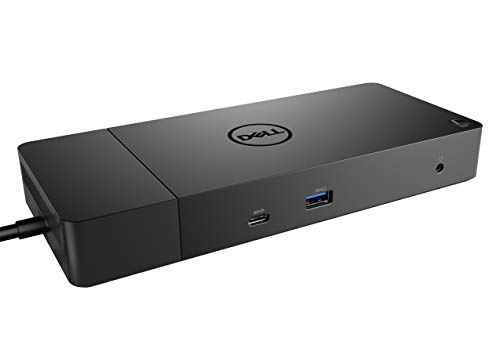 | 9.5PCKitHQ scoreView on Amazon |
06 Also Consider WD19 Dell Docking Station | 9.4PCKitHQ scoreView on Amazon |
07 Also Consider WD19S Dell USB-C Docking Station | 9.3PCKitHQ scoreView on Amazon |
08 Also Consider Dell WD19S Docking Station Dual Monitor | 9.2PCKitHQ scoreView on Amazon |
A closer look at each configuration
Dell WD19S Docking Station Bundle
score
The 130W power delivery, HDMI and DisplayPort, and included cables make this WD19S bundle a complete one-cable setup for a Precision 7680.
- Power delivery
- 130 W
- Interface
- USB-C
- HDMI
- Yes
- DisplayPort
- Yes
- Ethernet
- Yes
- USB-C
- Yes
- Weight
- 3.21 lb
- Warranty
- 1 Year Warranty
This bundle includes a Dell WD19S docking station with a 180W power supply, an HDMI cable, and a cleaning cloth. It delivers 130W of power over USB-C and connects through HDMI and mini-DisplayPort, with 2 USB-C and 3 USB-A 3.0 ports and an RJ-45 ethernet port. It works with laptops that support DisplayPort over USB-C or Thunderbolt 3, including select Precision models. It weighs 3.21 lb and carries a 1 Year Warranty.
Choose it if
- You want 130W power delivery over USB-C
- You want HDMI and DisplayPort for dual monitors
Consider another if
- You need the 210W power delivery of the Dell WD19DCS
- You need Thunderbolt like the Dell WD19TBS
Dell Performance Dock WD19DCS
score
The 210W power delivery and dual USB-C connection suit a Precision workstation with monitors and peripherals on one cable.
- Power delivery
- 210 W
- Interface
- dual USB-C
- USB-C
- Yes
- Weight
- 1.28 lb
This Dell dock gives 210W power delivery over dual USB-C, with 90W to non-Dell systems, from a 240W power adapter. One cable connects a Precision mobile workstation to monitors and peripherals, and the modular design allows power and connectivity upgrades as needs change. A single firmware manages the dock, and intelligent management keeps work running without disruptions. It measures 8.07 inches by 3.54 inches by 1.14 inches and weighs 1.28 lb.
Choose it if
- You want 210W power delivery over dual USB-C
- You want one cable to monitors and peripherals
Consider another if
- You need Thunderbolt like the Dell WD19TBS
- You need the 3 YEAR MANUFACTURER warranty of the Dell WD19DC
Dell Thunderbolt Dock- WD19TBS 130w Power Delivery
score
The Thunderbolt connection and three-display support suit a desk where one dock drives several monitors.
- Power delivery
- 130 W
- Interface
- Thunderbolt
- Weight
- 4 lb
This Dell Thunderbolt dock delivers 130W of power and connects through Thunderbolt for power, data, audio, and video. It supports up to three displays, including a single 5K and dual 4K monitors. The built-in 0.8-meter cable connects to the laptop, and an optional VESA mount puts the dock behind a monitor or under a desk. MAC Address pass-thru, remote port-disablement, PXE Boot, and Wake-on-LAN support managed setups. It weighs 4 lb.
Choose it if
- You want Thunderbolt for power, data, and video
- You want up to three displays from one dock
Consider another if
- You need the 210W power delivery of the Dell WD19DCS
- You need USB-C instead of Thunderbolt
WD19S Dell Docking Station
score
The 130W power delivery, dual and triple monitor support, and 4K-60Hz output suit a multi-monitor desk setup.
- Power delivery
- 130 W
- Interface
- USB-C 3.2 Gen 2
- HDMI
- Yes
- DisplayPort
- Yes
- Ethernet
- Yes
- USB-C
- Yes
This WD19S dock delivers 130W of power from a 180W power adapter and connects over USB-C 3.2 Gen 2. It has 2 DisplayPort, 1 HDMI, 1 USB-C 3.2 Gen 2 with DisplayPort, 1 USB-C 3.2 Gen 2, 2 USB 3.2 Gen 1 Type A, 1 USB 3.2 Gen 1 with Power Share, and an RJ-45 ethernet port. It supports up to 4K-60Hz on dual monitors and QHD-60Hz on triple monitors, and works with Latitude, Precision, XPS, and Venue series laptops. FKA provides 1 year replacement service and 3-year maintenance support.
Choose it if
- You want dual monitors at 4K-60Hz
- You want triple monitors at QHD-60Hz
Consider another if
- You need the 210W power delivery of the Dell WD19DCS
- You need Thunderbolt like the Dell WD19TBS
Dell Performance Dock WD19DC Docking Station
score
The 210W power delivery, dual USB-C, and four-display support suit a Precision 7000 workstation with several monitors.
- Power delivery
- 210 W
- Interface
- Dual USB-C
- USB-C
- Yes
- Warranty
- 3 YEAR MANUFACTURER
This Dell dock gives 210W power delivery over dual USB-C, with 90W to non-Dell systems, from a 240W power adapter. It supports up to four displays, including a single 5K and dual 4K monitors on supported systems. A single USB-C cable or dual USB-C connection carries power, data, audio, and video, and the second USB-C cable works as USB-C with power share for a peripheral or mobile phone. It suits Precision 7000 workstations and carries a 3 YEAR MANUFACTURER warranty.
Choose it if
- You want 210W power delivery over dual USB-C
- You want support for up to four displays
Consider another if
- You need Thunderbolt like the Dell WD19TBS
- You need a 180W power adapter like the ANYHDD bundle
WD19 Dell Docking Station
score
The VGA, HDMI, and mini-DisplayPort video ports suit a desk with older and newer monitors side by side.
- Interface
- USB-C
- HDMI
- Yes
- DisplayPort
- Yes
- Ethernet
- Yes
- USB-C
- Yes
- Warranty
- 1 year
This bundle includes a Dell WD19 docking station with a 180W adapter, an HDMI cable, and a cleaning cloth. It connects over USB-C and works with laptops that support DisplayPort over USB-C or Thunderbolt 3, including select Precision models. Video ports include VGA, HDMI, and mini-DisplayPort, with an RJ-45 ethernet port, a headphone-mic combo, 2 USB 2.0 ports, and 3 USB 3.0 ports. It carries a 1 year warranty.
Choose it if
- You want VGA, HDMI, and mini-DisplayPort video ports
- You want an RJ-45 ethernet port
Consider another if
- You need the 210W power delivery of the Dell WD19DCS
- You need Thunderbolt like the Dell WD19TBS
WD19S Dell USB-C Docking Station
score
The 130W supply, HDMI and DisplayPort, and 2.5 lb body suit a desk that needs a lighter USB-C dock.
- Interface
- USB-C
- HDMI
- Yes
- DisplayPort
- Yes
- Ethernet
- Yes
- USB-C
- Yes
- Weight
- 2.5 lb
- Warranty
- 1 year
This Dell WD19S dock runs on a 130W supply and connects over USB-C with HDMI and mini-DisplayPort video ports, 2 USB-C and 3 USB-A 3.0 ports, and an RJ-45 ethernet port. The dock links all peripherals, screens, and devices through one device. It supports dual monitors through its HDMI and mini-DisplayPort video ports. It works with laptops that support DisplayPort over USB-C or Thunderbolt 3, including select Precision models. It weighs 2.5 lb and carries a 1 year warranty.
Choose it if
- You want a 130W supply over USB-C
- You want HDMI and DisplayPort for dual monitors
Consider another if
- You need the 210W power delivery of the Dell WD19DCS
- You need Thunderbolt like the Dell WD19TBS
Dell WD19S Docking Station Dual Monitor
score
The 180W adapter, HDMI and DisplayPort, and full port set suit a desk that needs a complete USB-C dock.
- Interface
- USB-C
- HDMI
- Yes
- DisplayPort
- Yes
- Ethernet
- Yes
- USB-C
- Yes
- Weight
- 3.95 lb
- Warranty
- 1 year
This Koncept WD19S bundle includes a docking station with a 180W adapter, an HDMI cable, and a cleaning cloth. It supports dual monitors through HDMI and DisplayPort. It connects over USB-C with HDMI and mini-DisplayPort video ports, 2 USB-C and 3 USB-A 3.0 ports, and an RJ-45 ethernet port. It works with laptops that support DisplayPort over USB-C or Thunderbolt 3, including select Precision models. It weighs 3.95 lb and carries a 1 year warranty.
Choose it if
- You want a 180W USB-C dock
- You want HDMI and DisplayPort for dual monitors
Consider another if
- You need the 210W power delivery of the Dell WD19DCS
- You need Thunderbolt like the Dell WD19TBS
Make the choice for your setup
Power delivery and adapters
Power delivery decides how much charge the dock sends to the laptop through one cable. Three picks state 130W power delivery: the ANYHDD WD19S bundle, the Dell WD19TBS, and the FKAfusiontech WD19S. Two picks state 210W power delivery over dual USB-C: the Dell WD19DCS and the Dell WD19DC, both with a 240W power adapter and 90W to non-Dell systems. The ANYHDD bundle and the FKAfusiontech dock pair a 180W power adapter with 130W power delivery, and the WD19 dock includes a 180W adapter. The WD19S dock states a 130W supply, so compare the 130W and 210W delivery figures before you choose.
Monitors and video ports
Display support separates these docks once power fits. The Dell WD19DC supports up to four displays, including a single 5K and dual 4K monitors on supported systems, and the Dell WD19TBS supports up to three displays, including a single 5K and dual 4K monitors. The FKAfusiontech WD19S supports up to 4K-60Hz on dual monitors and QHD-60Hz on triple monitors. The ANYHDD bundle and the Koncept WD19S support dual monitors through HDMI and DisplayPort, and the WD19 dock supports dual monitors through VGA, HDMI, and mini-DisplayPort. Video ports include HDMI and mini-DisplayPort on the WD19S docks, VGA, HDMI, and mini-DisplayPort on the WD19 dock, and 2 DisplayPort plus HDMI on the FKAfusiontech dock. A related shortlist covers the Best M 2 Docking Station.
Ports, Ethernet, and weight
USB ports and Ethernet decide how many devices plug in directly without an extra hub. The ANYHDD bundle, the WD19S dock, and the Koncept WD19S each give 2 USB-C and 3 USB-A 3.0 ports with an RJ-45 ethernet port. The WD19 dock gives 2 USB 2.0 and 3 USB 3.0 ports with an RJ-45 ethernet port and a headphone-mic combo. The FKAfusiontech dock gives 2 USB 3.2 Gen 1 Type A ports, 1 USB 3.2 Gen 1 with Power Share, and an RJ-45 ethernet port. Weights run from 1.28 lb on the Dell WD19DCS to 4 lb on the Dell WD19TBS.
For a wider shortlist, start with Best Docking Station.
FAQ: Docking Station for Dell Precision 7680
How much power delivery do these docks provide?
Three picks state 130W power delivery: the ANYHDD WD19S bundle, the Dell WD19TBS, and the FKAfusiontech WD19S. The Dell WD19DCS and the Dell WD19DC state 210W power delivery, with 90W to non-Dell systems, from a 240W power adapter.
How many monitors can I connect with these docks?
The Dell WD19DC supports up to four displays, and the Dell WD19TBS supports up to three displays, including a single 5K and dual 4K monitors. The FKAfusiontech WD19S supports dual monitors at 4K-60Hz and triple monitors at QHD-60Hz.
Which docks connect over Thunderbolt?
The Dell WD19TBS connects over Thunderbolt for power, data, audio, and video, with support for up to three displays. The other docks connect over USB-C, including the Dell WD19DCS and the Dell WD19DC with dual USB-C.


