
Best Docking Station for iPad Air (2026): 6 Picks Compared
 By Theo LangUpdated
Choose the NXPGKEA iPad Pro USB C Hub Stand if you want a 10-in-1 dock that pairs 4K@60Hz HDMI output with 100W PD charging, wired Ethernet, SD/TF card readers, and a 3.5mm audio jack. Its aluminum stand holds 13, 12.9, and 11-inch iPads with a Type-C port. The six docks below differ in port counts, Ethernet speed, and weight, so match the port list to your devices.
Your shortlist at a glance
PCKitHQ scores range from 9.2 to 9.8. See how we pick.
| Product and key specifications | Score and retailer |
|---|---|
01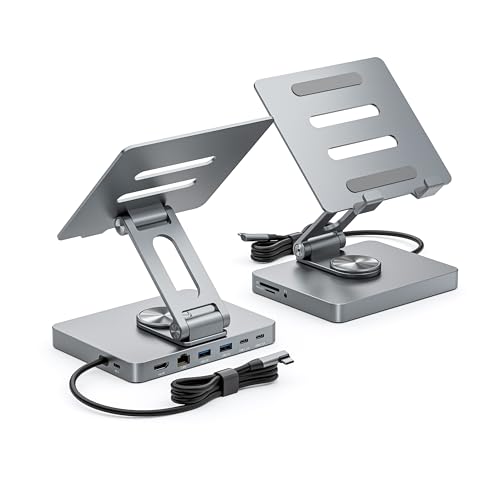 | 9.8PCKitHQ scoreView on Amazon |
02 Second Pick Anker USB C Hub for iPad | 9.7PCKitHQ scoreView on Amazon |
03 Also Consider iPad Pro Stand USB C Hub | 9.6PCKitHQ scoreView on Amazon |
04 | 9.4PCKitHQ scoreView on Amazon |
05 Also Consider iPad Pro USB C Hub Stand | 9.3PCKitHQ scoreView on Amazon |
06 Also Consider iPad Pro USB C Hub Stand | 9.2PCKitHQ scoreView on Amazon |
A closer look at each configuration
NXPGKEA iPad Pro USB C Hub Stand
score
The 10-in-1 NXPGKEA stand combines 4K@60Hz HDMI, 100W PD charging, Ethernet, and card readers in one aluminum dock.
- Power delivery
- 100 W
- Interface
- USB 3.0
- HDMI
- Yes
- Ethernet
- Yes
- USB-C
- Yes
- Weight
- 0.84 lb
The NXPGKEA stand is a 10-in-1 dock built around an aluminum stand for 13, 12.9, and 11-inch iPads with a Type-C port. Its HDMI port outputs 4K at 60Hz to an external display, and its USB-C PD port delivers up to 100W while the other ports stay in use. Dual USB 3.0 and dual USB-C 3.0 ports connect flash drives, hard drives, and peripherals, while SD and TF readers import photos from cameras. The 3.5mm audio jack connects wired headphones or speakers. It weighs 0.84 lb and fits iPads with a Type-C port, not laptops.
Choose it if
- You want 4K@60Hz HDMI output from your iPad Air
- You want 100W PD charging while every port stays in use
Consider another if
- You need a dock with more than 10 ports
- You want a stand for a tablet larger than 13 inches
Anker USB C Hub for iPad
score
The Anker 551 pairs a foldable 8-in-1 stand with 4K@60Hz HDMI, two USB-A ports, and an 18-month warranty.
- HDMI
- Yes
- USB-C
- Yes
- Weight
- 1.43 lb
- Warranty
- 18-month
The Anker 551 is an 8-in-1 hub with a foldable tablet stand for iPad Pro 5th generation, iPad Air 5th generation, iPad mini 6th generation, and later models. Its 4K HDMI port connects an external display at 4K at 60Hz, and its two USB-A data ports and microSD/SD slots move files from drives and memory cards. The USB-C Power Delivery input accepts a 45W to 100W charger for pass-through charging; the charger is not included. A 3.5mm AUX port connects wired audio. The hub weighs 1.43 lb and carries an 18-month warranty.
Choose it if
- You want a foldable stand with 4K@60Hz HDMI output
- You want an 18-month warranty on your iPad dock
Consider another if
- You need more than two USB-A data ports
- You need a charger included in the box
iPad Pro Stand USB C Hub
score
The BKELHS 7-in-1 dock adds 100 Mbps Ethernet and 4K@60Hz HDMI to a folding USB3.1 design.
- Interface
- USB3.1
This BKELHS dock is a 7-in-1 clip-shaped USB-C station with a folding design for carrying. Its HDMI port outputs 4K at 60Hz, and its Ethernet port runs at 100 Mbps. One USB 3.0 port transfers data at 5Gbps, with a USB 2.0 port for a second peripheral. SD/TF outputs read memory cards, and the PD 100W port charges through the USB-C connection while the HDMI, USB 3.0, and card reader stay in use.
Choose it if
- You want 100 Mbps Ethernet on a folding iPad dock
- You want a USB3.1 dock with 4K@60Hz HDMI output
Consider another if
- You need more than one USB 3.0 port
- You need Gigabit Ethernet rather than 100 Mbps Ethernet
j5create Adjustable Tablet Stand
score
The j5create JTS224 combines an adjustable stand with HDMI 2.0, two USB-A 5Gbps ports, and 100W PD charging.
- Power delivery
- 100 W
- HDMI
- Yes
- USB-C
- Yes
- Weight
- 1.1 lb
The j5create JTS224 is an 8-in-1 USB-C dock built into an adjustable tablet stand that folds and rotates to change the viewing angle. Its HDMI 2.0 port outputs 4K at 60Hz, and its two USB Type-A ports transfer data at 5Gbps. The SD/microSD 3.0 card reader moves files from memory cards, and the audio/mic combo jack connects wired audio. PD 100W pass-through charging powers the tablet while the other ports stay connected. A drawstring bag is included for carrying. It weighs 1.1 lb.
Choose it if
- You want two USB-A 5Gbps ports on your iPad stand
- You want 100W PD pass-through charging with 4K60 HDMI
Consider another if
- You need more than two USB-A 5Gbps ports
- You need a dock lighter than 1.1 lb
iPad Pro USB C Hub Stand
score
This BKELHS stand pairs three USB 3.0 ports with 4K@60Hz HDMI, SD/TF readers, and a 3.5mm audio port.
- Interface
- USB3.1
- HDMI
- Yes
- USB-C
- Yes
- Weight
- 1.17 lb
This BKELHS stand is a clip-shaped USB-C docking station that folds for carrying. Its HDMI port outputs 4K at 60Hz, and its three USB 3.0 ports transfer data at 5Gbps for drives and peripherals. SD/TF outputs read memory cards, and the PD port charges through the USB-C connection while the HDMI, USB 3.0, and card reader stay in use. A 3.5mm port connects headphones and speakers. It weighs 1.17 lb.
Choose it if
- You want three USB 3.0 ports on a folding dock
- You want 4K@60Hz HDMI output with SD/TF card readers
Consider another if
- You need more than three USB 3.0 ports
- You need a dock lighter than 1.17 lb
iPad Pro USB C Hub Stand
score
This BKELHS 9-in-1 dock pairs Gigabit Ethernet with three USB 3.0 ports and 4K@60Hz HDMI output.
- Interface
- USB3.1
- HDMI
- Yes
- Ethernet
- Yes
- USB-C
- Yes
- Weight
- 1.2 lb
This BKELHS dock is a 9-in-1 clip-shaped USB-C station that folds for carrying. Its HDMI port outputs 4K at 60Hz, and its Gigabit Ethernet port adds wired networking. Three USB 3.0 ports transfer data at 5Gbps for drives and peripherals, and SD/TF outputs read memory cards. The PD port charges through the USB-C connection while the other ports stay in use, and a 3.5mm port connects headphones and speakers. It weighs 1.2 lb.
Choose it if
- You want Gigabit Ethernet on a 9-in-1 iPad dock
- You want three USB 3.0 ports with 4K@60Hz HDMI
Consider another if
- You need a dock with more than nine ports
- You need a dock lighter than 1.2 lb
Make the choice for your setup
Match the ports to your devices
Start with the connections you use every day. The NXPGKEA stand gives you 10 ports, including 4K@60Hz HDMI, Ethernet, dual USB 3.0, dual USB-C 3.0, SD/TF readers, and a 3.5mm audio jack. The Anker 551 gives you 8 ports with two USB-A data ports and microSD/SD slots, while the j5create JTS224 gives you two USB-A 5Gbps ports and an HDMI 2.0 port. The two BKELHS stands with three USB 3.0 ports suit a keyboard, a mouse, and a flash drive, and the BKELHS 7-in-1 dock has one USB 3.0 port and one USB 2.0 port. Count the drives, peripherals, and cards you connect, and check the port list.
Compare Ethernet and charging
Wired networking differs across these docks. The NXPGKEA stand and the BKELHS 9-in-1 dock have Ethernet ports, and the BKELHS 9-in-1 dock names Gigabit Ethernet. The BKELHS 7-in-1 dock has a 100 Mbps Ethernet port. Charging differs too: the NXPGKEA stand delivers up to 100W PD, the j5create JTS224 offers PD 100W pass-through charging, and the Anker 551 accepts a 45W to 100W USB-C charger through its Power Delivery input port, with the charger not included. The BKELHS docks charge through a PD port while HDMI, USB 3.0, and the card reader stay in use. Match the Ethernet speed and the charging wattage to your network and your charger. If that fits your setup better, see our guide to the Best Docking Station for Multiple Monitors.
Check size, weight, and fit
These docks differ in size and weight. The NXPGKEA, Anker, and j5create models are stands that hold the tablet, while the three BKELHS docks are clip-shaped docking stations. The NXPGKEA stand weighs 0.84 lb and is built for 13, 12.9, and 11-inch iPads with a Type-C port. The Anker 551 weighs 1.43 lb and fits iPad Pro 5th generation, iPad Air 5th generation, iPad mini 6th generation, and later models. The j5create JTS224 weighs 1.1 lb and folds and rotates to adjust the viewing angle. The BKELHS docks with listed weights weigh 1.17 lb and 1.2 lb and fold for carrying. Check the sizes against your iPad model and the space on your desk before choosing.
Comparing more options? See Best Docking Station.
FAQ: Docking Station for iPad Air
Which dock has the most ports in this guide?
The NXPGKEA stand has 10 ports, including 4K@60Hz HDMI, Ethernet, dual USB 3.0, dual USB-C 3.0, SD/TF readers, and a 3.5mm audio jack. The BKELHS 9-in-1 dock has nine ports, and the Anker 551 and j5create JTS224 each have eight.
Do these docks charge the iPad while in use?
Yes, each dock here charges through a USB-C PD port while other ports stay in use. The NXPGKEA stand delivers up to 100W PD, the j5create JTS224 offers PD 100W pass-through charging, and the Anker 551 accepts a 45W to 100W charger.
Which docks have Ethernet in this guide?
The NXPGKEA stand and the BKELHS 9-in-1 dock have Ethernet, and the BKELHS 9-in-1 dock names Gigabit Ethernet. The BKELHS 7-in-1 dock has a 100 Mbps Ethernet port. Compare the Ethernet speed each dock names with the wired connection you need.


