What to Look for When Buying a Tablet
 By Theo LangUpdated
Start with what you will do on the tablet: reading and video want a sharp screen, note-taking wants a pen, and laptop work wants a keyboard and a desktop operating system. Then compare screen size, storage, battery life and weight, since those decide how the tablet feels to carry and use. Check the ports and the pen and keyboard support before you buy.
Pick the screen size first
The tablets here run from 11 inches to 13 inches. The iPad measures 11 inches, the Surface Pro 12 inches, and the Lenovo and Surface Pro 11 measure 13 inches. A larger screen shows more of a page or a video at once, while a smaller screen is lighter to hold and easier to carry. Hold the sizes in mind against the bag you carry and the desk you work at.
Match storage and memory to your use
Memory holds the apps you have open, and storage holds your files, photos and apps. The Surface Pro models here list 16GB of memory, and the Lenovo lists 8GB. Storage runs from 128GB on the iPad and the Lenovo to 256GB on the Surface Pro 11 and 512GB on the Surface Pro 2-in-1. Check the storage and memory figures the maker publishes for the apps you plan to run, and pick the figures that leave room to grow.
Check the pen, keyboard and ports
A pen and a keyboard change what a tablet can do, so check what each one works with. The iPad works with Apple Pencil and the Magic Keyboard Folio, and the Surface Pro 2-in-1 works with the Surface Pro Keyboard, which is sold separately. The Lenovo comes with a pen and a folio case, and the Surface Pro 11 bundle comes with the Pro Keyboard and the Slim Pen. The iPad lists a USB-C connector, so check the ports on the tablet you pick against the cables and drives you own.
Compare battery life and weight
Battery life and weight decide how long the tablet lasts away from a charger and how it feels to carry. The Surface Pro 2-in-1 lists up to 16 hours of battery life, and the iPad lists all-day battery life. The iPad weighs 1.05 pounds, the Lenovo 1.31 pounds, the Surface Pro 11 bundle 1.97 pounds, and the Surface Pro 2-in-1 2.55 pounds. Compare those figures with how you carry and use the tablet each day.
What you need

Apple iPad 11-inch
An 11-inch tablet with the A16 chip, a Liquid Retina display, 128GB of storage, Wi-Fi 6, Touch ID and USB-C.
View on Amazon
Microsoft Surface Pro 2-in-1 Laptop/Tablet
A 12-inch 2-in-1 with a Snapdragon X Plus chip, 16GB of memory, 512GB of storage and up to 16 hours of battery life.
View on Amazon
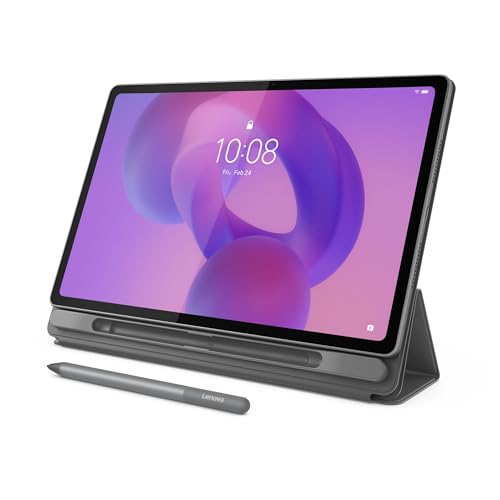
Lenovo Idea Tab Pro Gen 2 Tablet Pen & Folio Case
A 13-inch tablet with a 3.5K touchscreen at 144Hz, 8GB of memory, 128GB of storage, and a pen and folio case.
View on Amazon
Microsoft Surface Pro 11 Copilot PC Bundle
A 13-inch 2-in-1 with a 2.8K touchscreen, 16GB of memory, 256GB of storage, and the Pro Keyboard and Slim Pen.
View on AmazonThese come from our ranked list Best Tablet PC, which compares them spec by spec.
FAQ
How much storage should a tablet have?
It depends on what you keep on it. The tablets here list 128GB, 256GB or 512GB of storage, so compare those figures with the size of the apps and files you plan to keep. Check the storage figure the maker publishes for the apps you use.
Do I need a keyboard with a tablet?
Not always. A keyboard helps when you type a lot, and the Surface Pro 11 bundle comes with one while the Surface Pro 2-in-1 keyboard is sold separately. The iPad works with the Magic Keyboard Folio, and the Lenovo comes with a folio case.
What screen size is best for a tablet?
It depends on how you carry and use it. The iPad here is 11 inches, the Surface Pro 2-in-1 is 12 inches, and the Lenovo and Surface Pro 11 are 13 inches. A larger screen shows more at once, while a smaller one is easier to carry.