What Is a Tablet Used For?
 By Theo LangUpdated
A tablet is a flat touchscreen computer you hold in your hand, and you use it for reading, watching video, taking notes, drawing, video calls and light work. It sits between a phone and a laptop, with a larger screen than a phone and a simpler shape than a laptop. With a pen or a keyboard, a tablet also handles writing, study and office work.
Reading and watching video
A tablet suits reading books, papers and web pages, since you hold it like a book and tap or swipe to turn pages. It also suits watching films and shows, with a screen large enough to share with one other person at a desk or on a sofa. The tablets shown here have 11-inch, 12-inch and 13-inch screens, so a larger screen gives more room for text and video at once.
Notes and drawing with a pen
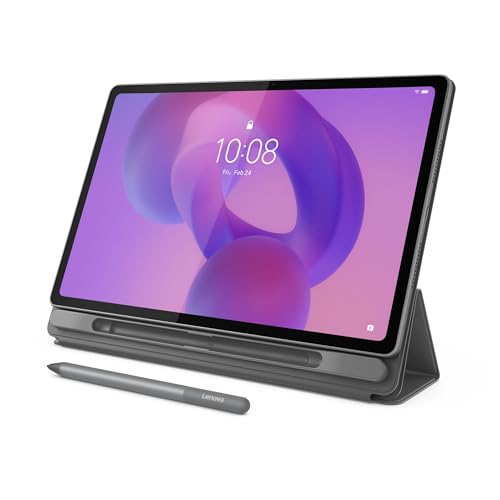
A tablet with a pen suits handwritten notes, sketches and marking up documents, since you write straight on the screen. The iPad shown here works with Apple Pencil, and the Surface Pro 11 shown here comes with a Slim Pen that stores in its keyboard. The Lenovo tablet shown here has tools for notes and for reading papers, with Smart Capture for pulling images into Lenovo Notepad, so check the pen that the listing names for each model.
Work and study with a keyboard
A tablet with a keyboard suits writing, email, spreadsheets and study, since the keyboard turns it into a small laptop for long writing. The iPad shown here works with a Magic Keyboard Folio, and the Surface Pro shown here has a built-in kickstand and works with a Surface Pro Keyboard. Check the apps you use for work or study, and check that they are available for the tablet you choose.
Video calls and photos
A tablet suits video calls, since the front camera faces you while you hold the screen or prop it on a stand. The iPad shown here has a 12MP front camera and a 12MP back camera, so the back camera suits scanning documents and taking photos. Hold the tablet steady for calls, or set it on a stand, and check the light in the room before you join a call.
What you need

Apple iPad 11-inch
An 11-inch tablet with an A16 chip, Liquid Retina display, 128GB storage, Wi-Fi 6, USB-C and Touch ID.
View on Amazon
Microsoft Surface Pro 2-in-1 Laptop/Tablet
A 12-inch 2-in-1 with a touchscreen, Snapdragon X Plus, 16GB RAM, 512GB storage and Windows 11.
View on Amazon
Lenovo Idea Tab Pro Gen 2 Tablet Pen & Folio Case
A 13-inch tablet with a 3.5K IPS touchscreen, 144 Hz refresh rate, Snapdragon 8s Gen 4, 8GB memory and 128GB storage.
View on Amazon
Microsoft Surface Pro 11 Copilot PC Bundle
A 13-inch 2.8K touchscreen tablet with a Snapdragon X Plus, 16GB RAM, 256GB SSD, a keyboard and Slim Pen.
View on AmazonThese come from our ranked list Best Tablet PC, which compares them spec by spec.
FAQ
Can a tablet replace a laptop?
It can for some work, when it has a keyboard, a pen and the apps you use. The Surface Pro models shown here run Windows and work with a keyboard, so they act as a laptop for writing and office work. Check the apps and the files you use before you decide.
Is a tablet good for school work?
Yes, for reading, notes, homework and video lessons. The Lenovo tablet shown here is built for study, with tools for notes and for reading papers, and a pen suits handwritten notes. A keyboard helps with long writing, and a case helps when you carry the tablet to class.
Do I need a pen for a tablet?
No, you can tap and type on the screen without one. A pen suits drawing, handwriting and marking up documents, since it gives you a fine point on the screen. Check the pen that the listing names for the tablet you choose, since pens differ by model.