What Does RAM Look Like in a PC?
 By Theo LangUpdated
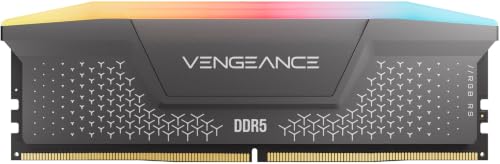
In a PC, RAM is a slim, flat stick, with a row of small black memory chips along one or both sides and a gold-colored edge connector along the bottom. Desktop sticks plug upright into long slots on the motherboard next to the processor, while laptop sticks are shorter. Many sticks have a metal heat spreader or a light strip over the chips.
The stick and its chips
A RAM stick is a narrow circuit board, with memory chips mounted in a line on the surface and a row of gold contacts along the bottom edge. The chips are small black rectangles, and the board between them is often green or black. Some sticks are bare, so you see the chips and the board, while others are covered by a metal heat spreader that hides the chips and gives the stick a flat, solid look.
The gold connector and the notch
The bottom edge of the stick carries a row of gold contacts that slide into the slot on the motherboard. Partway along that edge sits a small notch, cut into the board, and the slot has a matching bump. The notch sits in a different place on DDR4 and DDR5 sticks, so a stick with the notch in the wrong place does not fit into the slot.
Where RAM sits inside the case
Inside a desktop, the RAM slots sit in a row near the processor socket, held upright by clips at each end. A stick in a slot stands tall above the board, so it is easy to spot once the side panel is off. Shut the PC down, unplug it, and follow the maker's manual before you open the case or touch anything inside.
How to tell DDR4 from DDR5
DDR4 and DDR5 sticks look much alike. A stick is either DDR4 or DDR5, and its notch sits in a different place for each generation, so check the notch position and match the generation to what your motherboard supports. The two generations do not fit in each other's slots, so check your motherboard manual before you buy a stick.
What you need

Patriot Viper Venom DDR5 RAM
A 16 GB DDR5 kit in two 8 GB sticks, rated at 6000 MT/s with CL36 timings and support for Intel XMP and AMD EXPO.
View on Amazon
CORSAIR Vengeance RS DDR5
A 32 GB DDR5 kit in two 16 GB sticks, rated up to 6000 MHz with CL38 timings and support for AMD EXPO and Intel XMP 3.0.
View on Amazon
Corsair Vengeance RGB RS DDR5
A 64 GB DDR5 kit in two 32 GB sticks, rated up to 6000 MHz with CL40 timings, AMD EXPO and Intel XMP 3.0 support, and RGB lighting.
View on Amazon
G.SKILL RipjawsV DDR4 RAM (XMP)
A 32 GB DDR4 kit in two 16 GB sticks, rated up to 3200 MT/s with CL16 timings and an Intel XMP overclock profile.
View on AmazonThese come from our ranked list Best RAM for PC, which compares them spec by spec.
FAQ
Can I tell DDR4 from DDR5 by looking at a stick?
The sticks look much alike. Check the notch position and the generation of the stick, then match it to your motherboard manual.
What do the chips on a RAM stick do?
The chips hold the data your PC works with while it is running, so programs and open files can reach it quickly. When you shut the PC down, the data on the chips is gone.
Why does RAM have a gold edge?
The gold edge is the connector that links the stick to the motherboard slot. It carries the signals and power between the memory chips and the rest of the PC.