
SSD vs HDD (2026): Key Differences Compared
 By Theo LangUpdated
An SSD stores files on flash memory inside a portable case. A hard drive stores files on spinning disks inside a portable case. Look at the SSD examples when you want the 4,000 MB/s read speed of the Samsung P7 or the 0.11 lb weight of the SanDisk Extreme, and look at the hard drive examples when you want the 5TB capacity of the WD My Passport and the Seagate Portable.
SSD or Hard drive (HDD) at a glance
Each side is shown through example configurations from our buying guides. These are examples, not a ranking.
SSD
The example configurations
Samsung Portable SSD P7
The Samsung P7 pairs a 1TB capacity with USB4 and read speeds up to 4,000 MB/s.

- Capacity
- 1TB
- Interface
- USB4
- Weight
- 0.22 lb
- Warranty
- Three (3) Year Limited Warranty
The Samsung P7 has a 1TB capacity and a USB4 interface. Its read and write speeds are up to 4,000 and 3,700 MB/s. The drive weighs 0.22 lb and carries a Three (3) Year Limited Warranty. Durability covers everyday bumps, vibrations, and drops up to 6.5 feet. The P7 works with Windows PCs, smartphones, tablets, cameras, TVs, and gaming consoles. The drive is made for creative professionals, AI content producers, and capacity expanders. Large spreadsheets, project files, datasets, and AI models are the workloads the drive handles. Capacities run from 1TB to 8TB for photos, videos, games and more.
Choose it if
- You move large files and want read speeds up to 4,000 MB/s
- You carry a drive daily and want the 0.22 lb weight
Consider the other side if
- You need 5TB of capacity like the WD My Passport
- You want the 0.11 lb weight of the SanDisk Extreme
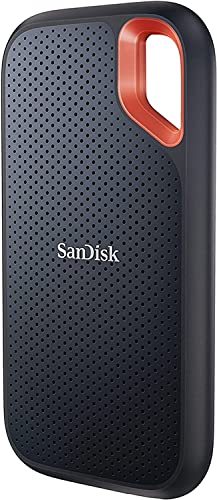
SanDisk 2TB Extreme Portable SSD
The SanDisk Extreme pairs a 2TB capacity with up to 1050 MB/s read speed and IP65 water and dust resistance.
- Capacity
- 2TB
- Rated read speed
- 1050 MB/s
- Interface
- USB-C 3.2 Gen 2
- Weight
- 0.11 lb
- Warranty
- 5-year limited manufacturer warranty
The SanDisk Extreme has a 2TB capacity and a USB-C 3.2 Gen 2 interface. Its read speed is up to 1050 MB/s and its write speed is up to 1000 MB/s. The drive weighs 0.11 lb and carries a 5-year limited manufacturer warranty. The drive has up to 3-meter drop protection and IP65 water and dust resistance. A carabiner loop attaches the drive to a belt loop or backpack. Password protection with 256-bit AES hardware encryption keeps private content private. The SanDisk Memory Zone app manages files and frees up space automatically. The drive uses NVMe solid state performance. This is the old model of the SanDisk Extreme Portable SSD. The drive tolerates -20°C to 85°C when not in use.
Choose it if
- You want 2TB of capacity in a 0.11 lb drive
- You want IP65 water and dust resistance on the go
Consider the other side if
- You need 5TB of capacity like the Seagate Portable
- You want the 4,000 MB/s read speed of the Samsung P7
WD 5TB My Passport
The WD My Passport pairs a 5TB capacity with USB 3.1 and USB 3.0 compatibility and a 3-year limited warranty.

- Capacity
- 5TB
- Interface
- USB 3.1/USB 3.0
- Weight
- 0.46 lb
- Warranty
- 3-year manufacturer's limited warranty
The WD My Passport has a 5TB capacity and a USB 3.1 and USB 3.0 interface. The drive weighs 0.46 lb and carries a 3-year manufacturer's limited warranty. Included device management software backs up files with defense against ransomware. Password protection and hardware encryption guard important files. The slim durable design suits carrying important files along on trips. The drive connects through USB 3.1 and works with USB 3.0 ports. Backup software comes with the drive and manages the device. The 3-year manufacturer's limited warranty covers the drive. The WD My Passport is a portable external hard drive in black.
Choose it if
- Your files need the 5TB capacity of this drive
- You want password protection and hardware encryption
Consider the other side if
- You want a 0.11 lb drive like the SanDisk Extreme
- You need read speeds up to 4,000 MB/s from the Samsung P7
Seagate Portable
The Seagate Portable pairs a 5TB capacity with a USB 3.0 interface and an 18 inch USB 3.0 cable.

- Capacity
- 5TB
- Interface
- USB 3.0
- Weight
- 0.57 lb
- Warranty
- 2 year limited warranty
The Seagate Portable has a 5TB capacity and a USB 3.0 interface. The drive weighs 0.57 lb and carries a 2 year limited warranty. It works with Windows or Mac computers, and backup is a drag and drop action. Setup needs a connection to a computer for automatic recognition. The included 18 inch USB 3.0 cable supports plug and play simplicity. The drive stores and gives access to 5TB of content on the go. The available storage capacity may vary. Windows or Mac computers recognize the drive on connection. The Seagate Portable works with PC, Mac, PS4, and Xbox. The 1-Year Rescue Service comes with the drive. The Seagate Portable is a black portable external hard drive.
Choose it if
- You need 5TB of capacity for content on the go
- You use Windows or Mac computers for drag and drop backup
Consider the other side if
- You want the 0.22 lb weight of the Samsung P7
- You want IP65 water and dust resistance like the SanDisk Extreme
How to choose between them
Compare the capacities
The Samsung P7 has a 1TB capacity, and the SanDisk Extreme has a 2TB capacity. The WD My Passport has a 5TB capacity, and the Seagate Portable has a 5TB capacity. The two hard drive examples hold more than either SSD example: 5TB against 1TB and 2TB. A buyer with a file collection above 2TB finds room in the 5TB examples. Your files fit within 1TB and find room in the Samsung P7, and your files fit within 2TB and find room in the SanDisk Extreme. A 5TB drive holds the files of a collection that passes 2TB. Match the capacity to the size of the files you plan to keep on the drive. The Samsung P7 holds 1TB against the 2TB of the SanDisk Extreme.
Weigh interface and speeds
The Samsung P7 has a USB4 interface with read and write speeds up to 4,000 and 3,700 MB/s. The SanDisk Extreme has a USB-C 3.2 Gen 2 interface with a read speed up to 1050 MB/s and a write speed up to 1000 MB/s. The WD My Passport has a USB 3.1 and USB 3.0 interface. The Seagate Portable has a USB 3.0 interface. The Samsung P7 has read speeds up to 4,000 MB/s, above the 1050 MB/s of the SanDisk Extreme. A buyer who moves large files and wants the speeds of the Samsung P7 looks at the SSD examples. You connect through USB 3.0 and find that interface on the WD My Passport and the Seagate Portable. The Samsung P7 writes up to 3,700 MB/s, and the SanDisk Extreme writes up to 1000 MB/s.
Compare weight and carrying details
The SanDisk Extreme weighs 0.11 lb, and the Samsung P7 weighs 0.22 lb. The WD My Passport weighs 0.46 lb, and the Seagate Portable weighs 0.57 lb. The SSD examples weigh less than the hard drive examples here: 0.11 lb and 0.22 lb against 0.46 lb and 0.57 lb. The SanDisk Extreme adds a carabiner loop for a belt loop or backpack. The Samsung P7 has drop protection up to 6.5 feet. The WD My Passport has a slim durable design for carrying files. Carry weight matters when the drive travels in a pocket every day. You carry a drive in a pocket or small bag and find the 0.11 lb SanDisk Extreme a weight below the other three drives.
Compare the full buying guides


FAQ: SSD vs HDD
Which drives have a 5TB capacity?
The WD My Passport has a 5TB capacity, and the Seagate Portable has a 5TB capacity. The Samsung P7 has a 1TB capacity, and the SanDisk Extreme has a 2TB capacity. The two 5TB drives hold more than the 1TB and 2TB drives. Match the capacity to the files you plan to keep on the drive. Check the capacity before you buy.
Which drive weighs 0.11 lb?
The SanDisk Extreme weighs 0.11 lb. The Samsung P7 weighs 0.22 lb. The WD My Passport weighs 0.46 lb, and the Seagate Portable weighs 0.57 lb. The SanDisk Extreme also adds a carabiner loop for a belt loop or backpack. The Samsung P7 has drop protection up to 6.5 feet. Weight is one figure to compare across the four drives.
Which interface does each drive use?
The Samsung P7 has a USB4 interface. The SanDisk Extreme has a USB-C 3.2 Gen 2 interface. The WD My Passport has a USB 3.1 and USB 3.0 interface. The Seagate Portable has a USB 3.0 interface. Match the interface to the ports on the computer you plan to use. The interface decides which cable and port the drive needs.


