
Are Portable Monitors Touchscreens?
 By Theo LangUpdated
Yes, some portable monitors have a touchscreen, and many do not. A touchscreen model adds tap, swipe and pinch gestures to the second screen, so you can tap buttons, scroll pages and drag windows on the screen. Non-touch models work the same way as an external monitor and rely on the laptop keyboard and mouse. Check the listing for a touchscreen before you buy, since touch varies by model.
How touch works on a portable monitor
A touchscreen portable monitor takes touch input through the same cable that carries video, or through a second cable for touch data. On a Windows laptop or a Mac, taps and swipes on the external screen move the pointer and open items there, while pinch gestures zoom in supported apps. The touch layer sits on top of the panel, so the picture underneath stays the same as on a non-touch model. Touch works with a finger or a stylus made for capacitive screens.
Check the port on your laptop
A single USB-C cable can carry power, video and touch, but only when the laptop port supports video output. Check your laptop manual or spec sheet for DisplayPort Alt Mode or Thunderbolt on that USB-C port. When the port does not carry video, use HDMI for the picture and add a USB cable for touch, following the monitor manual.
Compare screen size and resolution
The four monitors here each have a 15.6 inch screen, so size does not separate them. Resolution is the difference: the EVICIV model lists 3840 x 2160, while the cocopar, ViewSonic and CAPERAVE models list 1920 x 1080. A higher resolution shows more detail in text and images at the same screen size. Pick the resolution that fits the work you do, such as reading documents, editing photos or watching video, and check that your laptop can drive it.
Set up the touch connection
Connect the monitor to the laptop with a USB-C cable, or use HDMI for the picture and a USB cable for touch, then open the display settings on your laptop and arrange the second screen beside the main one. Tap the portable screen and watch where the pointer lands: it should land under your finger on that screen. When taps land on the wrong screen, check the touch settings in your system settings and match the touch input to the right display. Restart the laptop when touch does not respond after you reconnect the cable.
What you need
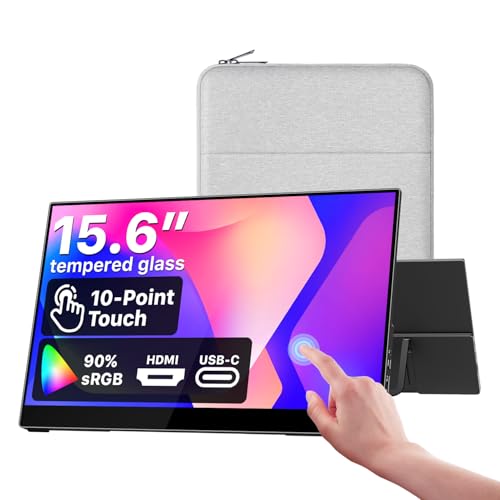
cocopar Portable Monitor Touchscreen 15.6-inch 90% sRGB Travel Monitor
A 15.6 inch 1080p touchscreen with IPS panel, 90% sRGB, speakers, a kickstand and a 2 year warranty, connecting by USB-C or HDMI.
View on Amazon
ViewSonic TD1655 15.6-inch Touch Screen Portable Monitor
A 15.6 inch 1080p touchscreen with 10-point touch, 60W USB-C, Mini HDMI, dual speakers, a built-in stand and a 3 year warranty.
View on Amazon
EVICIV Portable Monitor 4K Touchscreen 15.6-inch
A 15.6 inch 4K touchscreen with 3840 x 2160 resolution, 10-point touch, 125% sRGB, USB-C and Mini HDMI, weighing 1.8 lb.
View on Amazon
CAPERAVE 15.6'' Portable Monitor Touchscreen for Laptop Mac
A 15.6 inch 1080p touchscreen with 10-point touch, an IPS screen, a kickstand, speakers and USB-C and HDMI ports, with a 1 year warranty.
View on AmazonThese come from our ranked list Best Portable Monitor Touch Screen, which compares them spec by spec.
FAQ
Do all portable monitors have a touchscreen?
No. Touch is one feature among many, so check the listing for the word touchscreen before you buy. A monitor without touch still works as a second screen with your laptop keyboard and mouse.
Does a touchscreen portable monitor work with a Mac?
The cocopar, ViewSonic and CAPERAVE models list Mac support. The cocopar and CAPERAVE models list touch gestures for macOS and Windows, while the ViewSonic model lists Mac and PC use. Check the listing for your Mac model and for the cable it needs before you buy.
Can I use a touchscreen portable monitor with a game console?
Some do. The cocopar and EVICIV models list game consoles among their uses. Connect by HDMI for the picture and check the monitor notes for touch, since touch on a console depends on the console and the game.


